




HarmonyOS鸿蒙Next中通过capi使用avcodec的时候创建vp8/vp9/av1解码器实例的时候失败
HarmonyOS鸿蒙Next中通过capi使用avcodec的时候创建vp8/vp9/av1解码器实例的时候失败 【问题描述】:通过capi使用avcodec的时候创建vp8/vp9/av1解码器实例的时候失败?
【问题现象】:创建实例的时候返回为null,然后获取能力也是false
【版本信息】:手机系统版本:mate 70 pro、Api语言版本:23
【复现代码】:不涉及
【尝试解决方案】:使用获取支持的编解码能力
更多关于HarmonyOS鸿蒙Next中通过capi使用avcodec的时候创建vp8/vp9/av1解码器实例的时候失败的实战教程也可以访问 https://www.itying.com/category-93-b0.html


尊敬的开发者,您好,因来源、编解码协议及设备能力的不同,导致不同设备上可用的编解码器及其能力存在差异。使用前可通过OH_AVCodec_GetCapability获取对应编解码格式是否支持:获取支持的编解码能力。通过OH_AVCodec_GetCapability获取系统推荐的音视频编解码器能力实例,不支持时会返回NULL,说明当前设备确实不支持。

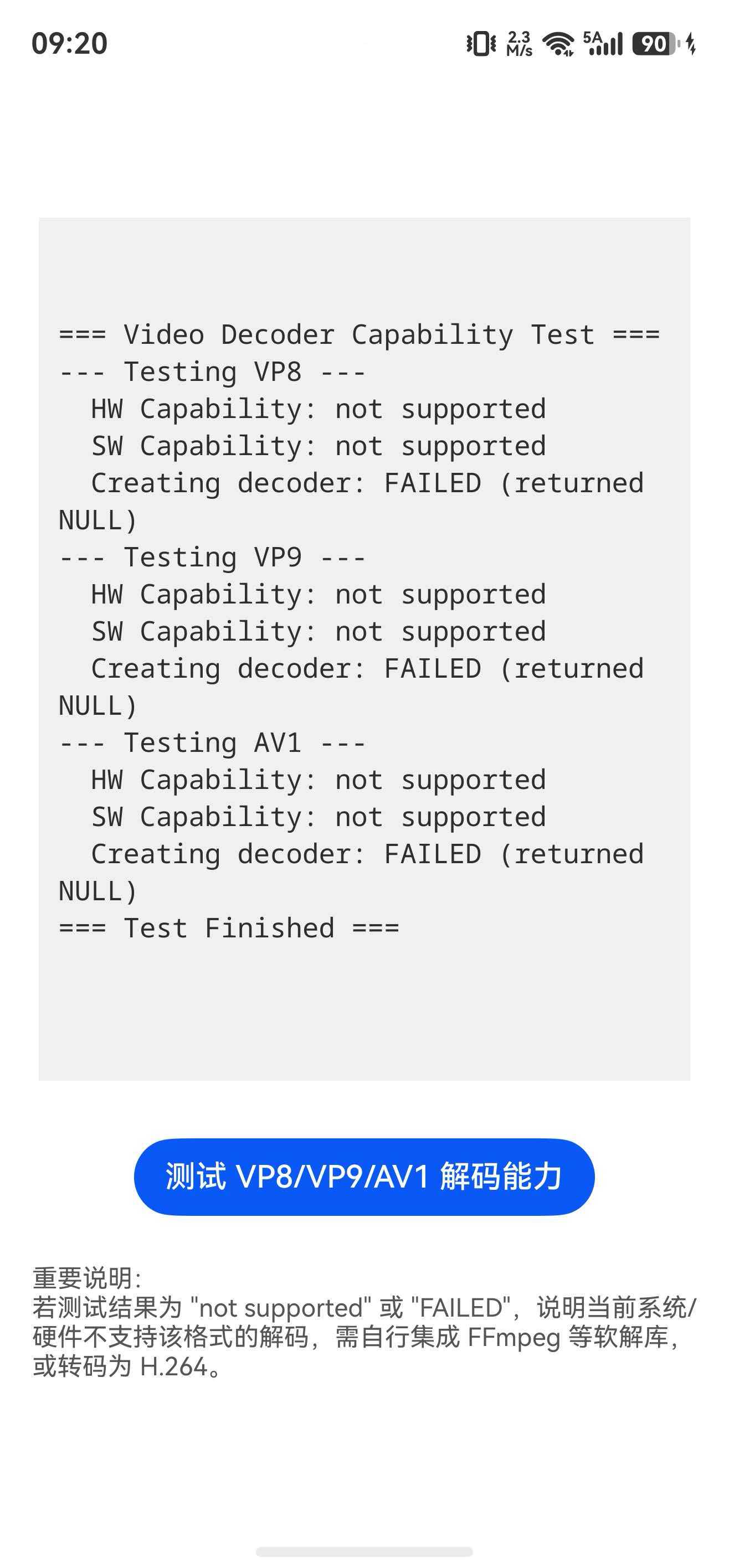
我用我的Mate70pro+测试,都不支持
#include <multimedia/player_framework/native_avcapability.h>
#include <multimedia/player_framework/native_avcodec_base.h>
#include <multimedia/player_framework/native_avcodec_videodecoder.h>
#include <hilog/log.h>
#include <napi/native_api.h>
#include <string>
#include <sstream>

#undef LOG_DOMAIN
#undef LOG_TAG
#define LOG_DOMAIN 0x3200
#define LOG_TAG "VideoDecoderTest"

// 用于收集所有测试结果
struct ResultCollector {
    std::ostringstream oss;
    void AddLine(const std::string& line) {
        oss << line << std::endl;
    }
};

std::string GetCodecName(const char* mime) {
    std::string mime_str(mime);
    if (mime_str.find("vp8") != std::string::npos) return "VP8";
    if (mime_str.find("vp9") != std::string::npos) return "VP9";
    if (mime_str.find("av01") != std::string::npos) return "AV1";
    return mime_str;
}

// 检查能力,并将结果写入收集器
void CheckCapability(const char* mime, ResultCollector& collector) {
    std::string codec_name = GetCodecName(mime);

    OH_AVCapability* capability_hw = OH_AVCodec_GetCapabilityByCategory(mime, false, HARDWARE);
    if (capability_hw != nullptr) {
        const char* name = OH_AVCapability_GetName(capability_hw);
        bool is_hw = OH_AVCapability_IsHardware(capability_hw);
        char buf[256];
        snprintf(buf, sizeof(buf), "  HW Capability: name=%s, isHW=%d", name ? name : "null", is_hw);
        collector.AddLine(buf);
    } else {
        collector.AddLine("  HW Capability: not supported");
    }

    OH_AVCapability* capability_sw = OH_AVCodec_GetCapabilityByCategory(mime, false, SOFTWARE);
    if (capability_sw != nullptr) {
        const char* name = OH_AVCapability_GetName(capability_sw);
        bool is_hw = OH_AVCapability_IsHardware(capability_sw);
        char buf[256];
        snprintf(buf, sizeof(buf), "  SW Capability: name=%s, isHW=%d", name ? name : "null", is_hw);
        collector.AddLine(buf);
    } else {
        collector.AddLine("  SW Capability: not supported");
    }
}

// 尝试创建解码器,并将结果写入收集器
void TryCreateDecoder(const char* mime, ResultCollector& collector) {
    std::string codec_name = GetCodecName(mime);

    OH_AVCodec* decoder = OH_VideoDecoder_CreateByMime(mime);
    if (decoder == nullptr) {
        collector.AddLine("  Creating decoder: FAILED (returned NULL)");
    } else {
        collector.AddLine("  Creating decoder: SUCCESS");
        OH_VideoDecoder_Destroy(decoder);
    }
}

// 主测试函数,返回完整结果字符串
static napi_value TestVideoDecoder(napi_env env, napi_callback_info info) {
    ResultCollector collector;
    collector.AddLine("=== Video Decoder Capability Test ===");

    collector.AddLine("--- Testing VP8 ---");
    CheckCapability(OH_AVCODEC_MIMETYPE_VIDEO_VP8, collector);
    TryCreateDecoder(OH_AVCODEC_MIMETYPE_VIDEO_VP8, collector);

    collector.AddLine("--- Testing VP9 ---");
    CheckCapability(OH_AVCODEC_MIMETYPE_VIDEO_VP9, collector);
    TryCreateDecoder(OH_AVCODEC_MIMETYPE_VIDEO_VP9, collector);

    collector.AddLine("--- Testing AV1 ---");
    CheckCapability(OH_AVCODEC_MIMETYPE_VIDEO_AV1, collector);
    TryCreateDecoder(OH_AVCODEC_MIMETYPE_VIDEO_AV1, collector);

    collector.AddLine("=== Test Finished ===");

    std::string result = collector.oss.str();
    napi_value str;
    napi_create_string_utf8(env, result.c_str(), result.length(), &str);
    return str;
}

// 模块注册(保持不变)
EXTERN_C_START
static napi_value Init(napi_env env, napi_value exports)
{
    napi_property_descriptor desc[] = {
        { "testVideoDecoder", nullptr, TestVideoDecoder, nullptr, nullptr, nullptr, napi_default, nullptr }
    };
    napi_define_properties(env, exports, sizeof(desc) / sizeof(desc[0]), desc);
    return exports;
}
EXTERN_C_END

static napi_module demoModule = {
    .nm_version = 1,
    .nm_flags = 0,
    .nm_filename = nullptr,
    .nm_register_func = Init,
    .nm_modname = "entry",
    .nm_priv = ((void*)0),
    .reserved = { 0 },
};

extern "C" __attribute__((constructor)) void RegisterEntryModule(void)
{
    napi_module_register(&demoModule);
}
这个现象大概率不是代码问题,而是 当前设备 / 当前 API 版本本身不支持对应软硬解能力。
你这里:
createDecoderByMime / createDecoderByName返回null- 查询 capability 也是
false
说明系统编解码器注册表里就没有对应实现。
重点注意,HarmonyOS NEXT 的 AVCodec 支持情况是设备相关 + 芯片相关 + 系统裁剪相关,不是所有手机都完整支持:
常见情况:
1、Mate 70 Pro 不一定开放 VP8 / VP9 / AV1 解码能力
尤其:
- VP8
- VP9
- AV1
这些很多设备是“部分支持”:
- 可能只支持编码不支持解码
- 可能只支持硬解某些 profile
- 可能系统直接没暴露 CAPI 能力
2、MimeType 写错
确认用的是系统支持的标准 mime:
video/x-vnd.on2.vp8
video/x-vnd.on2.vp9
video/av01
如果写成:
video/vp9
video/av1
通常会直接失败。
3、API 23 能力声明和实际设备能力不一致
API 文档里列出“支持”,只是 SDK 接口可用。
不代表所有终端都实现。
必须以:
OH_AVCapability_IsDecoderSupported(...)
结果为准。
如果这里 false,就说明设备没实现。
4、某些能力仅 Surface 模式支持
部分视频格式可能要求:
- Surface 解码
- 指定 PixelFormat
- 特定输出路径
直接 ByteBuffer 模式可能创建失败。
建议先打印设备支持列表确认:
OH_AVCapability *caps = OH_AVCodec_GetCapabilityByCategory(...);
遍历看看实际有哪些 codec name。
重点看有没有:
- vp8 decoder
- vp9 decoder
- av1 decoder
如果 H264/H265 正常,而:
- VP8 null
- VP9 null
- AV1 null
基本可以确定是 设备当前系统未提供这些解码器实现。
一句话:
createDecoder 返回 null + capability=false,通常表示当前 Mate 70 Pro(该系统版本)没有暴露 VP8/VP9/AV1 解码能力;优先确认 mime 是否正确,然后以 capability 查询结果为准,不是所有 API 23 设备都会支持这些 codec。


在 HarmonyOS NEXT API 23 的 Mate 70 Pro 上,avcodec 未内置 VP8、VP9 和 AV1 的软硬件解码器。当前系统仅支持 H.264 (AVC)、H.265 (HEVC) 等常见视频编解码格式,因此通过 OH_AVCodec_CreateByMime 创建这些解码器实例时会返回 NULL,基于 OH_AVCapability 查询能力也必然为 false。这不是调用方式错误,而是对应解码能力在目标系统上不存在。
