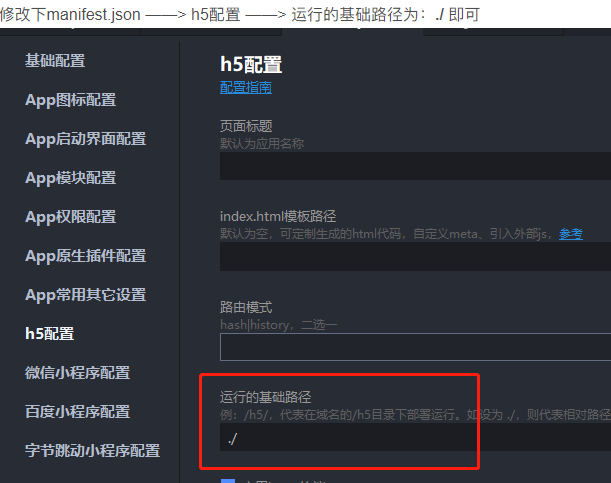


uni-app以H5方式打包发布后 通过浏览器打开index.html网页为空白
uni-app以H5方式打包发布后 通过浏览器打开index.html网页为空白
| 项目 | 内容 |
|---|---|
| 产品分类 | uniapp/H5 |
| PC开发环境操作系统 | Windows |
| PC开发环境操作系统版本号 | Windows 11 专业版 21H2 22000.434 |
| HBuilderX类型 | 正式 |
| HBuilderX版本号 | 3.3.11 |
| 浏览器平台 | Chrome |
| 浏览器版本 | 98.0.4758.82(正式版本) (64 位) |
| 项目创建方式 | HBuilderX |
示例代码:
<!DOCTYPE html>
<html lang=zh-CN>

<head>
    <meta charset=utf-8>
    <meta http-equiv=X-UA-Compatible content="IE=edge">
    <title>Demo</title>
    <script>var coverSupport = 'CSS' in window && typeof CSS.supports === 'function' && (CSS.supports('top: env(a)') || CSS.supports('top: constant(a)'))
        document.write('<meta name="viewport" content="width=device-width, user-scalable=no, initial-scale=1.0, maximum-scale=1.0, minimum-scale=1.0' + (coverSupport ? ', viewport-fit=cover' : '') + '" />')</script>
    <link rel=stylesheet href=/static/index.a5c69d49.css>
</head>

<body><noscript><strong>Please enable JavaScript to continue.</strong></noscript>
    <div id=app></div>
    <script src=/static/js/chunk-vendors.9c8e8f7a.js></script>
    <script src=/static/js/index.cb134b2d.js></script>
</body>

</html>
更多关于uni-app以H5方式打包发布后 通过浏览器打开index.html网页为空白的实战教程也可以访问 https://www.itying.com/category-93-b0.html
3 回复

需要本地起服务才可以 不能直接打开index.html,可以使用这个库:live-server
更多关于uni-app以H5方式打包发布后 通过浏览器打开index.html网页为空白的实战教程也可以访问 https://www.itying.com/category-93-b0.html