




HarmonyOS鸿蒙Next中bindSheep是否可以实现避让软键盘
HarmonyOS鸿蒙Next中bindSheep是否可以实现避让软键盘 现在触发TextArea聚焦,软键盘弹出后不在我的预想范围,如果监听聚焦事件通过margin样式设置可以把按钮顶上来,但是回退的时候,bindSheep就会停顿一下在消失
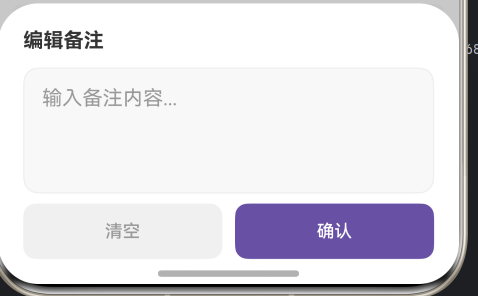
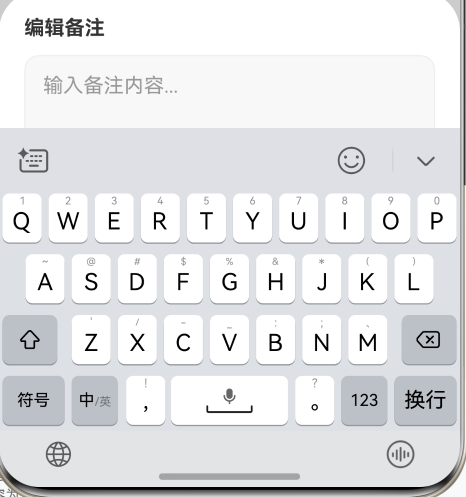
更多关于HarmonyOS鸿蒙Next中bindSheep是否可以实现避让软键盘的实战教程也可以访问 https://www.itying.com/category-93-b0.html


bindSheet 本身不建议当成“软键盘避让组件”来用。它是半模态面板,负责弹出、收起、拖拽、挡位这些能力;软键盘出来后怎么让内容不被遮住,应该按窗口避让区或键盘高度来处理。
你现在用 TextArea.onFocus 后手动改 margin,容易出现两个问题:
- 键盘动画和
bindSheet动画不是同一个时序,回退时就会看到 sheet 停顿一下再消失。 - 只按聚焦状态顶布局,不是真正按键盘高度算,机型、输入法、横竖屏都容易不准。
建议这样处理:
bindSheet只负责展示底部面板。- 面板内部用
Scroll或Column包住内容。 - 监听软键盘避让区或键盘高度变化。
- 根据键盘高度给 sheet 内容区加
padding({ bottom: keyboardHeightVp }),不要用聚焦事件硬改margin。 - 关闭 sheet 前可以先让
TextArea失焦/收起键盘,再关闭半模态,避免两个退出动画抢时序。
示意写法:【EntryAbility 监听软键盘高度,页面里的 bindSheet 根据键盘高度给内容加底部 padding】
EntryAbility.ets
import { UIAbility } from '@kit.AbilityKit';
import { window } from '@kit.ArkUI';

export default class EntryAbility extends UIAbility {
  onWindowStageCreate(windowStage: window.WindowStage): void {
    AppStorage.setOrCreate('keyboardHeightPx', 0);

    const mainWindow = windowStage.getMainWindowSync();

    mainWindow.on('avoidAreaChange', (data) => {
      if (data.type === window.AvoidAreaType.TYPE_KEYBOARD) {
        AppStorage.setOrCreate('keyboardHeightPx', data.area.bottomRect.height);
      }
    });

    windowStage.loadContent('pages/Index');
  }
}
Index.ets
@Entry
@Component
struct Index {
  @State isShowSheet: boolean = false;
  @State remark: string = '';
  @StorageLink('keyboardHeightPx') keyboardHeightPx: number = 0;

  private get keyboardHeightVp(): number {
    return this.getUIContext().px2vp(this.keyboardHeightPx);
  }

  @Builder
  EditRemarkSheet() {
    Column() {
      Text('编辑备注')
        .fontSize(18)
        .fontWeight(700)
        .width('100%')
        .margin({ bottom: 12 })

      TextArea({ text: this.remark, placeholder: '输入备注内容...' })
        .height(120)
        .width('100%')
        .backgroundColor('#F7F7F7')
        .borderRadius(12)
        .onChange((value: string) => {
          this.remark = value;
        })

      Row({ space: 12 }) {
        Button('清空')
          .layoutWeight(1)
          .backgroundColor('#EFEFEF')
          .fontColor('#999999')
          .onClick(() => {
            this.remark = '';
          })

        Button('确认')
          .layoutWeight(1)
          .backgroundColor('#6F55B5')
          .fontColor(Color.White)
          .onClick(() => {
            this.isShowSheet = false;
          })
      }
      .width('100%')
      .margin({ top: 12 })
    }
    .width('100%')
    .padding({
      left: 20,
      right: 20,
      top: 20,
      bottom: 20 + this.keyboardHeightVp
    })
  }

  build() {
    Column() {
      Button('打开备注编辑')
        .onClick(() => {
          this.isShowSheet = true;
        })
    }
    .width('100%')
    .height('100%')
    .justifyContent(FlexAlign.Center)
    .bindSheet($$this.isShowSheet, this.EditRemarkSheet(), {
      height: SheetSize.FIT_CONTENT,
      preferType: SheetType.BOTTOM,
      showClose: false,
      shouldDismiss: (sheetDismiss: SheetDismiss) => {
        sheetDismiss.dismiss()
      }
    })
  }
}
结论:bindSheet 不能直接解决软键盘避让;正确姿势是“bindSheet 做半模态,窗口键盘避让区负责高度,内容区动态 padding”。这样收起键盘和关闭半模态时不容易出现卡一下再消失的问题。“回退时停顿一下”基本就是手动 margin 动画和键盘/sheet 收起动画不同步导致的。


.bindSheet(this.addService.showAddTaskSheet, this.addTaskBindSheet(), {
  //backgroundColor: $r('app.color.page_back_color'),
  blurStyle: BlurStyle.COMPONENT_ULTRA_THIN,
  keyboardAvoidMode: SheetKeyboardAvoidMode.RESIZE_ONLY,
  preferType: SheetType.BOTTOM,
  title: { title: "新增事项" }
})
参考地址

TextInput、RichEditor、TextArea避让方案相同,以下以TextInput为例:
唤起软键盘时,系统会自动向上移动页面让输入框TextInput位于键盘避让区的上方,但TextInput下方的组件会被遮挡,所以需要监听键盘高度变化,自行控制页面向上偏移的距离。
- 关闭页面对键盘的自动避让,避免键盘避让区对计算页面偏移距离的影响。
- 设置状态变量offsetNum,用来控制组件向上偏移的距离。
- 使用window.on(‘keyboardHeightChange’, callback)监听键盘高度变化,在键盘弹出和收起时高度变化均会触发回调,在回调函数中改变状态变量offsetNum的数值。
- 使用offset()设置页面向上指定offsetNum。
代码Demo如下:在键盘弹出时,整个页面向上偏移,偏移量为键盘弹出的高度。
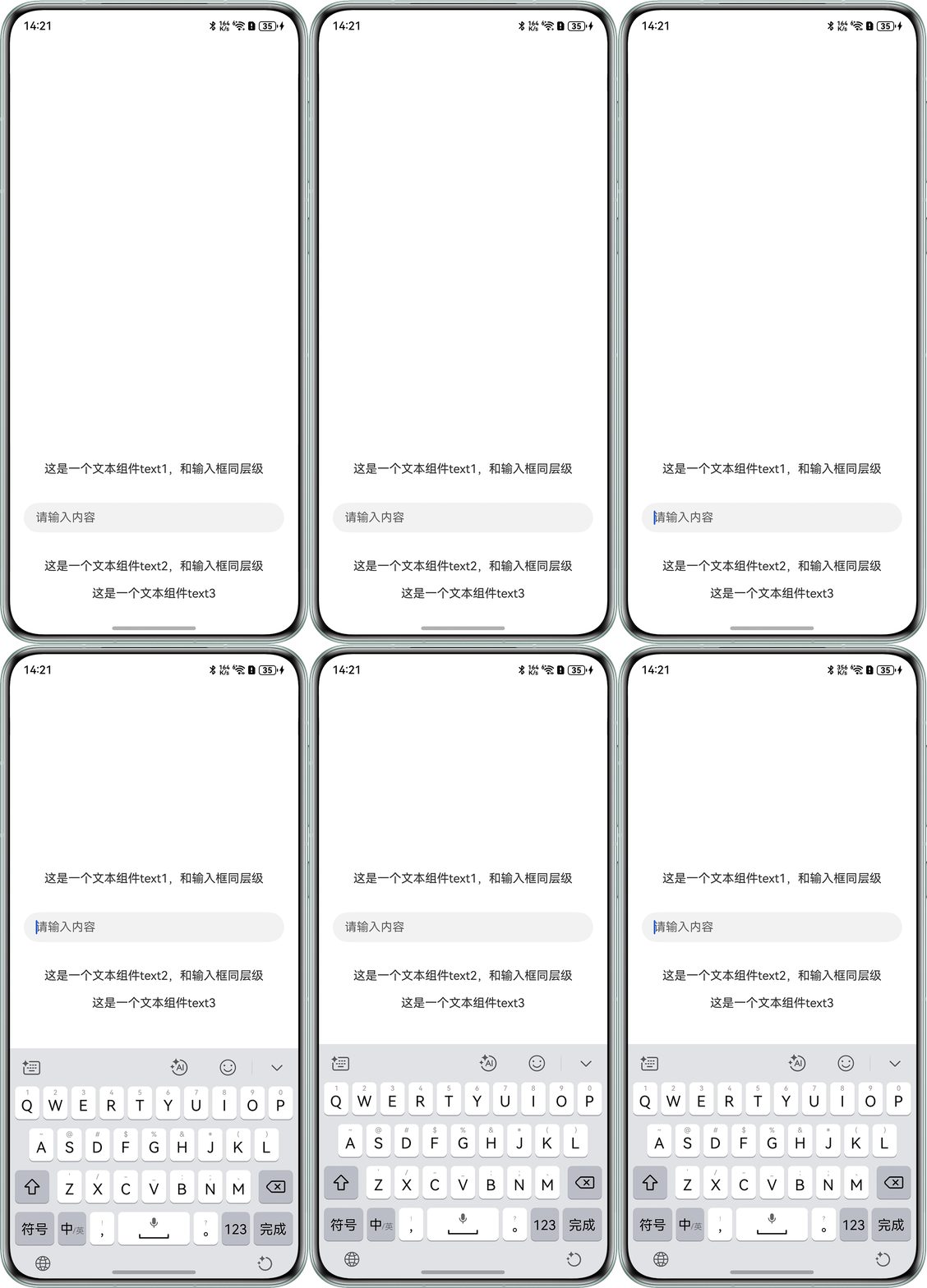
import window from '@ohos.window';
import { KeyboardAvoidMode } from '@kit.ArkUI';

@Entry
@Component
struct KeyboardAvoidDemo {
  @State text: string = '';
  controller: TextInputController = new TextInputController();
  @State offsetNum: number = 0;

  onPageShow(): void {
    // 获取当前窗口实例
    window.getLastWindow(this.getUIContext().getHostContext()).then((curWindow) => {
      try {
        curWindow.getUIContext().setKeyboardAvoidMode(KeyboardAvoidMode.NONE); // 关闭当前页面对键盘的自动避让
        // 监听键盘高度变化,返回键盘高度,单位为像素px
        curWindow.on('keyboardHeightChange', (height) => {
          // 在键盘高度变化时改变状态变量offsetNum
          if (height > 0) {
            this.getUIContext().animateTo({
              duration: 200,
              curve: Curve.Smooth
            }, () => {
              this.offsetNum = this.getUIContext().px2vp(height); // 页面向上偏移的距离为键盘的高度
            });
          } else {
            this.getUIContext().animateTo({
              duration: 200,
              curve: Curve.Smooth
            }, () => {
              this.offsetNum = 0; // height为0说明键盘收起
            });
          }
          console.info(`Succeeded in enabling the listener for keyboard height changes. Data: ${height}`);
        });
      } catch (exception) {
        console.error(`Failed to listen keyboard height. Cause: ${exception.code}, message: ${exception.message}`);
      }
    }).catch((err: string) => {
      console.error(`setWindowOrientation: Failed to obtain the top window. Cause: ${err}`);
    });
  }

  build() {
    Column() {
      Row() {
      }
      .width('100%')
      .height(550);

      Column() {
        Text('这是一个文本组件text1,和输入框同层级');
        TextInput({ text: this.text, controller: this.controller, placeholder: '请输入内容' })
          .placeholderFont({ size: 16, weight: 400 })
          .width('90%')
          .onChange((value: string) => {
            this.text = value;
          });
        Text('这是一个文本组件text2,和输入框同层级');
      }
      .justifyContent(FlexAlign.SpaceAround)
      .height('600px');

      Text('这是一个文本组件text3')
        .width('100%')
        .textAlign(TextAlign.Center);
    }
    .width('100%')
    .height('100%')
    .offset({
      bottom: this.offsetNum // 相对于页面底部偏移
    });
  }
}

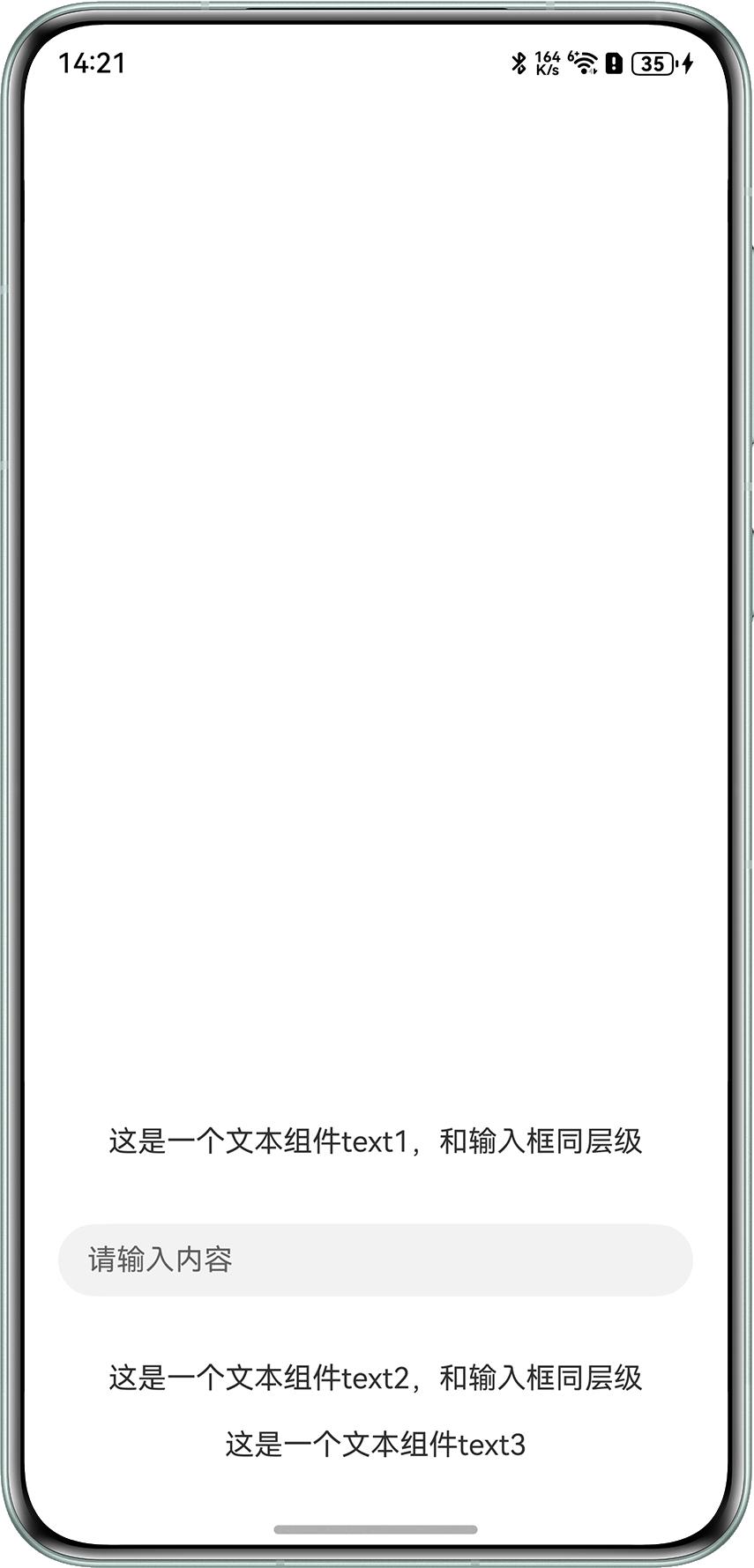
参考一下官方提到的一下常见问题:
解决方案
TextInput、RichEditor、TextArea避让方案相同,以下以TextInput为例:
唤起软键盘时,系统会自动向上移动页面让输入框TextInput位于键盘避让区的上方,但TextInput下方的组件会被遮挡,所以需要监听键盘高度变化,自行控制页面向上偏移的距离。
- 关闭页面对键盘的自动避让,避免键盘避让区对计算页面偏移距离的影响。
- 设置状态变量offsetNum,用来控制组件向上偏移的距离。
- 使用window.on(‘keyboardHeightChange’, callback)监听键盘高度变化,在键盘弹出和收起时高度变化均会触发回调,在回调函数中改变状态变量offsetNum的数值。
- 使用offset()设置页面向上指定offsetNum。
代码Demo如下:在键盘弹出时,整个页面向上偏移,偏移量为键盘弹出的高度。
import window from '@ohos.window';
import { KeyboardAvoidMode } from '@kit.ArkUI';

@Entry
@Component
struct KeyboardAvoidDemo {
  @State text: string = '';
  controller: TextInputController = new TextInputController();
  @State offsetNum: number = 0;

  onPageShow(): void {
    // 获取当前窗口实例
    window.getLastWindow(this.getUIContext().getHostContext()).then((curWindow) => {
      try {
        curWindow.getUIContext().setKeyboardAvoidMode(KeyboardAvoidMode.NONE); // 关闭当前页面对键盘的自动避让
        // 监听键盘高度变化,返回键盘高度,单位为像素px
        curWindow.on('keyboardHeightChange', (height) => {
          // 在键盘高度变化时改变状态变量offsetNum
          if (height > 0) {
            this.getUIContext().animateTo({
              duration: 200,
              curve: Curve.Smooth
            }, () => {
              this.offsetNum = this.getUIContext().px2vp(height); // 页面向上偏移的距离为键盘的高度
            });
          } else {
            this.getUIContext().animateTo({
              duration: 200,
              curve: Curve.Smooth
            }, () => {
              this.offsetNum = 0; // height为0说明键盘收起
            });
          }
          console.info(`Succeeded in enabling the listener for keyboard height changes. Data: ${height}`);
        });
      } catch (exception) {
        console.error(`Failed to listen keyboard height. Cause: ${exception.code}, message: ${exception.message}`);
      }
    }).catch((err: string) => {
      console.error(`setWindowOrientation: Failed to obtain the top window. Cause: ${err}`);
    });
  }

  build() {
    Column() {
      Row() {
      }
      .width('100%')
      .height(550);

      Column() {
        Text('这是一个文本组件text1,和输入框同层级');
        TextInput({ text: this.text, controller: this.controller, placeholder: '请输入内容' })
          .placeholderFont({ size: 16, weight: 400 })
          .width('90%')
          .onChange((value: string) => {
            this.text = value;
          });
        Text('这是一个文本组件text2,和输入框同层级');
      }
      .justifyContent(FlexAlign.SpaceAround)
      .height('600px');

      Text('这是一个文本组件text3')
        .width('100%')
        .textAlign(TextAlign.Center);
    }
    .width('100%')
    .height('100%')
    .offset({
      bottom: this.offsetNum // 相对于页面底部偏移
    });
  }
}

通过keyboardAvoidMode 去配置软键盘避让规则
  Button("transition modal 1")
                .onClick(() => {
                    this.isShow = true;
                })
                .fontSize(20)
                .margin(10)
                .bindSheet($$this.isShow, this.myBuilder(), {
                    height: this.sheetHeight,
                    backgroundColor: Color.Green,
                    keyboardAvoidMode: SheetKeyboardAvoidMode.TRANSLATE_AND_SCROLL,  //通过keyboardAvoidMode配置
                    onWillAppear: () => {
                        console.info("BindSheet onWillAppear.");
                    },
                    onAppear: () => {
                        console.info("BindSheet onAppear.");
                    },
                    onWillDisappear: () => {
                        console.info("BindSheet onWillDisappear.");
                    },
                    onDisappear: () => {
                        console.info("BindSheet onDisappear.");
                    }
                })
可以的,这个场景建议让 Sheet 自己处理软键盘避让,不要在 TextArea 的 onFocus/onBlur 里手动改外层 margin,否则键盘收起和 sheet 关闭/回退动画会叠加,容易出现你看到的停顿。
如果工程使用的 API 版本支持,可以在 bindSheet 的 SheetOptions 里配置 keyboardAvoidMode,例如:
Button('打开')

  .bindSheet(this.showSheet, this.sheetBuilder, {

    keyboardAvoidMode: SheetKeyboardAvoidMode.TRANSLATE_AND_RESIZE

  })
SheetKeyboardAvoidMode 主要有几个模式:
-
NONE:不避让键盘。
-
TRANSLATE_AND_RESIZE:先通过位置/高度变化避让,达到最大高度后再 resize。
-
RESIZE_ONLY:只 resize 内容。
-
TRANSLATE_AND_SCROLL:先避让,达到最大高度后滚动内容,bindSheet 默认就是这个模式。
你的按钮如果需要跟随键盘上移,建议把 TextArea 和按钮都放在 sheet 内容布局内部,例如 Column/Scroll 里,让 sheet 的 keyboardAvoidMode 统一处理位置关系。页面级别也可以按需用 UIContext.setKeyboardAvoidMode(…) 设置整体键盘避让策略,但这是页面全局行为,优先先用 sheet 自身的 keyboardAvoidMode。

可以的,这个场景建议让 Sheet 自己处理软键盘避让,不要在 TextArea 的 onFocus/onBlur 里手动改外层 margin,否则键盘收起和 sheet 关闭/回退动画会叠加,容易出现你看到的停顿。
如果工程使用的 API 版本支持,可以在 bindSheet 的 SheetOptions 里配置 keyboardAvoidMode,例如:
Button('打开')
  .bindSheet(this.showSheet, this.sheetBuilder, {
    keyboardAvoidMode: SheetKeyboardAvoidMode.TRANSLATE_AND_RESIZE
  })
SheetKeyboardAvoidMode 主要有几个模式:
- NONE:不避让键盘。
- TRANSLATE_AND_RESIZE:先通过位置/高度变化避让,达到最大高度后再 resize。
- RESIZE_ONLY:只 resize 内容。
- TRANSLATE_AND_SCROLL:先避让,达到最大高度后滚动内容,bindSheet 默认就是这个模式。
你的按钮如果需要跟随键盘上移,建议把 TextArea 和按钮都放在 sheet 内容布局内部,例如 Column/Scroll 里,让 sheet 的 keyboardAvoidMode 统一处理位置关系。页面级别也可以按需用 UIContext.setKeyboardAvoidMode(…) 设置整体键盘避让策略,但这是页面全局行为,优先先用 sheet 自身的 keyboardAvoidMode。

可以。HarmonyOS NEXT中bindSheet(半模态)支持软键盘避让,通过SheetOptions的keyboardAvoidMode属性设置避让模式即可,系统会自动处理输入框遮挡问题。
