




HarmonyOS鸿蒙Next中使用@Watch监听状态变化
3 回复

场景
在很多业务场景中,如购物车,对购物车里的商品数据如果进行了变更,那就需要重新计算总金额,针对这种情况我们又如何来处理呢?
思路
我们以一个监听数量变化为例
首先创建一个监听器,来监听数值变化
@Watch('onCountChanged')
  @State count: number = 0;

  // @Watch 用法

  onCountChanged(propName: string) {
    // 仅当新值 >= 3 时触发提示
    if (this.count >= 3) {
      this.showAlert(`计数已达到 ${this.count}!`);
    }
  }
然后在 UI 中触发值的变化
Button('增加计数')
        .width(200)
        .height(45)
        .onClick(() => {
          this.count++;
        })
完整示例代码
import promptAction from '@ohos.promptAction';

@Entry
@Component
struct WatchDemo {
  @Watch('onCountChanged')
  @State count: number = 0;

  // @Watch 用法

  onCountChanged(propName: string) {
    // 仅当新值 >= 3 时触发提示
    if (this.count >= 3) {
      this.showAlert(`计数已达到 ${this.count}!`);
    }
  }

  // 用于显示提示
  private showAlert(message: string) {
    promptAction.showToast({
      message: message
    });
  }

  build() {
    Column({ space: 25 }) {
      Text(' @Watch 状态监听')
        .fontSize(18)
        .fontWeight(FontWeight.Bold)
        .margin({ bottom: 10 })

      Text(`当前计数: ${this.count}`)
        .fontSize(24)
        .fontWeight(FontWeight.Bold)

      Button('增加计数')
        .width(200)
        .height(45)
        .onClick(() => {
          this.count++;
        })
    }
    .width('100%')
    .height('100%')
    .padding(30)
    .alignItems(HorizontalAlign.Center)
  }
}
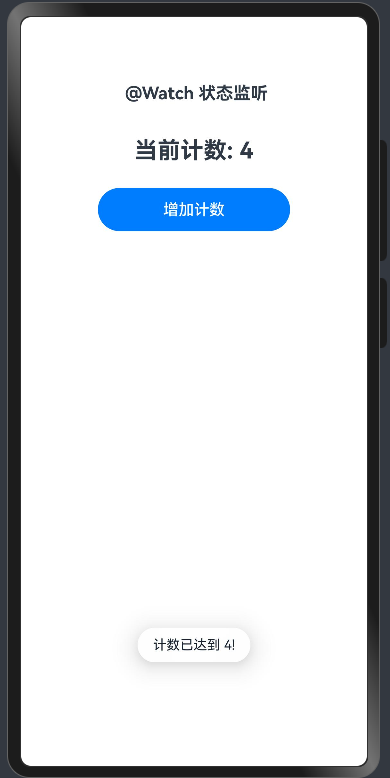
实现效果
当计数到达4的时候,提示触发
更多关于HarmonyOS鸿蒙Next中使用@Watch监听状态变化的实战系列教程也可以访问 https://www.itying.com/category-93-b0.html

在HarmonyOS Next中,@Watch装饰器用于监听状态变量的变化,并在变化时触发指定的回调函数,非常适合你提到的购物车计算这类联动更新场景。
基本用法:
- 定义状态变量:使用
@State装饰需要被监听的数据。 - 应用
@Watch装饰器:在需要执行联动更新的状态变量上添加@Watch,并指定一个回调函数。 - 实现回调函数:当
@Watch监视的@State变量变化后,框架会自动调用该回调函数。你可以在函数内更新其他数据或执行逻辑。
以购物车计算为例:
假设购物车中每个商品有单价(price)和数量(count),我们需要在任一变化时自动更新总价(totalPrice)。
// 商品项类
class CartItem {
  @State price: number = 0; // 单价
  @State count: number = 0; // 数量

  // 监听数量或单价的变化,自动更新总价
  @Watch('onItemChange')
  @State totalPrice: number = 0; // 单个商品总价

  // @Watch 的回调函数
  onItemChange() {
    this.totalPrice = this.price * this.count;
    console.log(`商品总价更新为: ${this.totalPrice}`);
  }
}

// 购物车类
class ShoppingCart {
  @State items: CartItem[] = []; // 商品列表

  // 监听购物车商品列表的变化(如商品增删),自动更新购物车总价
  @Watch('onCartChange')
  @State cartTotalPrice: number = 0;

  onCartChange() {
    this.cartTotalPrice = this.items.reduce((sum, item) => sum + item.totalPrice, 0);
    console.log(`购物车总价更新为: ${this.cartTotalPrice}`);
  }
}
关键点说明:
@Watch装饰的函数会在状态变量变化后执行。- 可以监听多个状态变量,它们的变化都会触发同一个回调函数。
- 回调函数内可以访问
this,指向当前组件或对象实例。 - 避免在
@Watch回调中修改被监听的状态变量本身,可能导致循环更新。如果需要,请谨慎处理或使用条件判断。
对于购物车场景,这种设计能确保任何商品价格或数量的变动都能实时、准确地反映在总价上,实现数据间的自动同步。
