




uni-app 原生导航栏中 type为transparent 时 button为left不居中问题
uni-app 原生导航栏中 type为transparent 时 button为left不居中问题
| 信息项 | 内容 |
|---|---|
| 产品分类 | uniapp/H5 |
| PC开发环境操作系统 | Windows |
| PC开发环境操作系统版本号 | Windiws10 ltsc |
| HBuilderX类型 | 正式 |
| HBuilderX版本号 | 3.2.3 |
| 浏览器平台 | Chrome |
| 浏览器版本 | 92.0.4515.159(正式版本) |
| 项目创建方式 | HBuilderX |
示例代码:
"app-plus": {
    "bounce": "none",
    "titleNView": {
        "type": "transparent",
        "buttons": [
            {
                "fontSrc": "/static/navbars.ttf",
                "text": "\ue657",
                "float":"left",
                "fontSize": "20",
                "background":"rgba(0,0,0,0)"
            },{
            "fontSrc": "/static/navbars.ttf",
            "text": "\ue71f",
            "redDot": false,
            "float":"right",
            "fontSize": "20",
            "background":"rgba(0,0,0,0)"
        }]
    }
}
操作步骤:
"app-plus": {
    "bounce": "none",
    "titleNView": {
        "type": "transparent",
        "buttons": [
            {
                "fontSrc": "/static/navbars.ttf",
                "text": "\ue657",
                "float":"left",
                "fontSize": "20",
                "background":"rgba(0,0,0,0)"
            },{
            "fontSrc": "/static/navbars.ttf",
            "text": "\ue71f",
            "redDot": false,
            "float":"right",
            "fontSize": "20",
            "background":"rgba(0,0,0,0)"
        }]
    }
}
预期结果:
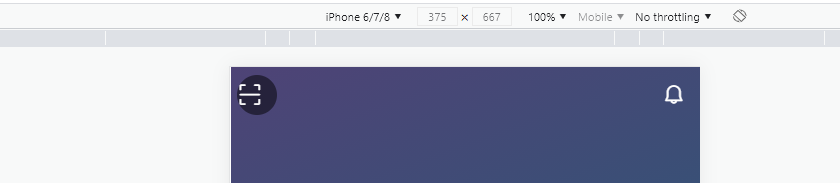
导航栏type为transparent时button为left的时候会居中。
实际结果:
button为lleft没有居中。
bug描述:
根据观察button为right的时候 是有 justify-content: center; 属性的。
但是为left的时候,是没有。
需要添加在以下css添加
.uni-page-head-transparent .uni-page-head-btn{
  justify-content: center;
}
更多关于uni-app 原生导航栏中 type为transparent 时 button为left不居中问题的实战教程也可以访问 https://www.itying.com/category-93-b0.html
4 回复

已确认bug,已加分,预计下版alpha带上
更多关于uni-app 原生导航栏中 type为transparent 时 button为left不居中问题的实战教程也可以访问 https://www.itying.com/category-93-b0.html


