




HarmonyOS 鸿蒙Next中如何实现服务卡片
HarmonyOS 鸿蒙Next中如何实现服务卡片 遇见的问题:
- 不知道如何创建FormExtensionAbility
- 卡片数据如何从数据库获取
- 卡片如何自动更新
- 点击卡片如何跳转到应用

解决方案
1. 技术架构
┌────────────────────────────────────┐
│  FeedingFormAbility                 │
│  (FormExtensionAbility)             │
│  - onAddForm: 创建卡片              │
│  - onUpdateForm: 更新卡片           │
│  - onFormEvent: 处理点击            │
└────────────────────────────────────┘
               ↕
┌────────────────────────────────────┐
│  FormDataService                   │
│  - 管理所有卡片ID                   │
│  - 从数据库获取数据                 │
│  - 更新所有卡片                     │
└────────────────────────────────────┘
               ↕
┌────────────────────────────────────┐
│  FeedingWidgetCard.ets             │
│  - 卡片UI页面                       │
│  - 使用@LocalStorageProp绑定数据    │
└────────────────────────────────────┘
2. 完整实现代码
步骤1: 配置form_config.json
位置: entry/src/main/resources/base/profile/form_config.json
{
  "forms": [
    {
      "name": "FeedingWidget",
      "description": "喂养记录卡片",
      "src": "./ets/widget/pages/FeedingWidgetCard.ets",
      "uiSyntax": "arkts",
      "window": {
        "designWidth": 720,
        "autoDesignWidth": true
      },
      "colorMode": "auto",
      "isDefault": true,
      "updateEnabled": true,
      "scheduledUpdateTime": "10:30",
      "updateDuration": 1,
      "defaultDimension": "2*2",
      "supportDimensions": ["2*2", "2*4", "4*4"],
      "formConfigAbility": "ability://entry/EntryAbility"
    }
  ]
}
关键配置:
uiSyntax: "arkts": 必须指定UI语法updateEnabled: true: 启用自动更新updateDuration: 1: 每1小时更新一次formConfigAbility: 点击跳转的Ability
步骤2: 注册FormExtensionAbility
位置: entry/src/main/module.json5
{
  "module": {
    "extensionAbilities": [
      {
        "name": "FeedingFormAbility",
        "srcEntry": "./ets/entryformability/FeedingFormAbility.ets",
        "type": "form",
        "exported": true,
        "description": "喂养记录卡片",
        "metadata": [
          {
            "name": "ohos.extension.form",
            "resource": "$profile:form_config"
          }
        ]
      }
    ]
  }
}
步骤3: 创建FormExtensionAbility
位置: entry/src/main/ets/entryformability/FeedingFormAbility.ets
import { FormExtensionAbility, formInfo, formBindingData } from '@kit.FormKit';
import { Want } from '@kit.AbilityKit';
import { FormDataService } from '../services/FormDataService';

const TAG = 'FeedingFormAbility';

export default class FeedingFormAbility extends FormExtensionAbility {
  /**
   * 创建卡片时调用
   */
  onAddForm(want: Want): formBindingData.FormBindingData {
    const formId = want.parameters?.[formInfo.FormParam.IDENTITY_KEY] as string;
    console.info(TAG, `创建卡片, formId: ${formId}`);

    // 注册卡片ID
    FormDataService.getInstance().registerForm(formId);

    // 获取卡片数据
    const formData = this.getFormData();

    return formBindingData.createFormBindingData(formData);
  }

  /**
   * 更新卡片时调用
   */
  onUpdateForm(formId: string): void {
    console.info(TAG, `更新卡片, formId: ${formId}`);

    // 异步更新卡片数据
    FormDataService.getInstance().updateForm(formId);
  }

  /**
   * 移除卡片时调用
   */
  onRemoveForm(formId: string): void {
    console.info(TAG, `移除卡片, formId: ${formId}`);

    // 注销卡片ID
    FormDataService.getInstance().unregisterForm(formId);
  }

  /**
   * 卡片事件处理
   */
  onFormEvent(formId: string, message: string): void {
    console.info(TAG, `卡片事件, formId: ${formId}, message: ${message}`);

    if (message === 'router') {
      // 跳转到应用内页面
      // 实际跳转由点击卡片时触发
    }
  }

  /**
   * 获取卡片数据
   */
  private getFormData(): Record<string, Object> {
    // 这里返回默认数据
    // 实际数据由FormDataService异步更新
    return {
      hasData: false,
      todayCount: 0,
      milkCount: 0,
      sleepCount: 0,
      diaperCount: 0,
      latestType: '',
      latestTime: '',
      latestIcon: ''
    };
  }
}
步骤4: 创建卡片数据服务
位置: entry/src/main/ets/services/FormDataService.ets
import { formProvider } from '@kit.FormKit';
import { FeedingRecordDao } from '../database/FeedingRecordDao';
import { FeedingRecord, FeedingType } from '../models/FeedingRecord';

const TAG = 'FormDataService';

/**
 * 卡片数据服务
 * 管理所有卡片的数据更新
 */
export class FormDataService {
  private static instance: FormDataService;
  private formIds: Set<string> = new Set();
  private feedingDao: FeedingRecordDao = new FeedingRecordDao();

  private constructor() {}

  static getInstance(): FormDataService {
    if (!FormDataService.instance) {
      FormDataService.instance = new FormDataService();
    }
    return FormDataService.instance;
  }

  /**
   * 注册卡片
   */
  registerForm(formId: string): void {
    this.formIds.add(formId);
    console.info(TAG, `注册卡片: ${formId}, 总数: ${this.formIds.size}`);

    // 立即更新数据
    this.updateForm(formId);
  }

  /**
   * 注销卡片
   */
  unregisterForm(formId: string): void {
    this.formIds.delete(formId);
    console.info(TAG, `注销卡片: ${formId}, 总数: ${this.formIds.size}`);
  }

  /**
   * 更新所有卡片
   */
  async updateAllForms(): Promise<void> {
    console.info(TAG, `更新所有卡片, 总数: ${this.formIds.size}`);

    for (const formId of this.formIds) {
      await this.updateForm(formId);
    }
  }

  /**
   * 更新指定卡片
   */
  async updateForm(formId: string): Promise<void> {
    try {
      // 从数据库获取今日数据
      const formData = await this.getFormData();

      // 创建更新数据
      const formBindingData = {
        data: JSON.stringify(formData)
      };

      // 更新卡片
      await formProvider.updateForm(formId, formBindingData);

      console.info(TAG, `卡片更新成功: ${formId}`);
    } catch (err) {
      console.error(TAG, `更新卡片失败: ${JSON.stringify(err)}`);
    }
  }

  /**
   * 获取卡片数据
   */
  private async getFormData(): Promise<Record<string, Object>> {
    try {
      // 获取今日开始时间
      const today = new Date();
      today.setHours(0, 0, 0, 0);
      const todayStart = today.getTime();

      // 查询今日所有记录
      const todayRecords = await this.feedingDao.findByDateRange(
        todayStart,
        Date.now()
      );

      if (todayRecords.length === 0) {
        return {
          hasData: false,
          todayCount: 0,
          milkCount: 0,
          sleepCount: 0,
          diaperCount: 0,
          latestType: '',
          latestTime: '',
          latestIcon: ''
        };
      }

      // 统计各类型数量
      const milkCount = todayRecords.filter(r =>
        r.type === FeedingType.BREAST || r.type === FeedingType.BOTTLE
      ).length;

      const sleepCount = todayRecords.filter(r =>
        r.type === FeedingType.SLEEP
      ).length;

      const diaperCount = todayRecords.filter(r =>
        r.type === FeedingType.DIAPER
      ).length;

      // 获取最新记录
      const latest = todayRecords[0];

      return {
        hasData: true,
        todayCount: todayRecords.length,
        milkCount: milkCount,
        sleepCount: sleepCount,
        diaperCount: diaperCount,
        latestType: this.getTypeName(latest.type),
        latestTime: this.formatTime(latest.recordTime),
        latestIcon: this.getTypeIcon(latest.type)
      };

    } catch (err) {
      console.error(TAG, `获取卡片数据失败: ${JSON.stringify(err)}`);
      return {
        hasData: false,
        todayCount: 0,
        milkCount: 0,
        sleepCount: 0,
        diaperCount: 0,
        latestType: '',
        latestTime: '',
        latestIcon: ''
      };
    }
  }

  /**
   * 获取类型名称
   */
  private getTypeName(type: FeedingType): string {
    const typeMap: Record<FeedingType, string> = {
      [FeedingType.BREAST]: '母乳喂养',
      [FeedingType.BOTTLE]: '奶瓶喂养',
      [FeedingType.SLEEP]: '睡眠',
      [FeedingType.DIAPER]: '换尿布',
      [FeedingType.SOLID_FOOD]: '辅食',
      [FeedingType.MEDICINE]: '用药'
    };
    return typeMap[type] || '';
  }

  /**
   * 获取类型图标
   */
  private getTypeIcon(type: FeedingType): string {
    const iconMap: Record<FeedingType, string> = {
      [FeedingType.BREAST]: '🍼',
      [FeedingType.BOTTLE]: '🍼',
      [FeedingType.SLEEP]: '😴',
      [FeedingType.DIAPER]: '🧷',
      [FeedingType.SOLID_FOOD]: '🥄',
      [FeedingType.MEDICINE]: '💊'
    };
    return iconMap[type] || '📝';
  }

  /**
   * 格式化时间
   */
  private formatTime(timestamp: number): string {
    const now = Date.now();
    const diff = now - timestamp;
    const minutes = Math.floor(diff / (1000 * 60));
    const hours = Math.floor(diff / (1000 * 60 * 60));
    const days = Math.floor(diff / (1000 * 60 * 60 * 24));

    if (minutes < 1) {
      return '刚刚';
    } else if (minutes < 60) {
      return `${minutes}分钟前`;
    } else if (hours < 24) {
      return `${hours}小时前`;
    } else {
      return `${days}天前`;
    }
  }
}
步骤5: 创建卡片UI页面
位置: entry/src/main/ets/widget/pages/FeedingWidgetCard.ets
@Entry
@Component
struct FeedingWidgetCard {
  // 绑定卡片数据
  @LocalStorageProp('hasData') hasData: boolean = false;
  @LocalStorageProp('todayCount') todayCount: number = 0;
  @LocalStorageProp('milkCount') milkCount: number = 0;
  @LocalStorageProp('sleepCount') sleepCount: number = 0;
  @LocalStorageProp('diaperCount') diaperCount: number = 0;
  @LocalStorageProp('latestType') latestType: string = '';
  @LocalStorageProp('latestTime') latestTime: string = '';
  @LocalStorageProp('latestIcon') latestIcon: string = '';

  build() {
    Column() {
      if (this.hasData) {
        // 有数据时显示
        this.buildDataView();
      } else {
        // 无数据时显示
        this.buildEmptyView();
      }
    }
    .width('100%')
    .height('100%')
    .padding(16)
    .backgroundColor('#FF9472')
    .backgroundImage($r('app.media.widget_bg'), ImageRepeat.NoRepeat)
    .backgroundImageSize(ImageSize.Cover)
    .borderRadius(16)
    .onClick(() => {
      // 点击跳转到应用
      postCardAction(this, {
        action: 'router',
        abilityName: 'EntryAbility',
        params: {
          page: 'pages/FeedingRecordPage'
        }
      });
    })
  }

  /**
   * 有数据视图
   */
  @Builder
  buildDataView() {
    Column({ space: 12 }) {
      // 标题栏
      Row() {
        Text('喂养记录')
          .fontSize(16)
          .fontWeight(FontWeight.Bold)
          .fontColor(Color.White);

        Blank();

        Text('🍼')
          .fontSize(20);
      }
      .width('100%')

      // 统计卡片
      Row({ space: 8 }) {
        this.buildStatCard('📊', this.todayCount.toString(), '今日');
        this.buildStatCard('🍼', this.milkCount.toString(), '喂奶');
        this.buildStatCard('😴', this.sleepCount.toString(), '睡眠');
        this.buildStatCard('🧷', this.diaperCount.toString(), '尿布');
      }
      .width('100%')

      // 最新记录
      Column({ space: 4 }) {
        Text('最新记录')
          .fontSize(12)
          .fontColor('rgba(255, 255, 255, 0.8)')
          .alignSelf(ItemAlign.Start);

        Row({ space: 8 }) {
          Text(this.latestIcon)
            .fontSize(20);

          Column({ space: 2 }) {
            Text(this.latestType)
              .fontSize(14)
              .fontWeight(FontWeight.Medium)
              .fontColor(Color.White);

            Text(this.latestTime)
              .fontSize(12)
              .fontColor('rgba(255, 255, 255, 0.8)');
          }
          .alignItems(HorizontalAlign.Start)
        }
        .width('100%')
        .padding(12)
        .backgroundColor('rgba(255, 255, 255, 0.2)')
        .borderRadius(8)
      }
      .width('100%')
    }
    .width('100%')
    .height('100%')
  }

  /**
   * 空数据视图
   */
  @Builder
  buildEmptyView() {
    Column({ space: 12 }) {
      Text('👶')
        .fontSize(48);

      Text('暂无记录')
        .fontSize(16)
        .fontWeight(FontWeight.Medium)
        .fontColor(Color.White);

      Text('点击添加喂养记录')
        .fontSize(14)
        .fontColor('rgba(255, 255, 255, 0.8)');
    }
    .width('100%')
    .height('100%')
    .justifyContent(FlexAlign.Center)
  }

  /**
   * 统计卡片
   */
  @Builder
  buildStatCard(icon: string, value: string, label: string) {
    Column({ space: 4 }) {
      Text(icon).fontSize(20);

      Text(value)
        .fontSize(18)
        .fontWeight(FontWeight.Bold)
        .fontColor(Color.White);

      Text(label)
        .fontSize(10)
        .fontColor('rgba(255, 255, 255, 0.8)');
    }
    .width('25%')
    .padding(8)
    .backgroundColor('rgba(255, 255, 255, 0.2)')
    .borderRadius(8)
  }
}
步骤6: 在应用中触发卡片更新
// 添加记录后更新所有卡片
import { FormDataService } from '../services/FormDataService';

async function addFeedingRecord(record: FeedingRecord): Promise<void> {
  // 保存到数据库
  await feedingDao.insert(record);

  // 更新所有卡片
  await FormDataService.getInstance().updateAllForms();
}
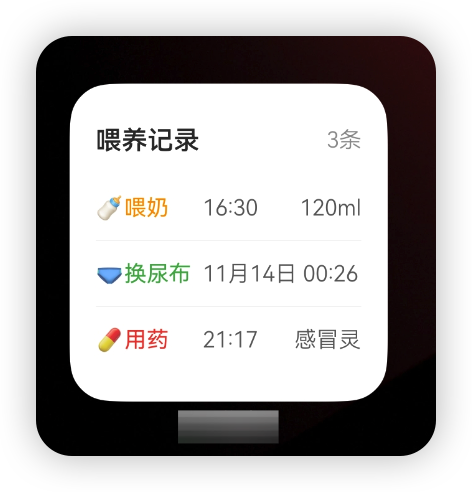
3. 运行效果
关键要点
1. 配置文件必须正确
form_config.json:
- ✅
uiSyntax: "arkts"- 必须指定 - ✅
formConfigAbility- 点击跳转的Ability
module.json5:
- ✅
type: "form"- 扩展类型 - ✅
exported: true- 必须导出
2. 数据绑定
使用@LocalStorageProp绑定卡片数据:
@LocalStorageProp('todayCount') todayCount: number = 0;
3. 更新机制
自动更新:
- 系统定时更新(updateDuration)
- 定点更新(scheduledUpdateTime)
手动更新:
await formProvider.updateForm(formId, formBindingData);
4. 点击跳转
postCardAction(this, {
  action: 'router',
  abilityName: 'EntryAbility',
  params: {
    page: 'pages/FeedingRecordPage'
  }
});
常见问题
Q1: 卡片无法添加到桌面?
检查配置
更多关于HarmonyOS 鸿蒙Next中如何实现服务卡片的实战系列教程也可以访问 https://www.itying.com/category-93-b0.html

鸿蒙Next中实现服务卡片主要通过ArkTS语言开发。使用FormExtensionAbility作为卡片入口,在module.json5中配置卡片信息。卡片UI通过ArkUI组件构建,支持静态和动态数据展示。可通过FormProvider更新卡片数据,使用formBindingData对象管理状态。卡片尺寸在配置文件中定义,支持2x2、2x4等规格。
在HarmonyOS Next中,服务卡片(Form)的开发主要围绕FormExtensionAbility展开。以下是针对你问题的具体实现方案:
1. 创建FormExtensionAbility
在module.json5配置文件的extensionAbilities模块下声明。
{
  "extensionAbilities": [{
    "name": "FormAbility",
    "srcEntry": "./ets/FormAbility/FormAbility.ts",
    "label": "$string:form_label",
    "description": "$string:form_desc",
    "type": "form",
    "metadata": [{
      "name": "ohos.extension.form",
      "resource": "$profile:form_config"
    }]
  }]
}
在resources/base/profile/目录下创建form_config.json文件,定义卡片的具体配置(如名称、尺寸、窗口类型等)。
对应的Ability类需继承FormExtensionAbility并实现生命周期回调:
import FormExtensionAbility from '@ohos.app.form.FormExtensionAbility';

export default class FormAbility extends FormExtensionAbility {
  onAddForm(want) {
    // 创建卡片时调用,返回卡片数据
    let formData = {};
    return formData;
  }
  // 其他生命周期:onCastToNormalForm, onUpdateForm, onChangeFormVisibility, onRemoveForm
}
2. 从数据库获取卡片数据
在onAddForm或onUpdateForm回调中,使用相关数据管理API查询。
- 若使用关系型数据库,可通过
@ohos.data.relationalStore获取RDB连接并查询。 - 若使用对象型数据库,可通过
@ohos.data.objectStore访问。 - 也可通过
@ohos.data.preferences获取轻量级键值数据。
示例(RDB查询):
import relationalStore from '@ohos.data.relationalStore';
// ... 建立连接后
let predicates = new relationalStore.RdbPredicates('TABLE_NAME');
let resultSet = await rdbStore.query(predicates, ['column1', 'column2']);
// 将resultSet数据转换为卡片数据格式
3. 卡片自动更新
- 定时更新:在
form_config.json中配置updateDuration字段(例如设为1小时),系统会按周期触发onUpdateForm回调。 - 主动更新:在应用内或卡片Provider中,调用
formProvider.updateForm方法强制更新指定卡片。 - 结合数据管理:可在
onUpdateForm中重新查询数据库,获取最新数据并返回。
4. 点击卡片跳转应用
在卡片布局的.hml或.ets文件中,为需要点击的区域绑定routerEvent事件。
// 卡片Provider中
import formProvider from '@ohos.app.form.formProvider';
import Want from '@ohos.app.ability.Want';

// 定义跳转目标Ability的Want信息
let targetWant: Want = {
  bundleName: 'com.example.myapp',
  abilityName: 'EntryAbility'
};
// 在事件回调中触发跳转
formProvider.setRouterEvent(this.formId, targetWant);
关键点总结:
- 卡片配置(
form_config.json)是定义外观和基本行为的核心。 FormExtensionAbility的生命周期方法承载了卡片的数据逻辑。- 数据获取依赖于标准的数据管理API,与普通应用开发方式一致。
- 更新机制由系统调度(定时)或应用触发(主动)。
- 路由事件通过
formProvider.setRouterEvent实现跳转。
请根据实际业务需求,在对应的生命周期回调中实现数据获取、更新和事件处理逻辑。
