




HarmonyOS鸿蒙Next中List列表使用onMove方法拖拽不生效这个是哪里出现问题了
HarmonyOS鸿蒙Next中List列表使用onMove方法拖拽不生效这个是哪里出现问题了
List({ space: 10, initialIndex: 0, scroller: this.listScroller }) {
    ForEach(this.selectUris, (url: string, index: number) => {
        ListItem() {
            Stack({
                alignContent: Alignment.TopEnd
            }) {
                Image(url).width(70).height(70).borderRadius(8)
                    .objectFit(ImageFit.Cover)
                Image($r('app.media.delete_icon')).width(16).height(16).margin({
                    top: 2,
                    right: 2,
                }).onClick(() => {
                    this.selectUris?.splice(index, 1);
                })
            }.margin({
                left: index === 0 ? 16 : 0,
                right: index === this.selectUris?.length - 1 ? 20 : 0
            })
        }
    }, (item: string) => item)
        .onMove((from: number, to: number) => {
            showToastCenter('进行了拖拽排序')
            let tmp = this.selectUris.splice(from, 1);
            this.selectUris.splice(to, 0, tmp[0]);
        })
}.height(74).width(CommonConstants.match_percent)
.scrollBar(BarState.Off)
.listDirection(Axis.Horizontal) // 排列方向
更多关于HarmonyOS鸿蒙Next中List列表使用onMove方法拖拽不生效这个是哪里出现问题了的实战教程也可以访问 https://www.itying.com/category-93-b0.html

看代码没啥问题,可以尝试直接修改数组本身,而不是修改数组引用。
this.selectUris = […this.selectUris]
.onMove((from: number, to: number) => {
    showToastCenter('进行了拖拽排序')
    let tmp = this.selectUris.splice(from, 1);
    this.selectUris.splice(to, 0, tmp[0]);
    this.selectUris = [...this.selectUris]
})
或者将selectUris改为可观察数组
@Observed
export class ObservedArray<T> extends Array<T> {
  constructor(args?: T[]) {
    if (args instanceof Array) {
      super(...args);
    } else {
      super();
    }
  }
}

@State selectUris: ObservedArray<striing> = new ObservedArray()
更多关于HarmonyOS鸿蒙Next中List列表使用onMove方法拖拽不生效这个是哪里出现问题了的实战系列教程也可以访问 https://www.itying.com/category-93-b0.html


我的项目API 13 ,目前已经解决了,是因为我拖拽的是图片。他老是显示小艺~智能助手。我把我的Image组件设置属性draggable为false 就解决了。官方-拖拽排序 生效是因为它只是文本。
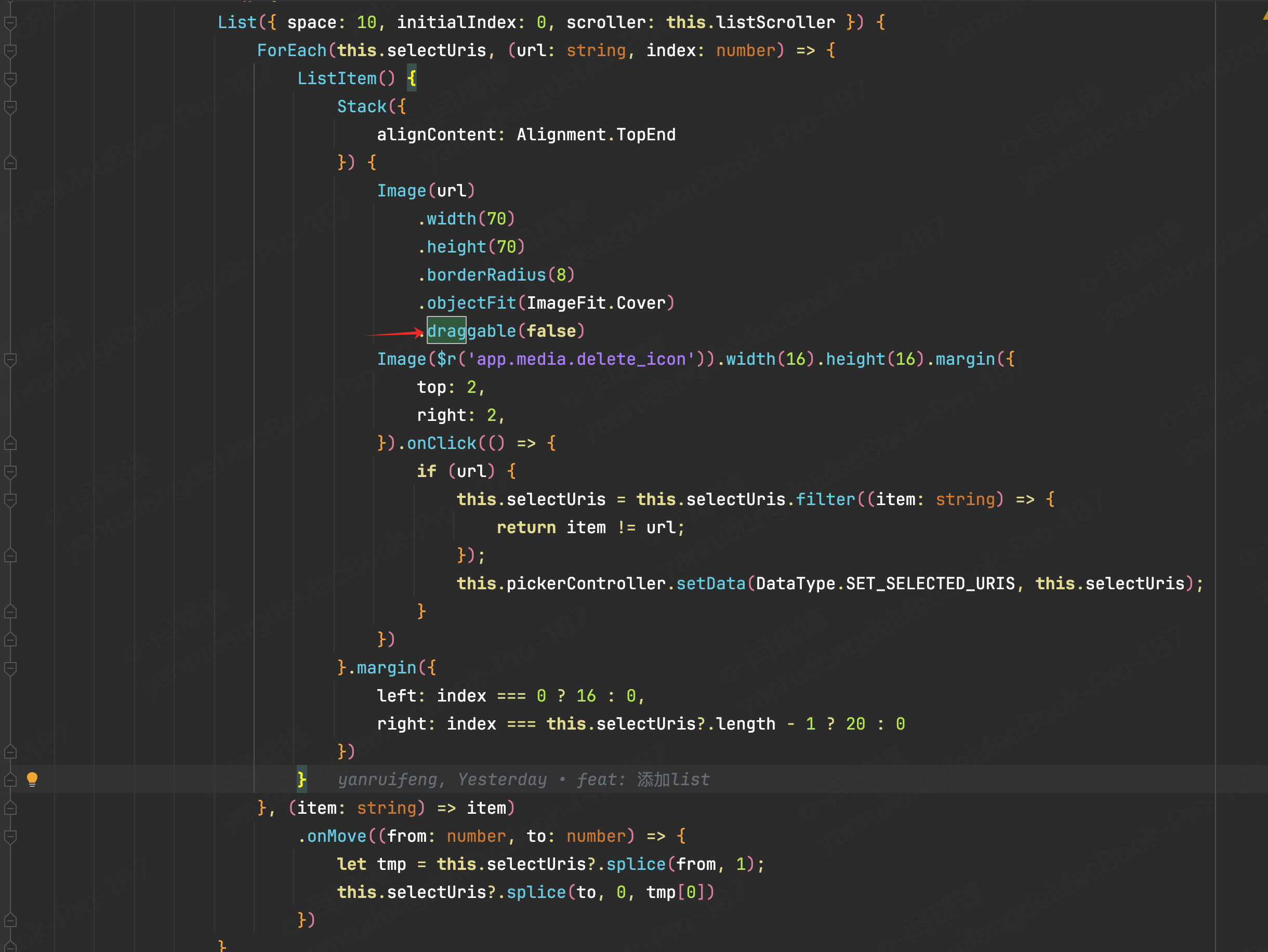

// 确保selectUris是响应式数据
@State selectUris: string[] = [...];

List({ space: 10, initialIndex: 0, scroller: this.listScroller }) {
    ForEach(this.selectUris, (url: string, index: number) => {
        ListItem() {
            // ListItem内容...
        }
        .draggable(true) // 关键:启用拖拽(搜索结果说明)
    }, (item: string) => item)
    .onMove((from: number, to: number) => {
        // 使用临时变量操作后更新数组
        const tmp = [...this.selectUris];
        const [movedItem] = tmp.splice(from, 1);
        tmp.splice(to, 0, movedItem);
        this.selectUris = tmp; // 触发UI更新
    })
}
尝试下

在HarmonyOS Next中,List组件的onMove方法用于处理列表项拖拽排序。拖拽不生效通常由以下原因导致:
- 未启用编辑模式:List的editMode属性需设置为true。
- onMove回调未正确实现:onMove方法需返回true以允许拖拽交换位置。
- 数据源未更新:onMove中需同步更新数据源数组顺序。
- 组件版本或API限制:确认使用的SDK版本支持该特性。
检查代码中List是否配置editMode=true,并确保onMove逻辑正确更新数据源。
在HarmonyOS Next中,onMove 方法需要与 editMode(true) 属性配合使用才能启用列表项的拖拽功能。从你提供的代码来看,List 组件缺少了 editMode(true) 的设置。
请在你的 List 组件中添加 .editMode(true) 链式调用。修改后的关键部分如下:
List({ space: 10, initialIndex: 0, scroller: this.listScroller }) {
    // ... ForEach 内容 ...
}
.editMode(true) // 启用编辑模式,这是onMove生效的前提
.height(74)
.width(CommonConstants.match_percent)
.scrollBar(BarState.Off)
.listDirection(Axis.Horizontal)
核心要点:
- 必须设置:
editMode(true)是激活列表项长按拖拽交互的开关。没有它,onMove回调不会被触发。 - 操作方式:设置后,用户需要长按列表项(在你的代码中是
ListItem内的Stack)并拖动,才能触发onMove事件。 - 数据更新:你的
onMove回调函数中的数组数据交换逻辑是正确的,用于在拖拽后更新数据源。
添加 editMode(true) 后,拖拽排序功能应该可以正常工作。如果仍然不生效,请检查 List 或 ListItem 内是否有其他手势事件(例如你代码中 Image 的 onClick)可能干扰了长按事件的捕获。
