




HarmonyOS鸿蒙Next中需要自定义一个用于跨组件共享UI上下文的类
HarmonyOS鸿蒙Next中需要自定义一个用于跨组件共享UI上下文的类
我需要一个全局单例类,用于在应用各处共享数据
3 回复

1、那就需要自自定义一个跨组件共享UI上下文的类GlobalThis
代码:
import { common } from '@kit.AbilityKit';


/**
 * @author J.query
 * @date 2024/10/15 14:06
 * @email j-query@foxmail.com
 * Description: 自定义一个用于跨组件共享UI上下文的类
 */

export class GlobalThis {
  private constructor() {
  }

  private static instance: GlobalThis;
  private _uiContexts = new Map<string, common.UIAbilityContext>();

  public static getInstance(): GlobalThis {
    if (!GlobalThis.instance) {
      GlobalThis.instance = new GlobalThis();
    }
    return GlobalThis.instance;
  }


  /**
   * 获取UI上下文
   * @param key
   * @returns
   */
  getContext(key: string): common.UIAbilityContext | undefined {
    return this._uiContexts.get(key);
  }

  /**
   * 设置UI上下文
   * @param key
   * @param value
   */
  setContext(key: string, value: common.UIAbilityContext): void {
    this._uiContexts.set(key, value);
  }
  // 其他需要传递的内容依此扩展
}
使用示例:
import { GlobalThis } from '../common/GlobalThis';
import { common } from '@kit.AbilityKit';
import showToast from '../common/ToastUtils';
/**
 * @author J.query
 * @date 2024/10/10
 * @email j-query@foxmail.com
 * Description: GlobalThis 使用示例
 */
@Entry
@Component
struct GlobalThisExample {
  @State contextInfo: string = '未设置上下文'
  @State keyInput: string = 'mainContext'
  @State newContextInfo: string = '这是新的上下文信息'

  aboutToAppear() {
    // 初始化时尝试获取已有上下文
    this.updateContextDisplay()
  }

  updateContextDisplay() {
    const globalInstance = GlobalThis.getInstance()
    const context = globalInstance.getContext(this.keyInput)
    if (context) {
      this.contextInfo = `已获取到上下文: ${this.keyInput}`
    } else {
      this.contextInfo = `未找到上下文: ${this.keyInput}`
    }
  }

  build() {
    Column() {
      Text('GlobalThis 单例工具类使用示例')
        .fontSize(20)
        .fontWeight(FontWeight.Bold)
        .margin({ bottom: 20 })

      Text('说明:GlobalThis是一个全局单例类,可用于在应用各处共享数据')
        .fontSize(14)
        .fontColor('#666')
        .margin({ bottom: 30 })
        .padding({ left: 20, right: 20 })

      // 显示当前上下文状态
      Text(`上下文状态: ${this.contextInfo}`)
        .fontSize(16)
        .margin({ bottom: 10 })

      // 输入键名
      Text('键名:')
      TextInput({ text: this.keyInput, placeholder: '输入键名' })
        .onChange((value: string) => {
          this.keyInput = value
        })
        .margin({ bottom: 10 })
        .width('80%')

      // 显示/设置上下文信息
      Text('上下文信息:')
      TextInput({ text: this.newContextInfo, placeholder: '输入要保存的上下文信息' })
        .onChange((value: string) => {
          this.newContextInfo = value
        })
        .margin({ bottom: 20 })
        .width('80%')

      // 操作按钮
      Row() {
        Button('获取上下文')
          .onClick(() => {
            this.updateContextDisplay()
          })
          .margin({ right: 10 })

        Button('设置上下文')
          .onClick(() => {
            // 注意:实际使用中这里应该是真实的UIAbilityContext对象
            // 这里仅作演示,实际使用时不会这样创建
            this.contextInfo = `已设置上下文: ${this.keyInput} = ${this.newContextInfo}`
          })
      }
      .margin({ bottom: 20 })

      Button('获取单例实例')
        .onClick(() => {
          const instance = GlobalThis.getInstance()
          console.log('GlobalThis instance:', instance)
          showToast("已获取单例实例,请查看日志");
        })

      Blank()
    }
    .width('100%')
    .height('100%')
    .padding(20)
    .backgroundColor('#f5f5f5')
  }
}
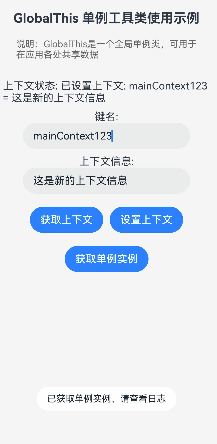
效果如图:
更多关于HarmonyOS鸿蒙Next中需要自定义一个用于跨组件共享UI上下文的类的实战系列教程也可以访问 https://www.itying.com/category-93-b0.html

在HarmonyOS Next中,自定义跨组件共享UI上下文的类,可通过@Component装饰器结合@Provide和@Consume装饰器实现。@Provide在祖先组件中定义共享数据,@Consume在子孙组件中消费该数据,实现跨层级的UI状态同步。也可使用@Observed和@ObjectLink装饰器处理复杂对象的状态管理。

在HarmonyOS Next中,要实现跨组件共享UI上下文,推荐使用LocalStorage或AppStorage进行状态管理,而非手动创建全局单例类。以下是具体方案:
-
使用AppStorage(应用全局状态)
AppStorage是应用级别的单例状态管理工具,数据可在所有UI组件中共享:// 存储数据 AppStorage.SetOrCreate('key', 'value'); // 获取数据 let value = AppStorage.Get('key'); // 在UI组件中监听变化 [@StorageProp](/user/StorageProp)('key') storageValue: string = ''; [@StorageLink](/user/StorageLink)('key') storageLink: string = ''; -
使用LocalStorage(页面级共享)
若需在特定组件树共享数据,可通过LocalStorage实例传递:let storage = new LocalStorage(); storage.set('key', 'value'); // 在组件装饰器中关联 [@Component](/user/Component)({ storage: storage }) struct MyComponent { @LocalStorageProp('key') localValue: string = ''; @LocalStorageLink('key') localLink: string = ''; } -
通过UI上下文传递
使用UIContext获取平台相关能力(如资源管理),但非数据共享主方案:let uiContext = getContext(this) as UIContext;
注意:
- 避免手动创建单例类管理UI数据,可能引发生命周期不一致问题。
- 使用响应式装饰器(
[@StorageLink](/user/StorageLink)、@LocalStorageLink)可实现数据变更自动刷新UI。 - 复杂场景可结合
@Observed和@ObjectLink实现对象级监听。
此方案符合HarmonyOS Next状态管理规范,能有效保证数据同步与UI一致性。
