




uni-app中scroll-view组件里的position: fixed;是相对于scroll-view而不是整个页面
uni-app中scroll-view组件里的position: fixed;是相对于scroll-view而不是整个页面
问题描述
在scroll-view 组件里面的元素使用position: fixed;定位时,是相对于scroll-view而不是整个页面。即使设置top: 0和bottom: 0,也是基于scroll-view的高度。
示例代码
<template>
    <view class="content">
            <scroll-view scroll-y="true" >
                <view class="content_box">
                    <button @click="Isright = !Isright" type="default">按钮</button>
                <view v-if="Isright" class="right_box"></view>
                </view>
            </scroll-view>
    </view>
</template>

<script>
    export default {
        data() {
            return {
                Isright:false
            }
        }
    }
</script>

<style>
    .content_box{width: 100%;height: 500rpx;}
    .right_box{
        position: fixed;
        right: 0;top: 0;bottom: 0;
        width: 200rpx;background-color: #007AFF;z-index: 9999;
    }
    .logo {margin: auto;height: 200rpx;width: 200rpx;}
</style>
相关链接
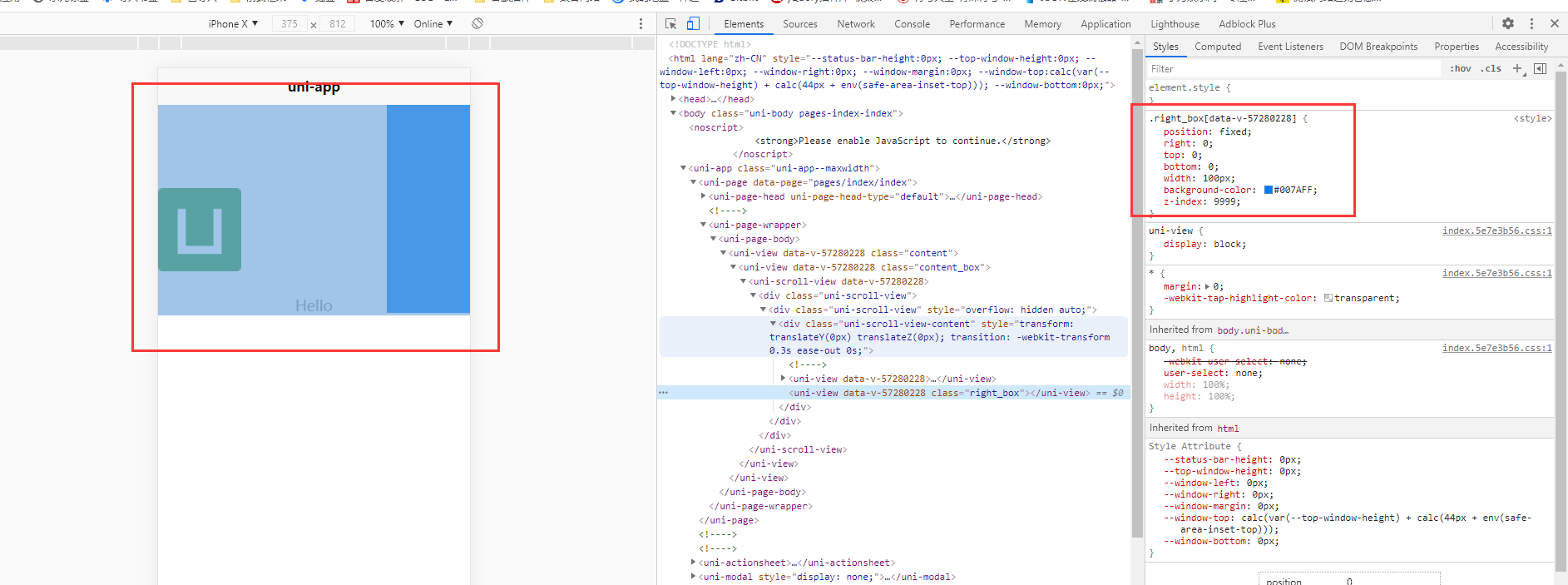
更多关于uni-app中scroll-view组件里的position: fixed;是相对于scroll-view而不是整个页面的实战教程也可以访问 https://www.itying.com/category-93-b0.html
2 回复

HBuilderX 3.2.10 alpha 已修复
更多关于uni-app中scroll-view组件里的position: fixed;是相对于scroll-view而不是整个页面的实战教程也可以访问 https://www.itying.com/category-93-b0.html

在 uni-app 中,scroll-view 组件内部使用 position: fixed; 确实会相对于 scroll-view 自身进行定位,而不是整个页面。这是由于 scroll-view 的渲染机制导致的,它本质上是一个独立的滚动容器,其内部的定位上下文被限制在该容器内。
原因分析
- 滚动容器限制:
scroll-view在渲染时会创建一个新的层叠上下文(stacking context),其内部的fixed定位会基于该容器,而非视口(viewport)。 - 平台差异:在 Web 平台,
fixed通常相对于视口定位,但在scroll-view中,各端(如小程序、H5)的实现可能受底层渲染引擎影响,行为可能不一致。例如,小程序中scroll-view可能通过原生组件实现,进一步限制了定位行为。
解决方案
若需实现相对于整个页面的固定定位,建议:
- 将元素移出
scroll-view:将需要fixed定位的元素放在scroll-view外部,使其脱离滚动容器的限制。 - 使用
position: sticky:如果需求是滚动到特定位置时固定,可尝试sticky定位,但需注意浏览器兼容性和uni-app各端的支持情况。 - 动态计算位置:通过
uni.createSelectorQuery()获取元素位置,结合scroll-view的滚动事件手动调整样式,但此方法较复杂且性能开销较大。
代码调整示例
将 right_box 移出 scroll-view,使其相对于页面定位:
<template>
    <view class="content">
        <scroll-view scroll-y="true">
            <view class="content_box">
                <button @click="Isright = !Isright" type="default">按钮</button>
            </view>
        </scroll-view>
        <view v-if="Isright" class="right_box"></view>
    </view>
</template>