




HarmonyOS鸿蒙Next中如何正确的引用音频播放器SmartXPlayer?
HarmonyOS鸿蒙Next中如何正确的引用音频播放器SmartXPlayer? 我在集成引用音频播放器SmartXPlayer时,不管是使用
ohpm i @qtfm/smartxplayer
还是
ohpm install smartxplayer
在
oh-package.json5中看到了
"@qtfm/smartxplayer": "^1.1.0"
。但在编译运行的时候就会报错。
Install Failed: error: failed to install bundle.
code:9568305
error: Failed to install the HAP or HSP because the dependent module does not exist.
entry's dependent module: smartxplayer does not exist
更多关于HarmonyOS鸿蒙Next中如何正确的引用音频播放器SmartXPlayer?的实战教程也可以访问 https://www.itying.com/category-93-b0.html

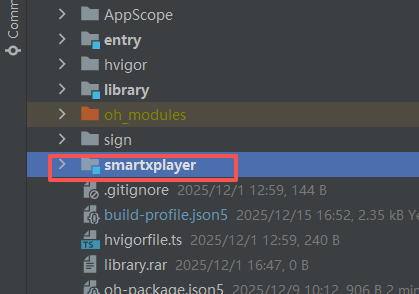
你好,这个包有点问题,本应该是har包,但是类型又是hsp包。使用 ohpm i @qtfm/smartxplayer 安装后,
修改 oh_modules/@qtfm/smartxplayer/src/main/module.json 中的type
"type":"shared" 修改为 "type":"har"
这样能正常编译运行。
更多关于HarmonyOS鸿蒙Next中如何正确的引用音频播放器SmartXPlayer?的实战系列教程也可以访问 https://www.itying.com/category-93-b0.html

ohpm install @qtfm/smartxplayer
初始化播放器实例
const svplayer = new SXPlayer(getAbilityContext(), {enableLog:true, ...});
播放网络视频
let entity: AudioEntry = {url: audio_url};
let params: PlayParams = {
  audioEntry: [entity],  // 音频播放地址
  playWhenPrepared: true,
  ...
};
sxplayer.player(params); // 播放音频
参考地址
https://developer.huawei.com/consumer/cn/blog/topic/03185823695795012


在HarmonyOS Next中,通过@ohos.multimedia.media模块的createAVPlayer()方法创建AVPlayer实例。使用fdSrc或fileSrc属性设置音频源路径。调用prepare()方法准备播放器,然后通过play()方法启动播放。需在module.json5中申请ohos.permission.READ_MEDIA权限。

在HarmonyOS Next中正确引用SmartXPlayer,需要确认依赖包名称和配置方式。根据你提供的错误信息,问题在于模块依赖关系未正确建立。
正确的引用步骤如下:
-
确认包名:SmartXPlayer在ohpm官方仓库中的完整包名是
@qtfm/smartxplayer。你使用的ohpm i @qtfm/smartxplayer命令是正确的。 -
检查oh-package.json5:依赖项应显示为:
"dependencies": {
  "@qtfm/smartxplayer": "^1.1.0"
}
- 模块配置:在
module.json5文件中,需要声明对SmartXPlayer的依赖:
"dependencies": [
  {
    "bundleName": "@qtfm/smartxplayer",
    "moduleName": "smartxplayer"
  }
]
- 导入使用:在代码中正确导入:
import { SmartXPlayer } from '@qtfm/smartxplayer';
- 清理重建:如果仍然报错,尝试:
- 删除
oh_modules目录 - 运行
ohpm install重新安装依赖 - 清理并重新编译项目
错误代码9568305表明HAP/HSP安装失败,通常是因为模块依赖声明不完整或包安装不完整。确保以上配置都正确后,编译错误应该能解决。
