




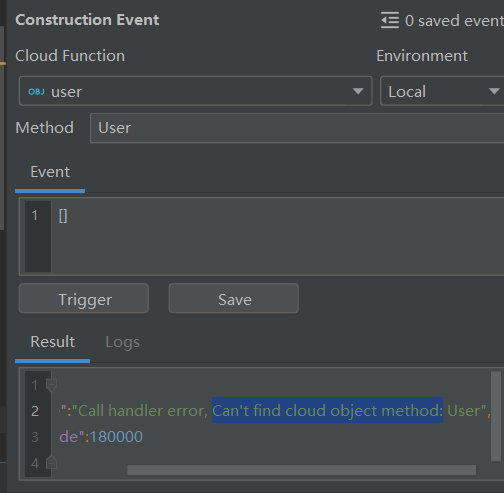
HarmonyOS鸿蒙Next中连接云数据库和云函数时一直显示Can't find cloud object method
HarmonyOS鸿蒙Next中连接云数据库和云函数时一直显示Can’t find cloud object method
import { CloudDBZoneWrapper } from './CloudDBZoneWrapper';

// 核心业务逻辑
async function executeMain(event, context, logger) {
    console.log("========== 1. 开始执行 ==========");
    try {
        const dbWrapper = new CloudDBZoneWrapper();
        const data = await dbWrapper.queryAll();

        console.log("========== 2. 查询成功 ==========");
        // 打印数据详情,证明真的查到了
        console.log(">>>> 数据内容详情:", JSON.stringify(data));

        return {
            code: 0,
            desc: "Success",
            data: data
        };
    } catch (error) {
        console.error("========== 报错了 ==========");
        console.error(error);
        return {
            code: 500,
            desc: "Error",
            error: error.message || error.toString()
        };
    }
}

export { executeMain as User };
export { executeMain as POST };
const clouddb = require('@hw-agconnect/database-server/dist/index.js');
const agconnect = require('@hw-agconnect/common-server');
const path = require('path');

let zoneName = "mydbcloud";
let objectName = 'user';

class CloudDBZoneWrapper {
    credentialPath: string;

    constructor() {
        // 【注意】这里保留了你之前运行成功的那个绝对路径!
        this.credentialPath = path.join(__dirname, 'resources', 'agc-apiclient-*************.json');
    }

    async init() {
        try {
            // 1. 初始化 AGC
            if (!agconnect.AGCClient.INSTANCES.has(zoneName)) {
                agconnect.AGCClient.initialize(
                    agconnect.CredentialParser.toCredential(this.credentialPath),
                    zoneName,
                    undefined
                );
            }

            const agcClient = agconnect.AGCClient.getInstance(zoneName);
            clouddb.AGConnectCloudDB.initialize(agcClient);
            const agconnectCloudDB = clouddb.AGConnectCloudDB.getInstance(agcClient);

            // 2. 【必杀技】直接定义 Schema 结构
            // 不再使用 class User,而是直接告诉 SDK 表结构长什么样
            const userSchema = {
                objectTypeName: objectName,
                fields: [
                    { fieldName: 'uuid', fieldType: 'STRING', isPrimaryKey: true }, // 主键
                    { fieldName: 'name', fieldType: 'STRING' },
                    { fieldName: 'email', fieldType: 'STRING' },
                    { fieldName: 'phone', fieldType: 'STRING' },
                    { fieldName: 'avatar', fieldType: 'STRING' }
                ]
            };

            // 3. 注册这个 Schema
            try {
                agconnectCloudDB.createObjectType(userSchema);
            } catch (e) {
                // 如果已经注册过,忽略错误
            }

        } catch (error) {
            console.error("Init schema failed: ", error);
            throw error;
        }
    }

    async queryAll() {
        await this.init();
        try {
            const agconnectCloudDB = clouddb.AGConnectCloudDB.getInstance(agconnect.AGCClient.getInstance(zoneName));
            const cloudDBZoneConfig = new clouddb.CloudDBZoneConfig(zoneName);
            const mCloudDBZone = await agconnectCloudDB.openCloudDBZone(cloudDBZoneConfig);

            // 查询
            const query = clouddb.CloudDBZoneQuery.where(objectName);
            const result = await mCloudDBZone.executeQuery(query);
            const snapshotObjects = result.getSnapshotObjects();

            // 4. 【必杀技】手动提取数据
            // 不指望它自动变身,我们手动把数据揪出来
            const formattedData = snapshotObjects.map(obj => {
                return {
                    uuid: obj.getFieldValue('uuid'),
                    name: obj.getFieldValue('name'),
                    email: obj.getFieldValue('email'),
                    phone: obj.getFieldValue('phone'),
                    avatar: obj.getFieldValue('avatar')
                };
            });

            return formattedData;
        } catch (error) {
            console.error("Query failed: ", error);
            throw error;
        }
    }
}

export { CloudDBZoneWrapper };
{
  "handler": "user.User",
  "functionType": 1,
  "triggers": [
    {
      "type": "http",
      "properties": {
        "enableUrlDecode": true,
        "authFlag": "true",
        "authAlgor": "HDA-SYSTEM",
        "authType": "apigw-client"
      }
    }
  ]
}
日志里能够显示出数据

更多关于HarmonyOS鸿蒙Next中连接云数据库和云函数时一直显示Can't find cloud object method的实战教程也可以访问 https://www.itying.com/category-93-b0.html
4 回复

环境选remote,
更多关于HarmonyOS鸿蒙Next中连接云数据库和云函数时一直显示Can't find cloud object method的实战系列教程也可以访问 https://www.itying.com/category-93-b0.html


这个错误通常是因为云函数配置的 handler 路径与代码中的导出名称不匹配导致的。
从你的代码和配置来看,问题出在 function.json 的 handler 配置上。你的代码中使用了:
export { executeMain as User };
export { executeMain as POST };
但在 function.json 中配置的是:
"handler": "user.User"
这表示云函数期望在 user.js 文件中找到一个名为 User 的导出函数。然而你的导出方式可能没有被正确识别。
解决方案:
-
修改导出方式(推荐): 在
index.js中,将导出改为:export const User = executeMain; export const POST = executeMain; -
或者修改 function.json: 将 handler 改为匹配你的导出名称:
"handler": "user.executeMain" -
确保文件结构正确: 检查你的云函数项目结构,确保:
function.json与index.js在同一目录- 如果使用子目录,路径要正确对应
-
重新部署: 修改后需要重新部署云函数才能生效。
从你的日志可以看到数据查询是成功的,说明 CloudDB 连接和查询逻辑没有问题,主要是云函数入口的导出/配置不匹配导致了 Can't find cloud object method 错误。
