




HarmonyOS 鸿蒙Next中使用SideBarContainer容器组件后,用变量控制抽屉开关导致页面内容被压缩怎么解决?

HarmonyOS 鸿蒙Next中使用SideBarContainer容器组件后,用变量控制抽屉开关导致页面内容被压缩怎么解决? 用鸿蒙SideBarContainer这个容器组件之后,使用变量控制抽屉的开关,但是页面的内容就被压缩了,怎么解决?

代码:

@Entry @Component struct SideBarContainerPage { @State currentIndex: number = 0; @State showSideBar: boolean = false;

build() { SideBarContainer(SideBarContainerType.Embed) { Column() {} .height(‘100%’) .width(“100%”)

  Column() {
    Tabs({ barPosition: BarPosition.End, index: $$this.currentIndex }) {
      TabContent() {}
      .tabBar(this.tabBuilder('tabBuilder1', $r('app.media.startIcon'), 0))

      TabContent() {}
      .tabBar(this.tabBuilder('tabBuilder2', $r('app.media.startIcon'), 1))
    }
    .onAnimationStart((index: number, targetIndex: number) => {
      if (this.currentIndex != targetIndex) {
        this.currentIndex = targetIndex
      }
    })
    .scrollable(false)
    .animationDuration(0)
    .barHeight(45)
    .layoutWeight(1)
    .padding({ bottom: 10 })
  }
}
.showControlButton(true)
.showSideBar($$this.showSideBar)
.sideBarWidth("70%")

}

@Builder tabBuilder(title: string, icon: Resource, targetIndex: number) { Column() { Image(icon) .width(20) .height(20) Text(title) .fontColor(Color.Gray) .layoutWeight(1) } .width(‘100%’) .justifyContent(FlexAlign.Center) .margin({ bottom: 2 }) .shadow({ color: ‘#20000000’, radius: 20, offsetY: 20 }) } }


更多关于HarmonyOS 鸿蒙Next中使用SideBarContainer容器组件后,用变量控制抽屉开关导致页面内容被压缩怎么解决?的实战教程也可以访问 https://www.itying.com/category-93-b0.html

3 回复

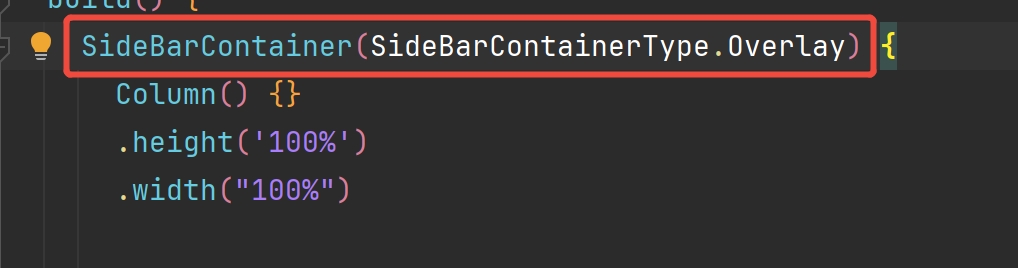
开发者您好,这个问题是SideBarContainerType这个属性属性值设置的问题,因为Embed这个属性值在整体容器大小不变时,显示侧边栏会导致内容区缩小,隐藏侧边栏会扩大内容区。把Embed改成Overlay即可,Overlay:侧边栏浮在内容区上面,不会影响内容区的大小。
cke_475.jpeg

参考指南:https://developer.huawei.com/consumer/cn/doc/harmonyos-references/ts-container-sidebarcontainer#sidebarcontainertype枚举说明

更多关于HarmonyOS 鸿蒙Next中使用SideBarContainer容器组件后,用变量控制抽屉开关导致页面内容被压缩怎么解决?的实战系列教程也可以访问 https://www.itying.com/category-93-b0.html


在HarmonyOS Next中,SideBarContainer的显示状态变化会触发组件重新布局。若使用变量控制开关时出现内容压缩,通常是因为侧边栏的展开/收起影响了主内容区的尺寸计算。可通过以下方式调整:

  1. 为主内容区设置固定尺寸或使用百分比布局,避免依赖自动填充。
  2. 在侧边栏状态变更时,使用onChange回调手动调整主内容布局参数。
  3. 检查是否在状态更新时触发了不必要的全局重绘,优化状态管理逻辑。

确保布局约束明确,可避免因动态变化导致的渲染异常。

在HarmonyOS Next中,使用SideBarContainer时出现页面内容被压缩的问题,通常是由于布局约束和尺寸计算导致的。从你的代码来看,主要问题在于SideBarContainer的Embed模式下,侧边栏和内容区域会共享同一空间。

解决方案:

  1. 为内容区域设置最小宽度约束 在Tabs组件上添加.minWidth('100%'),确保内容区域在侧边栏显示时保持最小宽度:

    Tabs({ barPosition: BarPosition.End, index: $$this.currentIndex })
      .minWidth('100%')  // 添加这行
      .scrollable(false)
      .animationDuration(0)
      .barHeight(45)
      .layoutWeight(1)
      .padding({ bottom: 10 })
    
  2. 使用Stack布局替代 如果Embed模式无法满足需求,可以考虑使用Stack布局手动控制侧边栏的显示隐藏:

    [@State](/user/State) showSideBar: boolean = false;
    
    build() {
      Stack() {
        // 主内容区域
        Column() {
          Tabs({ barPosition: BarPosition.End, index: $$this.currentIndex }) {
            // Tab内容
          }
          .width('100%')
          .height('100%')
        }
        
        // 侧边栏
        if (this.showSideBar) {
          Column() {
            // 侧边栏内容
          }
          .width('70%')
          .height('100%')
          .backgroundColor(Color.White)
          .align(Alignment.Start)
        }
      }
      .width('100%')
      .height('100%')
    }
    
  3. 调整SideBarContainer的布局策略 确保侧边栏和内容区域都有明确的尺寸约束:

    SideBarContainer(SideBarContainerType.Embed) {
      // 侧边栏内容
      Column()
        .width('100%')
        .height('100%')
      
      // 主内容区域  
      Column() {
        Tabs({ barPosition: BarPosition.End, index: $$this.currentIndex }) {
          // Tab内容
        }
        .width('100%')
        .height('100%')
      }
      .width('100%')
      .height('100%')
    }
    .sideBarWidth("70%")
    .minContentWidth("100%")  // 设置最小内容宽度
    
  4. 检查父容器约束 确保SideBarContainer的父容器有正确的尺寸设置:

    build() {
      Column() {
        SideBarContainer(SideBarContainerType.Embed) {
          // 内容
        }
        .width('100%')
        .height('100%')
      }
      .width('100%')
      .height('100%')
    }
    

关键点:

  • SideBarContainer在Embed模式下,侧边栏和内容区域会竞争空间
  • 使用.minWidth().minContentWidth()可以防止内容被过度压缩
  • 考虑使用Stack布局可以获得更精确的控制
  • 确保所有容器都有明确的尺寸约束

建议优先尝试第一种方案,为Tabs组件添加最小宽度约束,这通常能解决大部分压缩问题。

回到顶部