




HarmonyOS鸿蒙Next中如何实现一个JSON动态数据结构解析
HarmonyOS鸿蒙Next中如何实现一个JSON动态数据结构解析 动态数据结构存在的意义
后端返回字段随版本迭代而增删改时,动态解析能在不改前端固定模型的情况下继续工作,减少发布成本。
遇到缺失字段、新增字段或类型漂移时,可以用默认值或分支逻辑兜底,避免因结构变化导致崩溃。
如何去实现鸿蒙版本的JSON动态数据结构解析

数据字段是与业务绑定的,是否增加删除修改肯定有约定的,不然这个怎么玩耍啊
更多关于HarmonyOS鸿蒙Next中如何实现一个JSON动态数据结构解析的实战系列教程也可以访问 https://www.itying.com/category-93-b0.html

直接上代码
/**
 * 动态JSON解析工具类
 * 支持无固定结构体的JSON数据解析和访问
 */
type JsonValue = string | number | boolean | object | JsonValue[] | null | undefined;

export class DynamicJsonParser {
  private data: object | null = null;

  /**
   * 构造函数
   * @param jsonString JSON字符串或已解析的对象
   */
  constructor(jsonString?: string | object) {
    if (jsonString) {
      this.parse(jsonString);
    }
  }

  /**
   * 解析JSON字符串或对象
   * @param jsonString JSON字符串或对象
   * @returns 当前实例,支持链式调用
   */
  parse(jsonString: string | object): DynamicJsonParser {
    try {
      if (typeof jsonString === 'string') {
        this.data = JSON.parse(jsonString);
      } else {
        this.data = jsonString;
      }
    } catch (error) {
      console.error('JSON解析失败:', error);
      this.data = null;
    }
    return this;
  }

  /**
   * 获取值(支持点号路径,如 "user.name")
   * @param path 路径,可以是字符串键名或点号分隔的路径
   * @param defaultValue 默认值,当路径不存在时返回
   * @returns 对应的值
   */
  get(path: string, defaultValue?: JsonValue): JsonValue {
    if (!this.data) {
      return defaultValue;
    }

    const keys = path.split('.');
    let current: JsonValue = this.data;

    for (const key of keys) {
      if (current === null || current === undefined || typeof current !== 'object') {
        return defaultValue;
      }
      // 使用类型断言来访问对象属性
      current = (current as Record<string, JsonValue>)[key];
    }

    return current !== undefined ? current : defaultValue;
  }

  /**
   * 获取字符串值
   * @param path 路径
   * @param defaultValue 默认值
   * @returns 字符串值
   */
  getString(path: string, defaultValue: string = ''): string {
    const value = this.get(path);
    return value !== null && value !== undefined ? String(value) : defaultValue;
  }

  /**
   * 获取数字值
   * @param path 路径
   * @param defaultValue 默认值
   * @returns 数字值
   */
  getNumber(path: string, defaultValue: number = 0): number {
    const value = this.get(path);
    return value !== null && value !== undefined ? Number(value) : defaultValue;
  }

  /**
   * 获取布尔值
   * @param path 路径
   * @param defaultValue 默认值
   * @returns 布尔值
   */
  getBoolean(path: string, defaultValue: boolean = false): boolean {
    const value = this.get(path);
    return value !== null && value !== undefined ? Boolean(value) : defaultValue;
  }

  /**
   * 获取数组
   * @param path 路径
   * @param defaultValue 默认值
   * @returns 数组
   */
  getArray(path: string, defaultValue: JsonValue[] = []): JsonValue[] {
    const value = this.get(path);
    return Array.isArray(value) ? value : defaultValue;
  }

  /**
   * 获取对象
   * @param path 路径
   * @param defaultValue 默认值
   * @returns 对象
   */
  getObject(path: string, defaultValue: object | null = null): object | null {
    const value = this.get(path);
    return value !== null && typeof value === 'object' && !Array.isArray(value) ? value : defaultValue;
  }

  /**
   * 获取动态JSON解析器实例(用于嵌套对象)
   * @param path 路径
   * @returns DynamicJsonParser实例
   */
  getParser(path: string): DynamicJsonParser {
    const value = this.get(path);
    if (value === null || value === undefined) {
      return new DynamicJsonParser();
    }
    return new DynamicJsonParser(value as string | object);
  }

  /**
   * 检查路径是否存在
   * @param path 路径
   * @returns 是否存在
   */
  has(path: string): boolean {
    return this.get(path, undefined) !== undefined;
  }

  /**
   * 获取所有键名
   * @returns 键名数组
   */
  keys(): string[] {
    if (!this.data || typeof this.data !== 'object' || Array.isArray(this.data)) {
      return [];
    }
    return Object.keys(this.data);
  }

  /**
   * 获取所有值
   * @returns 值数组
   */
  values(): JsonValue[] {
    if (!this.data || typeof this.data !== 'object' || Array.isArray(this.data)) {
      return [];
    }
    return Object.values(this.data) as JsonValue[];
  }

  /**
   * 获取原始数据
   * @returns 原始数据对象
   */
  getRawData(): object | null {
    return this.data;
  }

  /**
   * 转换为JSON字符串
   * @param indent 缩进空格数,默认2
   * @returns JSON字符串
   */
  toString(indent: number = 2): string {
    try {
      return JSON.stringify(this.data, null, indent);
    } catch (error) {
      console.error('JSON序列化失败:', error);
      return '{}';
    }
  }

  /**
   * 遍历对象属性
   * @param callback 回调函数,接收(key, value)参数
   */
  forEach(callback: (key: string, value: JsonValue) => void): void {
    if (!this.data || typeof this.data !== 'object' || Array.isArray(this.data)) {
      return;
    }
    Object.entries(this.data).forEach((entry: [string, JsonValue]) => {
      const key = entry[0];
      const value = entry[1];
      callback(key, value);
    });
  }

  /**
   * 检查是否为数组
   * @returns 是否为数组
   */
  isArray(): boolean {
    return Array.isArray(this.data);
  }

  /**
   * 检查是否为空
   * @returns 是否为空
   */
  isEmpty(): boolean {
    if (this.data === null || this.data === undefined) {
      return true;
    }
    if (Array.isArray(this.data)) {
      return this.data.length === 0;
    }
    if (typeof this.data === 'object') {
      return Object.keys(this.data).length === 0;
    }
    return false;
  }

  /**
   * 获取数组长度或对象属性数量
   * @returns 长度或数量
   */
  size(): number {
    if (Array.isArray(this.data)) {
      return this.data.length;
    }
    if (this.data && typeof this.data === 'object') {
      return Object.keys(this.data).length;
    }
    return 0;
  }
}
通过以上代码实现的解析库有以下特点
解析能力:直接使用内置的 JSON.parse 完成字符串转对象,不依赖第三方库。
动态访问:通过点号路径拆分(“a.b.c” → [“a”,“b”,“c”])逐级取值,支持默认值兜底,避免空指针。
类型辅助:提供 getString/getNumber/getBoolean/getArray/getObject 等便捷方法,将动态值转换为常用类型。
嵌套复用:getParser 允许对嵌套片段再次包装成新的解析器,便于分层处理。
基础工具:keys/values/forEach/isEmpty/size/toString 等便于遍历和调试的辅助接口。
整体上是对原生 JSON 能力的轻量封装,聚焦“无固定结构”的安全读取与类型转换,没有额外依赖。
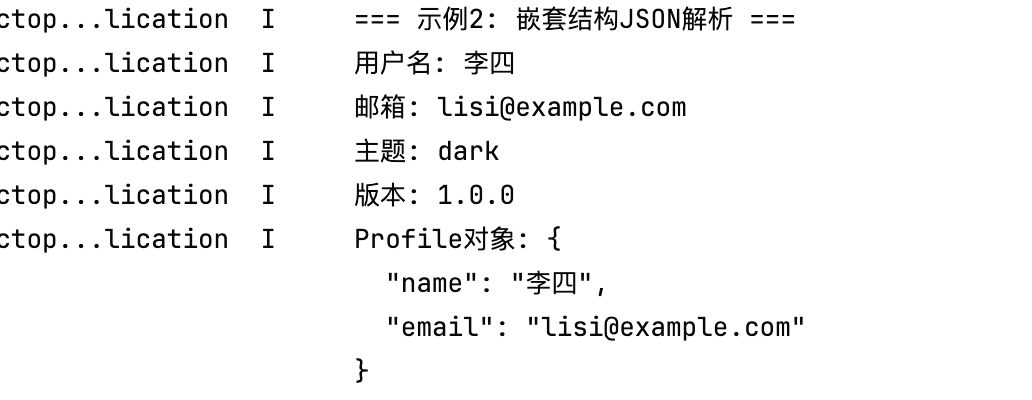
使用demo
  static example2(): void {
    console.log('=== 示例2: 嵌套结构JSON解析 ===');

    const jsonString = `{
      "user": {
        "profile": {
          "name": "李四",
          "email": "lisi@example.com"
        },
        "settings": {
          "theme": "dark",
          "language": "zh-CN"
        }
      },
      "metadata": {
        "version": "1.0.0",
        "timestamp": 1234567890
      }
    }`;

    const parser = new DynamicJsonParser(jsonString);

    // 使用点号路径访问嵌套属性
    console.log('用户名:', parser.getString('user.profile.name'));
    console.log('邮箱:', parser.getString('user.profile.email'));
    console.log('主题:', parser.getString('user.settings.theme'));
    console.log('版本:', parser.getString('metadata.version'));

    // 获取嵌套对象
    const profile = parser.getParser('user.profile');
    console.log('Profile对象:', profile.toString());
  }
运行效果

在HarmonyOS Next中,使用内置的JSON解析库处理动态数据结构。通过@ohos.util模块的JSON类,调用parse方法将JSON字符串转换为对象。对于动态结构,直接访问转换后的对象属性即可。若需处理复杂嵌套,可结合对象类型检查与条件判断来安全访问数据。

在HarmonyOS Next中实现JSON动态数据结构解析,核心在于利用ArkTS的类型系统与运行时反射能力,结合JSON.parse()和@ohos.util工具库。以下是具体实现方案:
1. 基础解析与动态访问
使用JSON.parse()将字符串解析为通用对象Record<string, Object>,通过键名动态访问:
let jsonStr: string = '{"name": "设备", "temp": 25}';
let dynamicObj: Record<string, Object> = JSON.parse(jsonStr);

// 动态访问字段
let name = dynamicObj['name']; // "设备"
let temp = dynamicObj['temp']; // 25

// 处理可能缺失的字段
let optionalValue = dynamicObj['optionalField'] ?? '默认值';
2. 类型安全包装
通过泛型封装动态访问逻辑,添加类型推断和默认值支持:
class DynamicJSON {
  private data: Record<string, Object>;

  constructor(jsonStr: string) {
    this.data = JSON.parse(jsonStr);
  }

  get<T>(key: string, defaultValue: T): T {
    return (this.data[key] as T) ?? defaultValue;
  }

  has(key: string): boolean {
    return key in this.data;
  }
}

// 使用示例
let parser = new DynamicJSON('{"version": 4}');
let version = parser.get<number>('version', 1); // 类型推断为number
3. 处理嵌套结构与类型转换
对于嵌套对象或数组,需递归处理并验证类型:
function parseDynamicField(obj: any, path: string): any {
  let keys = path.split('.');
  let current = obj;

  for (let key of keys) {
    if (current && typeof current === 'object' && key in current) {
      current = current[key];
    } else {
      return null; // 路径不存在
    }
  }

  // 类型转换示例
  if (Array.isArray(current)) return current;
  if (typeof current === 'number') return Number(current);
  return String(current ?? '');
}
4. 结构变更兼容策略
- 字段缺失:使用
??运算符提供默认值 - 类型漂移:通过
typeof和instanceof做运行时检查 - 新增字段:动态访问自动支持,不影响现有逻辑
5. 实际应用示例
// 后端返回数据可能变化的场景
let apiResponse = '{"id": 100, "status": "active", "newField": "v2新增"}';
let response = JSON.parse(apiResponse);

// 兼容新旧版本字段
let config = {
  id: response['id'] as number ?? 0,
  status: response['status'] as string ?? 'inactive',
  // 新增字段不会导致错误
  extra: response['newField'] as string ?? ''
};
关键点
- 使用
Record<string, Object>作为动态容器 - 通过
as进行类型断言时需确保值存在 - 嵌套访问需逐级检查对象有效性
- 利用
??、typeof和可选链?.增强健壮性
此方案避免了固定模型导致的频繁更新,通过动态访问和防御性编程适应后端字段变化,同时保持类型安全。
