




HarmonyOS鸿蒙Next中如何实现一个基础的九宫格抽奖效果?
HarmonyOS鸿蒙Next中如何实现一个基础的九宫格抽奖效果? 如何实现一个基础的九宫格抽奖效果?
5 回复

背景知识
- Flex:Flex是以弹性方式布局子组件的容器组件,能够高效地排列、对齐子元素并分配剩余空间。其wrap属性的参数设置为FlexWrap.Wrap时,可以实现子组件单行显示不下时自动换行的功能。
- @ObservedV2装饰器和@Trace装饰器:用于装饰类以及类中的属性,使得被装饰的类和属性具有深度观测的能力。
解决方案
- 定义一个单元格奖品类,可采用@ObservedV2装饰器和@Trace装饰器装饰为状态变量,并将九个单元格奖品实例存入对象数组备用。
- 使用Flex弹性布局,设置Flex组件宽度为三倍单元格宽度及单元格间距宽度之和,ForEach依次渲染步骤一中的单元格奖品实例的对象数组,同时设置Flex组件属性为FlexWrap.Wrap。当子组件横向排列超出Flex组件的单元格会自动排布到下一行,从而实现九宫格排列。
- 通过随机数得到最终奖品,设置抽奖的加减速逻辑,并在停止时设置提醒弹窗。
- 同时可以通过@Provide/@Consume设置子组件实时显示和编辑奖品的信息。
完整示例参考如下:
import cryptoFramework from '@ohos.security.cryptoFramework';
// 定义一个可观察的Prize类,用于表示奖品信息。
[@ObservedV2](/user/ObservedV2)
class Prize {
  [@Trace](/user/Trace) title: string; // 奖品标题属性,使用[@Trace](/user/Trace)进行追踪以便响应式更新UI
  [@Trace](/user/Trace) color: string; // 奖品颜色属性
  [@Trace](/user/Trace) description: string; // 奖品描述属性
  // 构造函数,用来初始化新的奖品实例
  constructor(title: string, color: string, description: string = '') {
    this.title = title; // 设置奖品标题
    this.color = color; // 设置奖品颜色
    this.description = description; // 设置奖品描述,默认为空字符串
  }
}
// 定义MyPrizeUpdate结构组件,用于显示和编辑选中的奖品信息
@Component
struct MyPrizeUpdate {
  [@Consume](/user/Consume) selectedIndex: number; // 当前选中的奖品索引
  [@Consume](/user/Consume) private selectionOrder: number[]; // 保存抽奖顺序的数组
  [@Consume](/user/Consume) private prizeArray: Prize[]; // 保存所有奖品的数组
  build() {
    Column({ space: 20 }) { // 创建列布局容器,设置子元素之间的间距为20px
      Row() { // 创建行布局容器
        Text('标题:') // 显示“标题”文本
        TextInput({ text: this.prizeArray[this.selectionOrder[this.selectedIndex%this.selectionOrder.length]].title })
          .width('300lpx') // 设置输入框宽度
          .onChange((value) => { // 监听输入框内容变化
            this.prizeArray[this.selectionOrder[this.selectedIndex%this.selectionOrder.length]].title = value; // 更新奖品标题
          })
      }
      Row() {
        Text('描述:')
        TextInput({
          text: `${this.prizeArray[this.selectionOrder[this.selectedIndex%this.selectionOrder.length]].description}`
        }).width('300lpx').onChange((value) => { // 同上,但针对奖品描述
          this.prizeArray[this.selectionOrder[this.selectedIndex%this.selectionOrder.length]].description = value;
        })
      }
      Row() {
        Text('颜色:')
        TextInput({
          text: `${this.prizeArray[this.selectionOrder[this.selectedIndex%this.selectionOrder.length]].color}`
        }).width('300lpx').onChange((value) => { // 同上,但针对奖品颜色
          this.prizeArray[this.selectionOrder[this.selectedIndex%this.selectionOrder.length]].color = value;
        })
      }
    }
    .justifyContent(FlexAlign.Start) // 设置内容左对齐
    .padding(40) // 设置内边距
    .width('100%') // 设置宽度为100%
    .backgroundColor(Color.White) // 设置背景颜色为白色
  }
}
// 定义抽奖页面入口组件
@Entry
@Component
struct LotteryPage {
  [@Provide](/user/Provide) private selectedIndex: number = 0; // 提供当前选中的索引,初始值为0
  private random: cryptoFramework.Random = cryptoFramework.createRandom(); // 生成随机数实例
  private isAnimating: boolean = false; // 标记是否正在进行动画,初始值为false
  [@Provide](/user/Provide) private selectionOrder: number[] = [0, 1, 2, 5, 8, 7, 6, 3]; // 定义抽奖顺序
  private cellWidth: number = 200; // 单元格宽度
  private baseMargin: number = 10; // 单元格边距
  [@Provide](/user/Provide) private prizeArray: Prize[] = [
    new Prize('红包', '#ff9675', '10元'), // 初始化奖品数组,创建各种奖品对象
    new Prize('话费', '#ff9f2e', '5元'),
    new Prize('红包', '#8e7fff', '50元'),
    new Prize('红包', '#48d1ea', '30元'),
    new Prize('开始抽奖', '#fffdfd'), // 抽奖按钮,没有具体奖品描述
    new Prize('谢谢参与', '#5f5f5f'),
    new Prize('谢谢参与', '#5f5f5f'),
    new Prize('超市红包', '#5f5f5f', '100元'),
    new Prize('鲜花', '#75b0fe'),
  ];
  private intervalID: number = 0; // 定时器ID,用于控制抽奖速度
  @State isSheetVisible: boolean = false; // 控制底部弹出表单的可见性
  // 开始抽奖逻辑
  startLottery(speed: number = 500) {
    setTimeout(() => { // 设置延时执行
      if (speed > 50) { // 如果速度大于50,则递归调用startLottery以逐渐加速
        speed -= 50;
        this.startLottery(speed);
      } else {
        this.runAtConstantSpeed(); // 达到最高速度后进入匀速阶段
        return;
      }
      this.selectedIndex++; // 每次调用时更新选中索引
    }, speed);
  }
  // 以恒定速度运行抽奖
  runAtConstantSpeed() {
    let randData = this.random.generateRandomSync(3);
    let speed = Math.floor(randData.data[0] / 255 * this.selectionOrder.length);
    clearInterval(this.intervalID); // 清除之前的定时器
    this.intervalID = setInterval(() => { // 设置新的定时器来更新选中索引
      if (this.selectedIndex >= speed) { // 如果选中索引达到速度值,停止并进入减速阶段
        clearInterval(this.intervalID);
        this.slowDown();
        return;
      }
      this.selectedIndex++;
    }, 50);
  }
  // 减速逻辑
  slowDown(speed = 50) {
    setTimeout(() => { // 设置延时执行
      if (speed < 500) { // 如果速度小于500,则递归调用slowDown以逐渐减速
        speed += 50;
        this.slowDown(speed);
      } else {
        this.selectedIndex %= this.selectionOrder.length; // 确保索引在有效范围内
        let index = this.selectionOrder[this.selectedIndex]; // 获取最终选中的奖品索引
        this.isAnimating = false; // 动画结束
        this.getUIContext().showAlertDialog({
          // 显示结果对话框
          title: '结果',
          message: `${this.prizeArray[index].title}${this.prizeArray[index].description}`, // 显示奖品信息
          confirm: {
            defaultFocus: true,
            value: '我知道了', // 确认按钮文本
            action: () => {
            } // 点击确认后的操作
          },
          alignment: DialogAlignment.Center,
        });
        return;
      }
      this.selectedIndex++;
    }, speed);
  }
  // 构建UI方法
  build() {
    Column() { // 使用Column布局容器
      Flex({ wrap: FlexWrap.Wrap }) { // 使用弹性布局,允许换行
        ForEach(this.prizeArray, (item: Prize, index: number) => { // 遍历奖品数组,创建每个奖品的UI
          Column() { // 使用Column布局容器为每个奖品项
            Text(`${item.title}`) // 显示奖品标题
              .fontColor(index === 4 ? Color.White : item.color) // 设置字体颜色,对于抽奖按钮特殊处理
              .fontSize(16)
            Text(`${item.description}`) // 显示奖品描述
              .fontColor(index === 4 ? Color.White : item.color) // 设置字体颜色
              .fontSize(20)
          }
          .clickEffect({ level: ClickEffectLevel.LIGHT, scale: 0.8 }) // 添加点击效果
          .onClick(() => { // 处理点击事件
            if (this.isAnimating) { // 如果正在动画中,忽略点击
              return;
            }
            if (index === 4) { // 如果点击的是抽奖按钮,开始抽奖
              this.isAnimating = true;
              this.startLottery();
            } else {
              for (let i = 0; i < this.selectionOrder.length; i++) {
                if (this.selectionOrder[i] === index) {
                  this.selectedIndex = i; // 更新选中索引到对应位置
                }
              }
            }
          })
          .alignItems(HorizontalAlign.Center) // 设置水平居中对齐
          .justifyContent(FlexAlign.Center) // 设置垂直居中对齐
          .width(`${this.cellWidth}lpx`) // 设置单元格宽度
          .height(`${this.cellWidth}lpx`) // 设置单元格高度
          .margin(`${this.baseMargin}lpx`) // 设置单元格边距
          .backgroundColor(index === 4 ? '#ff5444' : // 抽奖按钮背景颜色特殊处理
            (this.selectionOrder[this.selectedIndex % this.selectionOrder.length] === index ? Color.Gray : Color.White))
          .borderRadius(10) // 设置圆角
          .shadow({
            // 设置阴影效果
            radius: 10,
            color: '#f98732',
            offsetX: 0,
            offsetY: 20
          })
        })
      }.width(`${this.cellWidth * 3 + this.baseMargin * 6}lpx`) // 设置整体宽度
      .margin({ top: 30 }) // 设置顶部边距
      MyPrizeUpdate().margin({ top: 20 }) // 插入MyPrizeUpdate组件,并设置其上边距
    }
    .height('100%') // 设置高度为100%
    .width('100%') // 设置宽度为100%
    .backgroundColor('#ffb350') // 设置页面背景颜色
  }
}
总结
本方案主要是实现九宫格的布局以及随机抽奖的逻辑及动画,其中随机抽奖的逻辑及动画不同的活动有不同的需求,需要自己实现特定逻辑。而九宫格布局除了以Flex组件自动换行实现之外,还可以采用Grid组件实现九宫格布局。
更多关于HarmonyOS鸿蒙Next中如何实现一个基础的九宫格抽奖效果?的实战系列教程也可以访问 https://www.itying.com/category-93-b0.html


实现思路
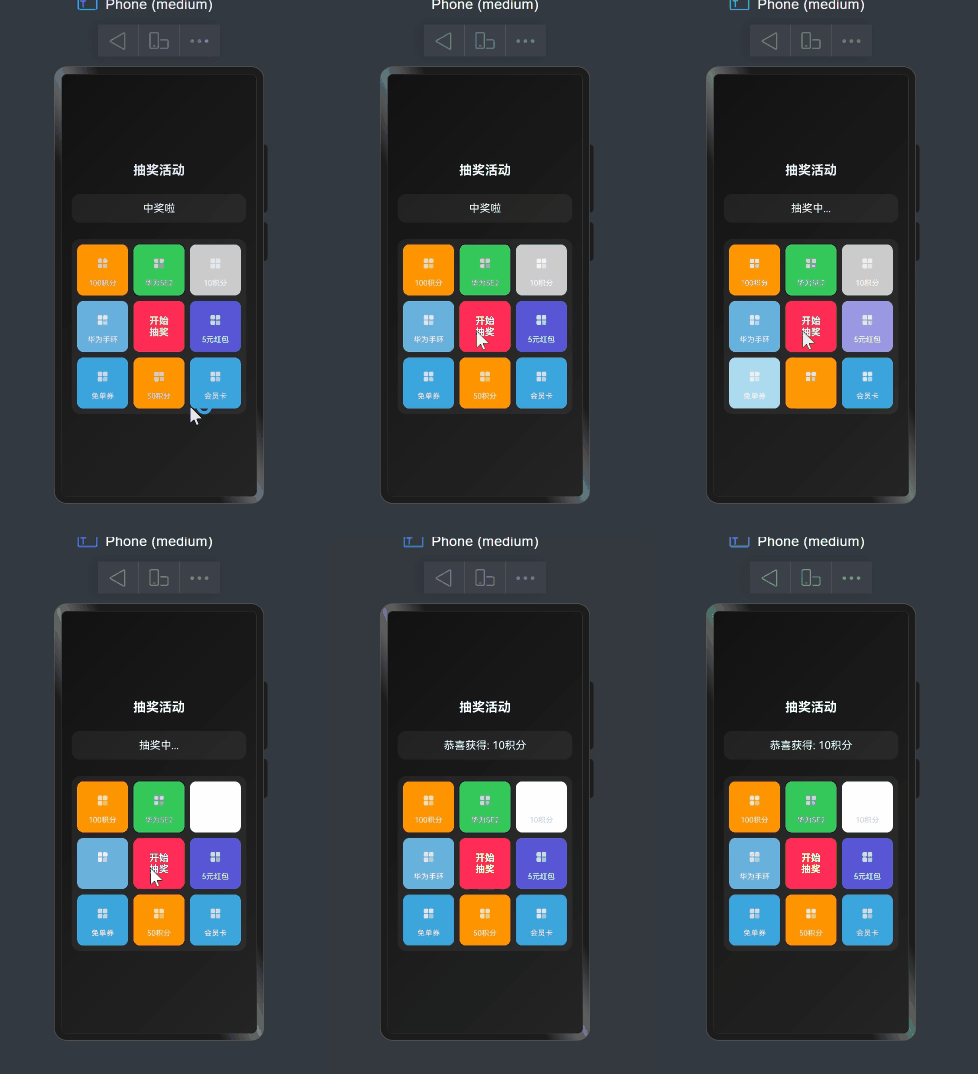
首先设计数据结构,将宫格配置为一个一维数组,并在 UI 中使用 Grid 组件渲染(中间格子放置“开始抽奖”按钮)。
其次设计急速状态核心算法,通过更新当前高亮的格子,增加速度变化,模拟减速效果,最终通过结果判断显示结果。
效果
使用场景
1、电商大转盘抽奖 2、年会抽奖应用 3、积分商城刮刮乐辅助活动 4、游戏内的幸运盘 等等活动场景。
完整代码
interface PrizeItem {
  id: number
  name: string
  icon: ResourceStr
  color: string
}

@Entry
@Component
struct Draw {

  @State prizes: PrizeItem[] = [
    {
      id: 1,
      name: '100积分',
      icon: $r('app.media.foreground'),
      color: '#FF9500'
    },
    {
      id: 2,
      name: '华为SE2',
      icon: $r('app.media.foreground'),
      color: '#34C759'
    },
    {
      id: 3,
      name: '10积分',
      icon: $r('app.media.foreground'),
      color: '#CCCCCC'
    },
    {
      id: 8,
      name: '华为手环',
      icon: $r('app.media.foreground'),
      color: '#68B0DE'
    },
    {
      id: 0,
      name: '开始\n抽奖',
      icon: $r('app.media.foreground'),
      color: '#FF2D55'
    },
    {
      id: 4,
      name: '5元红包',
      icon: $r('app.media.foreground'),
      color: '#5856D6'
    },
    {
      id: 7,
      name: '免单券',
      icon: $r('app.media.foreground'),
      color: '#39A5DC'
    },
    {
      id: 6,
      name: '50积分',
      icon: $r('app.media.foreground'),
      color: '#FF9500'
    },
    {
      id: 5,
      name: '会员卡',
      icon: $r('app.media.foreground'),
      color: '#39A5DC'
    },
  ]

  @State currentIndex: number = -1

  @State isRunning: boolean = false

  @State result: string = '中奖啦'

  private timer: number = 0

  private speed: number = 100
  private totalRounds: number = 30
  private currentRound: number = 0

  private targetIndex: number = 2

  // 开始抽奖
  startLottery() {
    if (this.isRunning) {
      return
    }

    this.isRunning = true
    this.result = '抽奖中...'
    this.currentRound = 0
    this.speed = 100

    // 启动动画
    this.runLottery()
  }

  // 运行抽奖动画
  runLottery() {
    if (this.timer) {
      clearTimeout(this.timer)
    }

    this.timer = setTimeout(() => {
      // 更新当前高亮的格子
      this.currentIndex = (this.currentIndex + 1) % 9
      if (this.currentIndex === 4) { // 跳过中间的"开始抽奖"按钮
        this.currentIndex = 5
      }

      this.currentRound++

      // 增加速度变化,模拟减速效果
      if (this.currentRound > this.totalRounds * 0.7) {
        this.speed += 10
      } else if (this.currentRound > this.totalRounds * 0.5) {
        this.speed += 5
      }

      // 结束条件判断
      if (this.currentRound >= this.totalRounds && this.currentIndex === this.targetIndex) {
        // 抽奖结束
        this.isRunning = false
        this.result = `恭喜获得: ${this.prizes[this.targetIndex].name}`
      } else {
        // 继续动画
        this.runLottery()
      }
    }, this.speed)
  }

  // 组件销毁时清除定时器
  aboutToDisappear() {
    if (this.timer) {
      clearTimeout(this.timer)
      this.timer = 0
    }
  }

  build() {
    Column({ space: 30 }) {
      // 标题
      Text('抽奖活动')
        .fontSize(24)
        .fontWeight(FontWeight.Bold)
        .fontColor(Color.White)

      Column() {
        Text(this.result)
          .fontSize(20)
          .fontColor(Color.White)
      }
      .width('90%')
      .padding(15)
      .backgroundColor('#0DFFFFFF')
      .borderRadius(16)

      Grid() {
        ForEach(this.prizes, (prize: PrizeItem, index) => {
          GridItem() {
            Column() {
              if (index === 4) {
                // 中间的开始按钮
                Button({ type: ButtonType.Capsule }) {
                  Text(prize.name)
                    .fontSize(18)
                    .fontWeight(FontWeight.Bold)
                    .textAlign(TextAlign.Center)
                    .fontColor(Color.White)
                }
                .width('90%')
                .height('90%')
                .backgroundColor(prize.color)
                .onClick(() => this.startLottery())
              } else {
                // 普通奖品格子
                Image(prize.icon)
                  .width(40)
                  .height(40)
                Text(prize.name)
                  .fontSize(14)
                  .fontColor(index === this.currentIndex && index !== 4 ? prize.color : Color.White)
                  .margin({ top: 8 })
                  .textAlign(TextAlign.Center)
              }
            }
            .width('100%')
            .height('100%')
            .justifyContent(FlexAlign.Center)
            .alignItems(HorizontalAlign.Center)
            .backgroundColor(index === this.currentIndex && index !== 4 ? Color.White : prize.color)
            .borderRadius(12)
            .padding(10)
            .animation({
              duration: 200,
              curve: Curve.EaseInOut
            })
          }
        })
      }
      .columnsTemplate('1fr 1fr 1fr')
      .rowsTemplate('1fr 1fr 1fr')
      .columnsGap(10)
      .rowsGap(10)
      .width('90%')
      .aspectRatio(1)
      .backgroundColor('#0DFFFFFF')
      .borderRadius(16)
      .padding(10)
    }
    .width('100%')
    .height('100%')
    .justifyContent(FlexAlign.Center)
    .backgroundColor(Color.Black)
    .linearGradient({
      angle: 135,
      colors: [
        ['#121212', 0],
        ['#242424', 1]
      ]
    })
    .expandSafeArea()
  }
}

在HarmonyOS Next中实现九宫格抽奖效果
实现方法
主要使用ArkTS声明式UI开发。通过Grid组件构建九宫格布局,每个格子使用Column或Image组件展示奖品。
关键技术
- 状态管理:使用
[@State](/user/State)控制高亮格子的索引 - 动画效果:结合
setInterval定时器实现格子轮流高亮的动画效果 - 抽奖逻辑:通过随机数生成最终奖品索引,并触发动画停止
实现步骤
- 使用Grid组件创建九宫格布局
- 每个格子使用Column或Image组件展示奖品内容
- 通过@State装饰器管理当前高亮格子的索引
- 使用setInterval定时器循环更新高亮索引,实现轮流高亮效果
- 抽奖时生成随机数确定最终奖品,停止定时器并显示结果
在HarmonyOS Next中实现九宫格抽奖效果,核心是结合ArkUI的网格布局和动画能力。以下是关键步骤和代码示例:
-
UI布局:使用
Grid组件构建3x3网格,每个格子用GridItem表示,可通过[@State](/user/State)装饰器管理奖品数据和高亮状态。[@State](/user/State) prizes: string[] = ['奖品1', '奖品2', ..., '奖品9'] [@State](/user/State) activeIndex: number = -1 // 当前高亮格子索引 build() { Grid() { ForEach(this.prizes, (item: string, index: number) => { GridItem() { Text(item) .backgroundColor(this.activeIndex === index ? Color.Red : Color.Gray) } }) } .columnsTemplate('1fr 1fr 1fr') } -
抽奖逻辑:通过随机数或后端接口确定中奖索引,使用
setInterval模拟格子高亮循环,最后停在目标位置。startLottery() { let count = 0 const interval = setInterval(() => { this.activeIndex = (this.activeIndex + 1) % 9 count++ if (count > 30) { // 循环30次后停止 clearInterval(interval) this.activeIndex = targetIndex // 最终中奖索引 } }, 100) } -
动画增强:可配合
animateTo实现平滑过渡效果,或添加缩放/透明度动画提升体验。
注意事项:
- 抽奖逻辑建议放入异步任务,避免阻塞UI。
- 若涉及网络请求,需在
aboutToAppear或按钮事件中处理。 - 可使用
@StorageLink持久化中奖记录。
此方案通过状态驱动UI更新,兼顾性能与可维护性。
