




HarmonyOS鸿蒙Next应用如何获取地理位置和地理名称?
HarmonyOS鸿蒙Next应用如何获取地理位置和地理名称? 一般移动应用开发,当我们从系统获取地理位置,一般会拿到地理坐标,是一串数字,并不是地理位置名称。例如 116.2305,33.568。
这些数字坐标会有不同的坐标系,国际上一般使用 wgs84 (WGS 84是全球定位系统(GPS)的基准坐标系统,广泛应用于全球定位和导航。它采用十进制度表示经度和纬度。)
但是国内一般会使用加密坐标系,GCJ-02 (中国采用的加密坐标系,也称为火星坐标系,对WGS 84坐标进行加密偏移。)
拿到坐标参数x,y后,我们需要通过逆地理编码,将坐标转化为地理描述。地里描述,包括国家、行政区划、街道、门牌号、地址描述等。
鸿蒙应用如何获取地理位置和地理名称?
更多关于HarmonyOS鸿蒙Next应用如何获取地理位置和地理名称?的实战教程也可以访问 https://www.itying.com/category-93-b0.html

一、结论
我们需要获取当前设备的地理位置,该行为需要权限配置,用户同意后,才能拿到当前定位的地址位置。
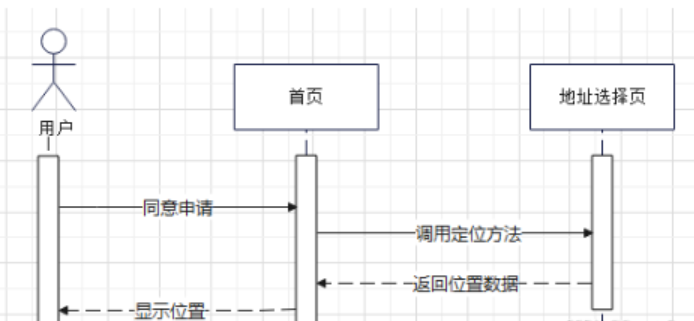
1. 配置定位权限
      {
        "name": "ohos.permission.APPROXIMATELY_LOCATION",
        "reason": "$string:reason",
        "usedScene": {
          "abilities": [
            "EntryAbility"
          ],
          "when": "always"
        }
      },
      {
        "name": "ohos.permission.LOCATION",
        "reason": "$string:reason",
        "usedScene": {
          "abilities": [
            "EntryAbility"
          ],
          "when": "always"
        }
      },
2.申请用户动态权限
    abilityAccessCtrl.createAtManager().requestPermissionsFromUser(getContext(), [
      'ohos.permission.LOCATION', 'ohos.permission.APPROXIMATELY_LOCATION']).then(() => {
        // 权限申请通过后, 获取当前位置

    });
3.导入位置服务。获取地理位置信息,进行逆地理编码获取当前位置。
import { geoLocationManager } from '@kit.LocationKit';

        private locationChange: (err: BusinessError, location: geoLocationManager.Location) => void = (err, location) => {

    if (location) {
      let reverseGeocodeRequest: geoLocationManager.ReverseGeoCodeRequest = {
        'latitude': location.latitude,
        'longitude': location.longitude,
        'maxItems': 1
      };

      // 逆地址编码转化,获取地址位置描述
      geoLocationManager.getAddressesFromLocation(reverseGeocodeRequest, (err, data) => {
        if (data) {
          hilog.info(0x00000, 'getAddressesFromLocation: data=', JSON.stringify(data));
          if (data[0].locality !== undefined) {
            let local = data[0].locality.replace(/"/g, '').slice(0, -1);
            let currentLocal = data[0].locality.replace(/"/g, '').slice(0, -1);
            console.log(this.TAG, " local: " + local + " currentLocal: " + currentLocal)
          }
        }
      });
    }
  };
二、DEMO源码示例:
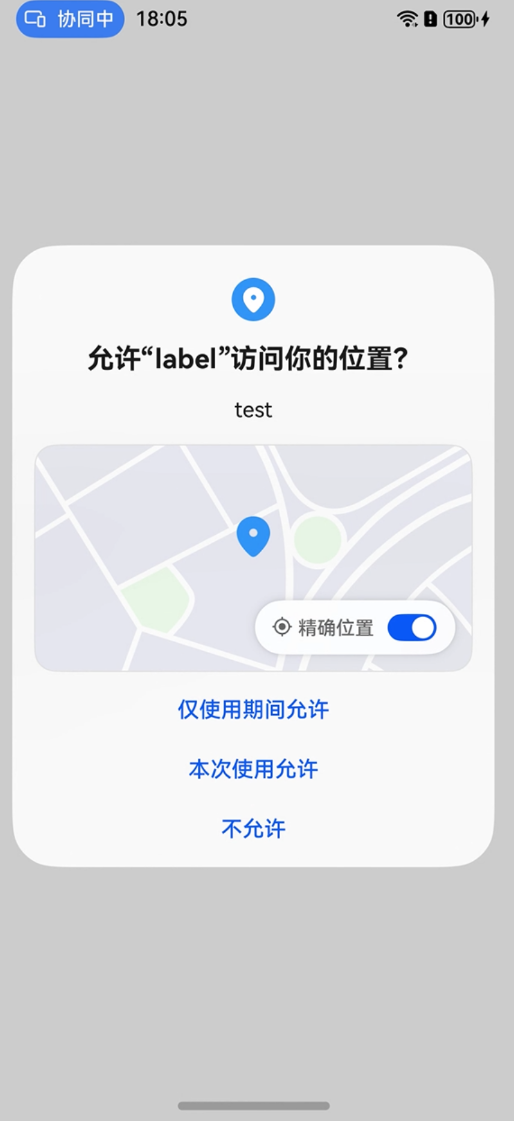
import { abilityAccessCtrl } from '@kit.AbilityKit';
import { geoLocationManager } from '@kit.LocationKit';
import { BusinessError } from '@kit.BasicServicesKit';
import { hilog } from '@kit.PerformanceAnalysisKit';

@Entry
@Component
struct LocationPage {

  private TAG: string = "LocationPage";

  /**
   * 定位回调
   */
  private locationChange: (err: BusinessError, location: geoLocationManager.Location) => void = (err, location) => {
    if (err) {
      //
      console.log(this.TAG, " locationChanger: err=: " + JSON.stringify(err))
    }
    if (location) {
      let reverseGeocodeRequest: geoLocationManager.ReverseGeoCodeRequest = {
        'latitude': location.latitude, // 表示纬度信息,正值表示北纬,负值表示南纬。取值范围为-90到90。仅支持WGS84坐标系。
        'longitude': location.longitude, // 表示经度信息,正值表示东经,负值表是西经。取值范围为-180到180。仅支持WGS84坐标系。
        // 指定返回位置信息的最大个数。取值范围为大于等于0,推荐该值小于10。默认值是1。
        'maxItems': 1
      };

      // 逆地址编码转化,获取地址位置描述
      geoLocationManager.getAddressesFromLocation(reverseGeocodeRequest, (err, data) => {
        if (data) {
          hilog.info(0x00000, 'getAddressesFromLocation: data=', JSON.stringify(data));
          if (data[0].locality !== undefined) {
            let local = data[0].locality.replace(/"/g, '').slice(0, -1);
            let currentLocal = data[0].locality.replace(/"/g, '').slice(0, -1);
            console.log(this.TAG, " local: " + local + " currentLocal: " + currentLocal)
          }
        }
      });
    }
  };

  onClickGetLocation = ()=>{
    // 请求用户同意权限
    abilityAccessCtrl.createAtManager().requestPermissionsFromUser(getContext(), [
      'ohos.permission.LOCATION', 'ohos.permission.APPROXIMATELY_LOCATION']).then(() => {
        // 获取当前位置
      geoLocationManager.getCurrentLocation(this.locationChange);

    });
  }


  build() {
    RelativeContainer() {
      Text("获取当前定位信息")
        .id('LocationPageHelloWorld')
        .fontSize(50)
        .fontWeight(FontWeight.Bold)
        .alignRules({
          center: { anchor: '__container__', align: VerticalAlign.Center },
          middle: { anchor: '__container__', align: HorizontalAlign.Center }
        })
        .onClick(this.onClickGetLocation)
    }
    .height('100%')
    .width('100%')
  }
}
一般获取定位,还需要配置网络权限,用于方便系统定位。
      {
        "name": "ohos.permission.INTERNET",
        "reason": "$string:reason",
        "usedScene": {
          "abilities": [
            "EntryAbility"
          ],
          "when": "always"
        }
      }
更多关于HarmonyOS鸿蒙Next应用如何获取地理位置和地理名称?的实战系列教程也可以访问 https://www.itying.com/category-93-b0.html

在HarmonyOS Next中,获取地理位置和地理名称主要使用@ohos.geoLocationManager和@ohos.geolocation模块。
-
获取地理位置(坐标): 使用
geoLocationManager.getCurrentLocation()方法。该方法返回一个Promise,解析后可获得包含latitude(纬度)和longitude(经度)等信息的Location对象。 -
获取地理名称(逆地理编码): 使用
geolocation.getAddressesFromLocation()方法。你需要将上一步获得的经纬度坐标作为参数传入。该方法返回一个Promise,解析后可获得包含placeName(地名)等详细地址信息的GeoAddress对象列表。
关键步骤:
- 在
module.json5中申请ohos.permission.LOCATION权限。 - 导入所需模块。
- 先获取坐标,再将其用于逆地理编码查询地名。

在HarmonyOS Next中,获取地理位置和地理名称(逆地理编码)主要通过@ohos.geoLocationManager和@ohos.geoLocationManager(或集成第三方地图服务SDK)来实现。以下是关键步骤和代码示例:
1. 获取设备地理位置坐标
首先,使用geoLocationManager模块获取设备的经纬度坐标(默认返回GCJ-02坐标系,符合国内要求)。
步骤:
- 申请位置权限:在
module.json5中配置ohos.permission.LOCATION权限。 - 使用
geoLocationManager.getCurrentLocation()获取实时位置。
示例代码:
import { geoLocationManager } from '@ohos.geoLocationManager';
import { BusinessError } from '@ohos.base';

// 请求位置权限(需提前在配置文件中声明)
let requestInfo: geoLocationManager.LocationRequest = {
  priority: geoLocationManager.LocationRequestPriority.FIRST_FIX, // 高精度
  scenario: geoLocationManager.LocationRequestScenario.NAVIGATION // 适用场景
};

try {
  geoLocationManager.getCurrentLocation(requestInfo, (err: BusinessError, location: geoLocationManager.Location) => {
    if (err) {
      console.error(`获取位置失败: ${JSON.stringify(err)}`);
      return;
    }
    console.info(`当前位置:纬度=${location.latitude}, 经度=${location.longitude}`);
    // 此处拿到的是GCJ-02坐标,可直接用于国内逆地理编码
  });
} catch (error) {
  console.error(`调用位置服务异常: ${JSON.stringify(error)}`);
}
2. 逆地理编码:坐标转地理名称
HarmonyOS Next当前未直接提供逆地理编码API,需通过以下两种方式实现:
方式一:调用第三方地图服务API(推荐)
使用高德、百度等地图服务的逆地理编码HTTP API,将坐标转换为地址描述。需在项目中集成网络请求能力(@ohos.net.http)。
示例(以高德地图API为例):
import { http } from '@ohos.net.http';
import { BusinessError } from '@ohos.base';

// 将GCJ-02坐标发送至高德逆地理编码API
async function reverseGeocode(lat: number, lon: number) {
  let key = '你的高德API密钥'; // 需申请高德Web服务Key
  let url = `https://restapi.amap.com/v3/geocode/regeo?key=${key}&location=${lon},${lat}`;

  let httpRequest = http.createHttp();
  try {
    let response = await httpRequest.request(url, { method: http.RequestMethod.GET });
    let result = JSON.parse(response.result as string);
    if (result.status === '1') {
      let address = result.regeocode.formatted_address; // 完整地址
      let province = result.regeocode.addressComponent.province; // 省份
      console.info(`地址信息:${address}, 省份:${province}`);
    }
  } catch (error) {
    console.error(`逆地理编码请求失败: ${JSON.stringify(error)}`);
  }
}

// 调用示例:传入坐标
reverseGeocode(39.9087, 116.3975);
方式二:使用HarmonyOS集成的地图服务SDK
若应用已集成华为地图服务(需单独申请),可直接调用其逆地理编码能力:
// 示例:华为地图SDK逆地理编码(需确认HarmonyOS Next版本支持情况)
import { HMSSite } from '@hms/core'; // 假设的华为地图服务模块

let request: ReverseGeocodeRequest = {
  location: { lat: 39.9087, lng: 116.3975 },
  language: 'zh' // 中文结果
};
HMSSite.reverseGeocode(request).then((result) => {
  console.info(`地址:${result.address}`);
});
注意事项
- 坐标系一致性:
geoLocationManager返回的坐标默认为GCJ-02,与国内地图服务匹配,无需转换。 - 网络依赖:逆地理编码需联网,建议处理网络异常场景。
- 权限管理:位置权限需动态申请,用户拒绝后需引导手动开启。
- 服务配额:第三方地图API通常有调用次数限制,商用需规划配额。
通过以上步骤,可实现在HarmonyOS Next应用中获取坐标并转换为地理名称。
