




HarmonyOS 鸿蒙Next中实现一个丰富的颜色工具库
HarmonyOS 鸿蒙Next中实现一个丰富的颜色工具库
如何使用鸿蒙实现一个RGB和十六进制颜色互转、以及常用的颜色工具库
3 回复

实际项目中使用到的一个工具类
/**
 * 颜色工具类
 * 提供颜色转换、混合、对比度计算等功能
 */

export interface RGB {
  r: number;
  g: number;
  b: number;
}

export interface HSL {
  h: number; // 0-360
  s: number; // 0-100
  l: number; // 0-100
}

export interface HSV {
  h: number; // 0-360
  s: number; // 0-100
  v: number; // 0-100
}

export class ColorUtils {
  /**
   * 将十六进制颜色转换为RGB
   * @param hex 十六进制颜色值,如 "#FF0000" 或 "FF0000"
   * @returns RGB对象
   */
  static hexToRgb(hex: string): RGB | null {
    const result = /^#?([a-f\d]{2})([a-f\d]{2})([a-f\d]{2})$/i.exec(hex);
    return result ? {
      r: parseInt(result[1], 16),
      g: parseInt(result[2], 16),
      b: parseInt(result[3], 16)
    } : null;
  }

  /**
   * 将RGB转换为十六进制颜色
   * @param r 红色值 0-255
   * @param g 绿色值 0-255
   * @param b 蓝色值 0-255
   * @returns 十六进制颜色字符串
   */
  static rgbToHex(r: number, g: number, b: number): string {
    return "#" + [r, g, b].map(x => {
      const hex = Math.round(x).toString(16);
      return hex.length === 1 ? "0" + hex : hex;
    }).join("");
  }

  /**
   * 将RGB转换为HSL
   * @param r 红色值 0-255
   * @param g 绿色值 0-255
   * @param b 蓝色值 0-255
   * @returns HSL对象
   */
  static rgbToHsl(r: number, g: number, b: number): HSL {
    r /= 255;
    g /= 255;
    b /= 255;

    const max = Math.max(r, g, b);
    const min = Math.min(r, g, b);
    let h = 0, s = 0;
    const l = (max + min) / 2;

    if (max !== min) {
      const d = max - min;
      s = l > 0.5 ? d / (2 - max - min) : d / (max + min);

      switch (max) {
        case r:
          h = ((g - b) / d + (g < b ? 6 : 0)) / 6;
          break;
        case g:
          h = ((b - r) / d + 2) / 6;
          break;
        case b:
          h = ((r - g) / d + 4) / 6;
          break;
      }
    }

    return {
      h: Math.round(h * 360),
      s: Math.round(s * 100),
      l: Math.round(l * 100)
    };
  }

  /**
   * 将HSL转换为RGB
   * @param h 色相 0-360
   * @param s 饱和度 0-100
   * @param l 亮度 0-100
   * @returns RGB对象
   */
  static hslToRgb(h: number, s: number, l: number): RGB {
    h /= 360;
    s /= 100;
    l /= 100;

    let r, g, b;

    if (s === 0) {
      r = g = b = l;
    } else {
      const hue2rgb = (p: number, q: number, t: number) => {
        if (t < 0) t += 1;
        if (t > 1) t -= 1;
        if (t < 1 / 6) return p + (q - p) * 6 * t;
        if (t < 1 / 2) return q;
        if (t < 2 / 3) return p + (q - p) * (2 / 3 - t) * 6;
        return p;
      };

      const q = l < 0.5 ? l * (1 + s) : l + s - l * s;
      const p = 2 * l - q;

      r = hue2rgb(p, q, h + 1 / 3);
      g = hue2rgb(p, q, h);
      b = hue2rgb(p, q, h - 1 / 3);
    }

    return {
      r: Math.round(r * 255),
      g: Math.round(g * 255),
      b: Math.round(b * 255)
    };
  }

  /**
   * 将RGB转换为HSV
   * @param r 红色值 0-255
   * @param g 绿色值 0-255
   * @param b 蓝色值 0-255
   * @returns HSV对象
   */
  static rgbToHsv(r: number, g: number, b: number): HSV {
    r /= 255;
    g /= 255;
    b /= 255;

    const max = Math.max(r, g, b);
    const min = Math.min(r, g, b);
    const d = max - min;
    let h = 0;

    if (d !== 0) {
      if (max === r) {
        h = ((g - b) / d + (g < b ? 6 : 0)) / 6;
      } else if (max === g) {
        h = ((b - r) / d + 2) / 6;
      } else {
        h = ((r - g) / d + 4) / 6;
      }
    }

    const s = max === 0 ? 0 : d / max;
    const v = max;

    return {
      h: Math.round(h * 360),
      s: Math.round(s * 100),
      v: Math.round(v * 100)
    };
  }

  /**
   * 将HSV转换为RGB
   * @param h 色相 0-360
   * @param s 饱和度 0-100
   * @param v 明度 0-100
   * @returns RGB对象
   */
  static hsvToRgb(h: number, s: number, v: number): RGB {
    h /= 360;
    s /= 100;
    v /= 100;

    const i = Math.floor(h * 6);
    const f = h * 6 - i;
    const p = v * (1 - s);
    const q = v * (1 - f * s);
    const t = v * (1 - (1 - f) * s);

    let r = 0, g = 0, b = 0;

    switch (i % 6) {
      case 0: r = v; g = t; b = p; break;
      case 1: r = q; g = v; b = p; break;
      case 2: r = p; g = v; b = t; break;
      case 3: r = p; g = q; b = v; break;
      case 4: r = t; g = p; b = v; break;
      case 5: r = v; g = p; b = q; break;
    }

    return {
      r: Math.round(r * 255),
      g: Math.round(g * 255),
      b: Math.round(b * 255)
    };
  }

  /**
   * 混合两种颜色
   * @param color1 第一种颜色(十六进制)
   * @param color2 第二种颜色(十六进制)
   * @param ratio 混合比例 0-1,0表示完全color1,1表示完全color2
   * @returns 混合后的十六进制颜色
   */
  static mixColors(color1: string, color2: string, ratio: number): string {
    const rgb1 = this.hexToRgb(color1);
    const rgb2 = this.hexToRgb(color2);

    if (!rgb1 || !rgb2) {
      return color1;
    }

    const r = Math.round(rgb1.r * (1 - ratio) + rgb2.r * ratio);
    const g = Math.round(rgb1.g * (1 - ratio) + rgb2.g * ratio);
    const b = Math.round(rgb1.b * (1 - ratio) + rgb2.b * ratio);

    return this.rgbToHex(r, g, b);
  }

  /**
   * 调整颜色亮度
   * @param hex 十六进制颜色
   * @param percent 亮度调整百分比,-100到100
   * @returns 调整后的十六进制颜色
   */
  static lighten(hex: string, percent: number): string {
    const rgb = this.hexToRgb(hex);
    if (!rgb) return hex;

    const hsl = this.rgbToHsl(rgb.r, rgb.g, rgb.b);
    hsl.l = Math.max(0, Math.min(100, hsl.l + percent));

    const newRgb = this.hslToRgb(hsl.h, hsl.s, hsl.l);
    return this.rgbToHex(newRgb.r, newRgb.g, newRgb.b);
  }

  /**
   * 调整颜色暗度
   * @param hex 十六进制颜色
   * @param percent 暗度调整百分比,-100到100
   * @returns 调整后的十六进制颜色
   */
  static darken(hex: string, percent: number): string {
    return this.lighten(hex, -percent);
  }

  /**
   * 计算两种颜色的对比度
   * @param color1 第一种颜色(十六进制)
   * @param color2 第二种颜色(十六进制)
   * @returns 对比度值(1-21,WCAG标准)
   */
  static getContrast(color1: string, color2: string): number {
    const rgb1 = this.hexToRgb(color1);
    const rgb2 = this.hexToRgb(color2);

    if (!rgb1 || !rgb2) return 1;

    const getLuminance = (r: number, g: number, b: number): number => {
      const [rs, gs, bs] = [r, g, b].map(val => {
        val = val / 255;
        return val <= 0.03928 ? val / 12.92 : Math.pow((val + 0.055) / 1.055, 2.4);
      });
      return 0.2126 * rs + 0.7152 * gs + 0.0722 * bs;
    };

    const l1 = getLuminance(rgb1.r, rgb1.g, rgb1.b);
    const l2 = getLuminance(rgb2.r, rgb2.g, rgb2.b);

    const lighter = Math.max(l1, l2);
    const darker = Math.min(l1, l2);

    return (lighter + 0.05) / (darker + 0.05);
  }

  /**
   * 判断颜色是否为深色
   * @param hex 十六进制颜色
   * @returns true表示深色,false表示浅色
   */
  static isDark(hex: string): boolean {
    const rgb = this.hexToRgb(hex);
    if (!rgb) return false;

    // 使用相对亮度公式
    const luminance = (0.299 * rgb.r + 0.587 * rgb.g + 0.114 * rgb.b) / 255;
    return luminance < 0.5;
  }

  /**
   * 获取颜色的互补色
   * @param hex 十六进制颜色
   * @returns 互补色(十六进制)
   */
  static getComplementary(hex: string): string {
    const rgb = this.hexToRgb(hex);
    if (!rgb) return hex;

    return this.rgbToHex(255 - rgb.r, 255 - rgb.g, 255 - rgb.b);
  }

  /**
   * 生成颜色渐变数组
   * @param startColor 起始颜色(十六进制)
   * @param endColor 结束颜色(十六进制)
   * @param steps 渐变步数
   * @returns 颜色数组
   */
  static generateGradient(startColor: string, endColor: string, steps: number): string[] {
    const colors: string[] = [];
    for (let i = 0; i < steps; i++) {
      const ratio = i / (steps - 1);
      colors.push(this.mixColors(startColor, endColor, ratio));
    }
    return colors;
  }
}
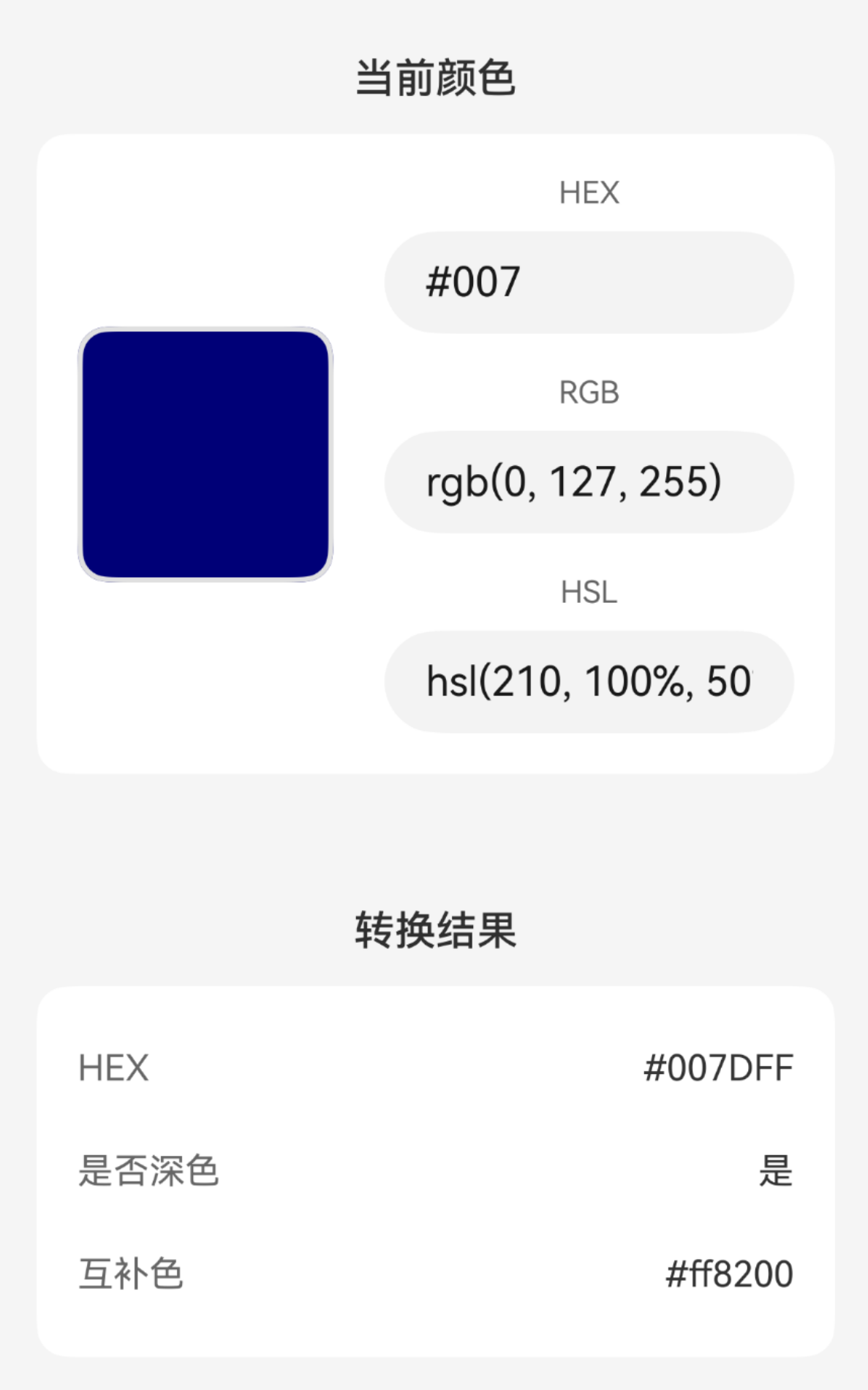
效果
更多关于HarmonyOS 鸿蒙Next中实现一个丰富的颜色工具库的实战系列教程也可以访问 https://www.itying.com/category-93-b0.html
鸿蒙Next的颜色工具库基于ArkTS/TypeScript开发,提供颜色转换、调色板生成、对比度计算等功能。核心使用Color类封装RGBA/HSLA/HEX等格式转换,支持线性渐变插值。通过ColorUtils工具类实现十六进制与十进制互转、亮度调整、色彩混合等操作。系统资源管理使用ResourceManager访问颜色资源,支持动态主题适配。

在HarmonyOS Next中实现颜色工具库,推荐使用ArkTS进行开发。以下是核心实现方案:
1. 基础颜色转换类
// ColorUtils.ets
export class ColorConverter {
  // RGB转十六进制
  static rgbToHex(r: number, g: number, b: number): string {
    return `#${((1 << 24) + (r << 16) + (g << 8) + b).toString(16).slice(1)}`;
  }

  // 十六进制转RGB
  static hexToRgb(hex: string): number[] {
    const result = /^#?([a-f\d]{2})([a-f\d]{2})([a-f\d]{2})$/i.exec(hex);
    return result ? [
      parseInt(result[1], 16),
      parseInt(result[2], 16),
      parseInt(result[3], 16)
    ] : [0, 0, 0];
  }

  // 支持透明度
  static rgbaToHex(r: number, g: number, b: number, a: number): string {
    const alpha = Math.round(a * 255);
    return `#${((1 << 24) + (r << 16) + (g << 8) + b).toString(16).slice(1)}${alpha.toString(16).padStart(2, '0')}`;
  }
}
2. 颜色操作工具
export class ColorOperations {
  // 调整亮度
  static adjustBrightness(hex: string, percent: number): string {
    const rgb = ColorConverter.hexToRgb(hex);
    const factor = 1 + percent / 100;

    return ColorConverter.rgbToHex(
      Math.min(255, Math.max(0, Math.round(rgb[0] * factor))),
      Math.min(255, Math.max(0, Math.round(rgb[1] * factor))),
      Math.min(255, Math.max(0, Math.round(rgb[2] * factor)))
    );
  }

  // 计算对比色
  static getContrastColor(hex: string): string {
    const rgb = ColorConverter.hexToRgb(hex);
    const luminance = (0.299 * rgb[0] + 0.587 * rgb[1] + 0.114 * rgb[2]) / 255;
    return luminance > 0.5 ? '#000000' : '#FFFFFF';
  }
}
3. 预定义颜色常量
export class ColorPalette {
  static readonly PRIMARY = '#007DFF';
  static readonly SUCCESS = '#00C853';
  static readonly WARNING = '#FF9800';
  static readonly ERROR = '#FF3B30';
  static readonly NEUTRAL = '#8E8E93';

  // Material Design 颜色系统
  static readonly MATERIAL_RED = '#F44336';
  static readonly MATERIAL_BLUE = '#2196F3';
  static readonly MATERIAL_GREEN = '#4CAF50';
  // ... 更多预定义颜色
}
4. 渐变生成器
export class GradientGenerator {
  // 生成线性渐变字符串
  static linearGradient(colors: string[], angle: number = 90): string {
    const colorStops = colors.map((color, index) => {
      const percentage = Math.round((index / (colors.length - 1)) * 100);
      return `${color} ${percentage}%`;
    }).join(', ');

    return `linear-gradient(${angle}deg, ${colorStops})`;
  }
}
5. 使用示例
// 在组件中使用
import { ColorConverter, ColorOperations, ColorPalette } from './ColorUtils';

@Entry
@Component
struct ColorExample {
  private hexColor: string = '#FF5733';

  build() {
    Column() {
      // 颜色转换
      Text(`RGB值: ${ColorConverter.hexToRgb(this.hexColor)}`)

      // 颜色操作
      Text(`加深后: ${ColorOperations.adjustBrightness(this.hexColor, -20)}`)

      // 使用预定义颜色
      Text('成功提示')
        .fontColor(ColorPalette.SUCCESS)
    }
  }
}
6. 扩展建议
- 添加HSL/HSV颜色空间转换
- 实现颜色相似度计算
- 添加主题色提取功能
- 支持颜色盲模拟
这个工具库完全基于HarmonyOS Next的ArkTS开发,可以直接集成到项目中。所有方法都是静态的,无需实例化即可使用,符合HarmonyOS的开发规范。
