




HarmonyOS鸿蒙Next中实现类似“拖拽式九宫格”手势解锁功能
HarmonyOS鸿蒙Next中实现类似“拖拽式九宫格”手势解锁功能 结合鸿蒙OS的多模态输入子系统来实现类似“拖拽式九宫格”手势解锁功能?

实现思路
1、使用 Matrix4 和 Vector2(或简单的坐标数组)来构建9个节点的网格布局。使用 Set 集合来存储当前选中的节点索引,确保路径唯一性。
2、组合使用 TapGesture 和 PanGesture。TapGesture 用于处理单个点的点击。PanGesture 用于处理手指在节点间的滑动,通过计算手指坐标与节点圆心的距离来判断是否“滑入”某个节点。
3、利用鸿蒙的 Canvas 绘制连接线。为了避免频繁的内存分配,Canvas对象和Paint对象将在 aboutToAppear 中初始化。
使用场景
在一些查看私密相册、日记本或锁定核心功能这种场景下,使用这种九宫格解锁是很常见的。
实现效果
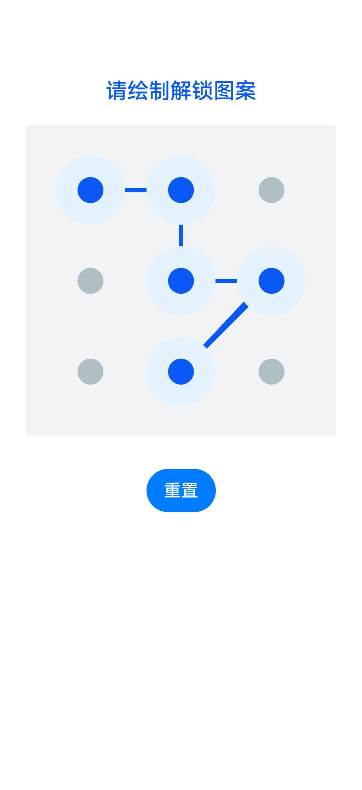
完整代码
import { vibrator } from '@kit.SensorServiceKit';
import { hilog } from '@kit.PerformanceAnalysisKit';

// 定义节点数据模型
class PointNode {
  x: number;
  y: number;
  index: number;
  isSelected: boolean = false;

  constructor(x: number, y: number, index: number) {
    this.x = x;
    this.y = y;
    this.index = index;
  }
}

@Entry
@Component
struct PatternLockPage {
  // 配置参数
  @State private gridSize: number = 3;
  @State private nodeRadius: number = 20; // 节点半径
  @State private selectedNodes: Set<number> = new Set<number>(); // 存储选中的索引
  @State private currentFingerX: number = 0;
  @State private currentFingerY: number = 0;
  @State private isGestureActive: boolean = false;
  @State private statusColor: string = '#0A59F7'; // 默认蓝色
  @State private statusMessage: string = '请绘制解锁图案';

  private canvasWidth: number = 0;
  private canvasHeight: number = 0;
  private points: PointNode[] = [];
  private settings: RenderingContextSettings = new RenderingContextSettings(true);
  private context: CanvasRenderingContext2D = new CanvasRenderingContext2D(this.settings);
  private correctPassword: string = "0,1,2,5,8"; // 示例密码
  private isError: boolean = false;

  aboutToAppear(): void {
    // 初始化点位置,将在onAreaChange中计算具体坐标
  }

  /**
   * 计算九宫格节点坐标
   */
  private calculatePoints(width: number, height: number) {
    this.points = [];
    const padding = 60;
    const availableWidth = width - padding * 2;
    const gap = availableWidth / (this.gridSize - 1);

    for (let i = 0; i < this.gridSize; i++) {
      for (let j = 0; j < this.gridSize; j++) {
        const x = padding + j * gap;
        const y = padding + i * gap;
        this.points.push(new PointNode(x, y, i * this.gridSize + j));
      }
    }
  }

  /**
   * 触发震动反馈
   */
  private triggerVibrate() {
    try {
      vibrator.startVibration({
        type: 'time',
        duration: 15 // 极短震动,模仿机械按键
      }, {
        id: 0,
        usage: 'touch'
      });
    } catch (err) {
      hilog.error(0x0000, 'PatternLock', `Vibrate error: ${JSON.stringify(err)}`);
    }
  }

  build() {
    Column() {
      Text(this.statusMessage)
        .fontSize(20)
        .fontColor(this.statusColor)
        .margin({ top: 40, bottom: 20 })
        .fontWeight(FontWeight.Medium)

      // 绘制区域
      Stack({ alignContent: Alignment.Center }) {
        Canvas(this.context)
          .width('100%')
          .aspectRatio(1) // 保持正方形
          .backgroundColor('#F1F3F5')
          .onReady(() => {
            // Canvas准备就绪,初始绘制
            this.drawLock();
          })
          .onAreaChange((oldValue: Area, newValue: Area) => {
            // 确保只计算一次
            if (this.canvasWidth === 0 && newValue.width as number > 0) {
              this.canvasWidth = newValue.width as number;
              this.canvasHeight = newValue.height as number;
              this.calculatePoints(this.canvasWidth, this.canvasHeight);
              this.drawLock();
            }
          })
          .gesture(
            // 组合手势:PanGesture 用于滑动手势
            PanGesture({ direction: PanDirection.All })
              .onActionStart((event: GestureEvent) => {
                this.isGestureActive = true;
                this.isError = false;
                this.statusColor = '#0A59F7';
                this.statusMessage = '请绘制解锁图案';
                this.selectedNodes.clear();
                this.checkHit(event.fingerList[0].localX, event.fingerList[0].localY);
              })
              .onActionUpdate((event: GestureEvent) => {
                this.currentFingerX = event.fingerList[0].localX;
                this.currentFingerY = event.fingerList[0].localY;
                this.checkHit(this.currentFingerX, this.currentFingerY);
                this.drawLock(); // 实时重绘
              })
              .onActionEnd(() => {
                this.isGestureActive = false;
                this.verifyPassword();
              })
          )
      }
      .width('80%')
      .borderRadius(20)

      Button('重置')
        .margin({ top: 30 })
        .onClick(() => {
          this.reset();
        })
    }
    .width('100%')
    .height('100%')
    .justifyContent(FlexAlign.Start)
  }

  /**
   * 检测手指是否触碰到了节点
   */
  private checkHit(x: number, y: number) {
    // 扩大触摸判定范围,提升手感
    const hitRadius = this.nodeRadius * 2.5;

    this.points.forEach(point => {
      const dx = x - point.x;
      const dy = y - point.y;
      // 使用欧几里得距离平方比较,避免开方运算,提升微小性能
      if (dx * dx + dy * dy < hitRadius * hitRadius) {
        if (!this.selectedNodes.has(point.index)) {
          // 检查中间节点(例如从0直接滑到2,中间经过1,需自动补全1)
          this.checkIntermediatePoint(point.index);

          this.selectedNodes.add(point.index);
          this.triggerVibrate(); // 触发震动
        }
      }
    });
  }

  /**
   * 补全中间节点逻辑(确保连线是连续的)
   */
  private checkIntermediatePoint(currentIndex: number) {
    if (this.selectedNodes.size === 0) return;

    const lastIndex = Array.from(this.selectedNodes).pop();
    if (!lastIndex && lastIndex !== 0) return;

    // 计算行列索引
    const lastRow = Math.floor(lastIndex / 3);
    const lastCol = lastIndex % 3;
    const currRow = Math.floor(currentIndex / 3);
    const currCol = currentIndex % 3;

    // 如果在同一行、同一列或对角线
    if (lastRow === currRow || lastCol === currCol || Math.abs(lastRow - currRow) === Math.abs(lastCol - currCol)) {
      const midRow = (lastRow + currRow) / 2;
      const midCol = (lastCol + currCol) / 2;

      // 如果中间是整数,说明存在中间点
      if (Number.isInteger(midRow) && Number.isInteger(midCol)) {
        const midIndex = midRow * 3 + midCol;
        if (!this.selectedNodes.has(midIndex)) {
          this.selectedNodes.add(midIndex);
          // 注意:这里不触发震动,避免连续震动感奇怪,只触发目标点震动
        }
      }
    }
  }

  /**
   * 验证密码
   */
  private verifyPassword() {
    const result = Array.from(this.selectedNodes).join(',');
    if (result === this.correctPassword) {
      this.statusColor = '#00C853'; // 成功绿
      this.statusMessage = '解锁成功';
      // 可以在此处执行跳转逻辑
    } else {
      this.isError = true;
      this.statusColor = '#D50000'; // 失败红
      this.statusMessage = '图案错误,请重试';
      this.triggerVibrate(); // 错误震动
      this.drawLock();

      // 延迟重置
      setTimeout(() => {
        this.reset();
      }, 1000);
    }
  }

  private reset() {
    this.selectedNodes.clear();
    this.isError = false;
    this.statusColor = '#0A59F7';
    this.statusMessage = '请绘制解锁图案';
    this.drawLock();
  }

  /**
   * 核心绘制逻辑
   */
  private drawLock() {
    if (!this.context || this.points.length === 0) return;

    // 清空画布
    this.context.clearRect(0, 0, this.canvasWidth, this.canvasHeight);

    // 绘制连线
    if (this.selectedNodes.size > 0) {
      this.context.beginPath();
      const sortedNodes = this.points.filter(p => this.selectedNodes.has(p.index));

      // 设置线条样式
      this.context.lineWidth = 4;
      this.context.strokeStyle = this.isError ? '#D50000' : '#0A59F7';
      this.context.lineCap = 'round';
      this.context.lineJoin = 'round';

      // 移动到起点
      this.context.moveTo(sortedNodes[0].x, sortedNodes[0].y);

      // 连接所有已选中的点
      for (let i = 1; i < sortedNodes.length; i++) {
        this.context.lineTo(sortedNodes[i].x, sortedNodes[i].y);
      }

      // 如果正在手势中,连接到当前手指位置
      if (this.isGestureActive) {
        this.context.lineTo(this.currentFingerX, this.currentFingerY);
      }

      this.context.stroke();
    }

    // 绘制节点
    this.points.forEach(point => {
      const isSelected = this.selectedNodes.has(point.index);

      // 绘制外圈(选中时显示)
      if (isSelected) {
        this.context.beginPath();
        this.context.fillStyle = this.isError ? '#FFEBEE' : '#E3F2FD'; // 浅色背景
        this.context.arc(point.x, point.y, this.nodeRadius * 1.6, 0, 2 * Math.PI);
        this.context.fill();
      }

      // 绘制中心圆点
      this.context.beginPath();
      this.context.fillStyle = isSelected ? (this.isError ? '#D50000' : '#0A59F7') : '#B0BEC5';
      this.context.arc(point.x, point.y, this.nodeRadius * 0.6, 0, 2 * Math.PI);
      this.context.fill();
    });
  }
}
更多关于HarmonyOS鸿蒙Next中实现类似“拖拽式九宫格”手势解锁功能的实战系列教程也可以访问 https://www.itying.com/category-93-b0.html

在HarmonyOS Next中实现拖拽式九宫格手势解锁,需使用ArkUI框架。通过Canvas组件绘制九宫格节点和连接线,结合Gesture手势事件(如PanGesture)监听触摸轨迹。利用TouchEvent获取坐标,判断节点选中状态并更新UI。路径数据存储于数组,用于验证解锁图案。

在HarmonyOS Next中实现“拖拽式九宫格”手势解锁功能,可以结合多模态输入子系统与图形绘制能力来完成。以下是关键实现思路:
-
界面绘制:使用
Canvas组件绘制九宫格圆点及连线路径。通过GraphicsContext的strokeLine方法实时绘制手指移动轨迹。 -
手势识别:利用
@ohos.multimodalInput.pointer模块的指针事件监听:
// 注册指针事件
window.getLastWindow(this.context).then(win => {
  win.on('pointerDown', (event) => {});
  win.on('pointerMove', (event) => {});
  win.on('pointerUp', (event) => {});
});
-
坐标映射:将指针事件的屏幕坐标转换为九宫格索引。通过计算触摸点与每个圆心的距离,判断是否触发选中状态。
-
状态管理:
- 记录已选中的圆点索引序列
- 实时验证手势路径有效性(如最小点数、避免重复点)
- 使用
@State装饰器驱动UI刷新
-
安全增强:
- 结合
@ohos.userIAM.userAuth进行生物特征验证 - 使用
@ohos.security.huks加密存储手势模板
- 结合
-
动效实现:通过
animateTo添加圆点选中放大、连线绘制的平滑动画,提升交互体验。
注意事项:
- 需在
module.json5中申请ohos.permission.USE_USER_ID权限 - 建议使用
@ohos.security.secureRandom生成随机校验码 - 多设备协同场景需通过
@ohos.distributedDataManager同步手势配置
这种实现方式既利用了鸿蒙的原生手势能力,又保证了数据安全性和跨设备一致性。
