




HarmonyOS鸿蒙Next中应用如何实现五子棋小游戏?
HarmonyOS鸿蒙Next中应用如何实现五子棋小游戏? 应用如何实现五子棋小游戏?
4 回复


引言
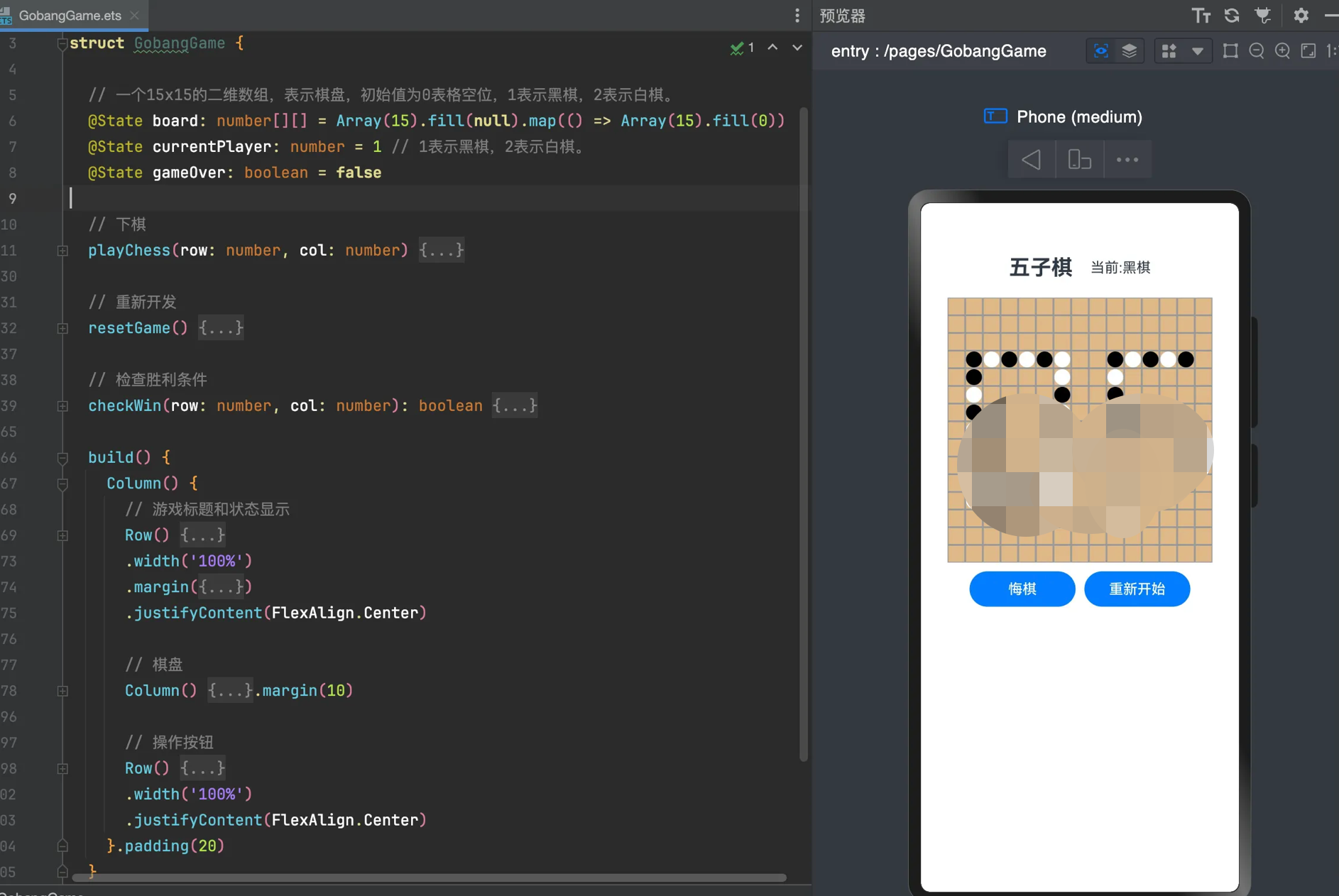
五子棋是一款经典的策略游戏,规则简单但乐趣无穷。本文将带你使用 HarmonyOS 的 ArkUI 框架,以组件化的思想快速实现一个双人对战的五子棋游戏。我们将逻辑与 UI 分离,打造一个结构清晰、易于维护的应用。
1. 棋盘
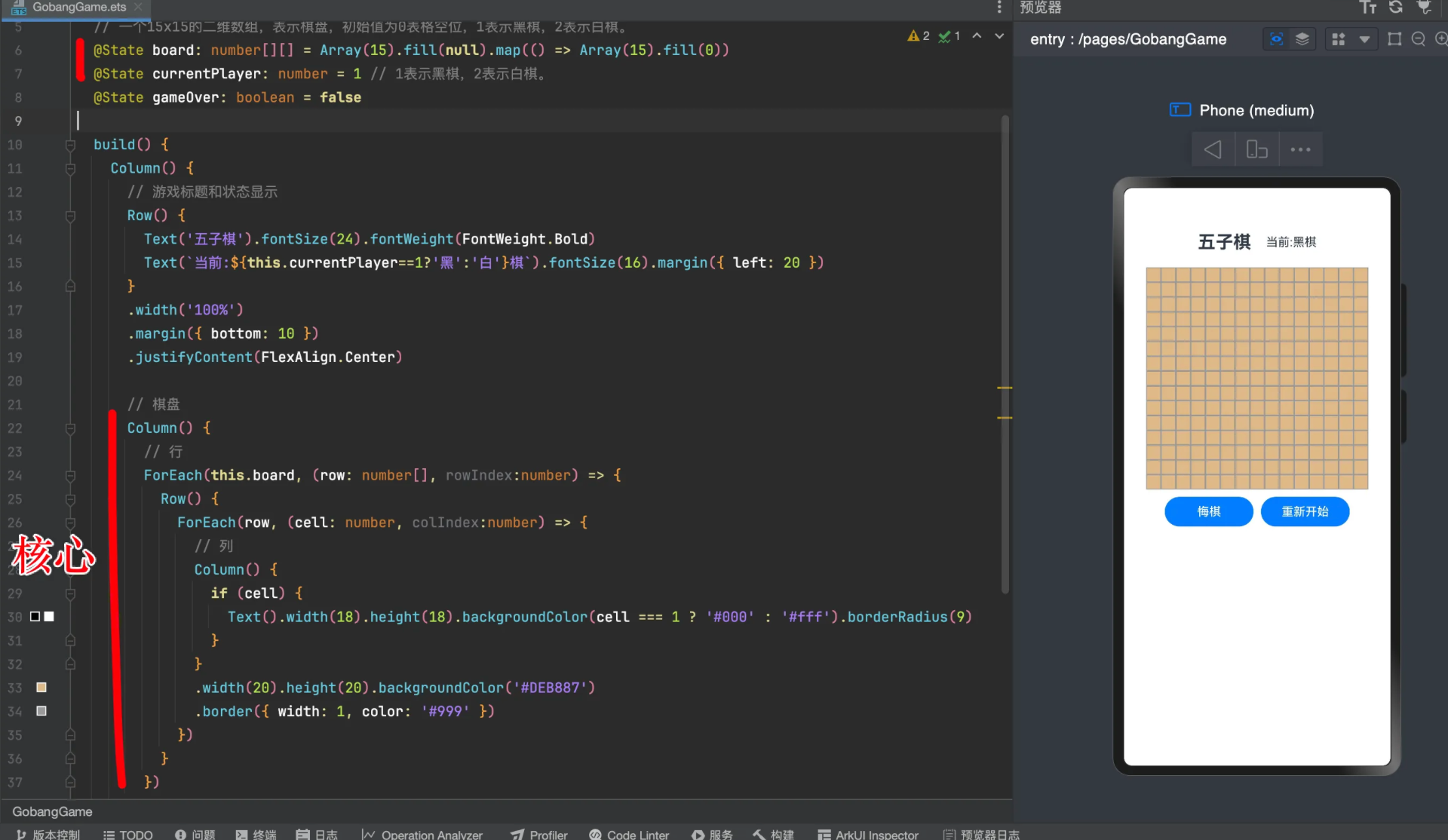
ets/pages/gobang/01-棋盘.ets
@Entry
@Component
struct Study {

  // 一个15x15的二维数组,表示棋盘,初始值为0表格空位,1表示黑棋,2表示白棋。
  @State board: number[][] = Array(15).fill(null).map(() => Array(15).fill(0))
  @State currentPlayer: number = 1 // 1表示黑棋,2表示白棋。
  @State gameOver: boolean = false

  build() {
    Column() {
      // 游戏标题和状态显示
      Row() {
        Text('五子棋').fontSize(24).fontWeight(FontWeight.Bold)
        Text(`当前:${this.currentPlayer==1?'黑':'白'}棋`).fontSize(16).margin({ left: 20 })
      }
      .width('100%')
      .margin({ bottom: 10 })
      .justifyContent(FlexAlign.Center)

      // 棋盘
      Column() {
        // 行
        ForEach(this.board, (row: number[], rowIndex:number) => {
          Row() {
            ForEach(row, (cell: number, colIndex:number) => {
              // 列
              Column() {
                if (cell) {
                  Text().width(18).height(18).backgroundColor(cell === 1 ? '#000' : '#fff').borderRadius(9)
                }
              }
              .width(20).height(20).backgroundColor('#DEB887')
              .border({ width: 1, color: '#999' })
            })
          }
        })
      }.margin(10)

      // 操作按钮
      Row() {
        Button('悔棋').width(120)
        Button('重新开始').width(120).margin({ left: 10 })
      }
      .width('100%')
      .justifyContent(FlexAlign.Center)
    }.padding(20)
  }
}
2. 棋子
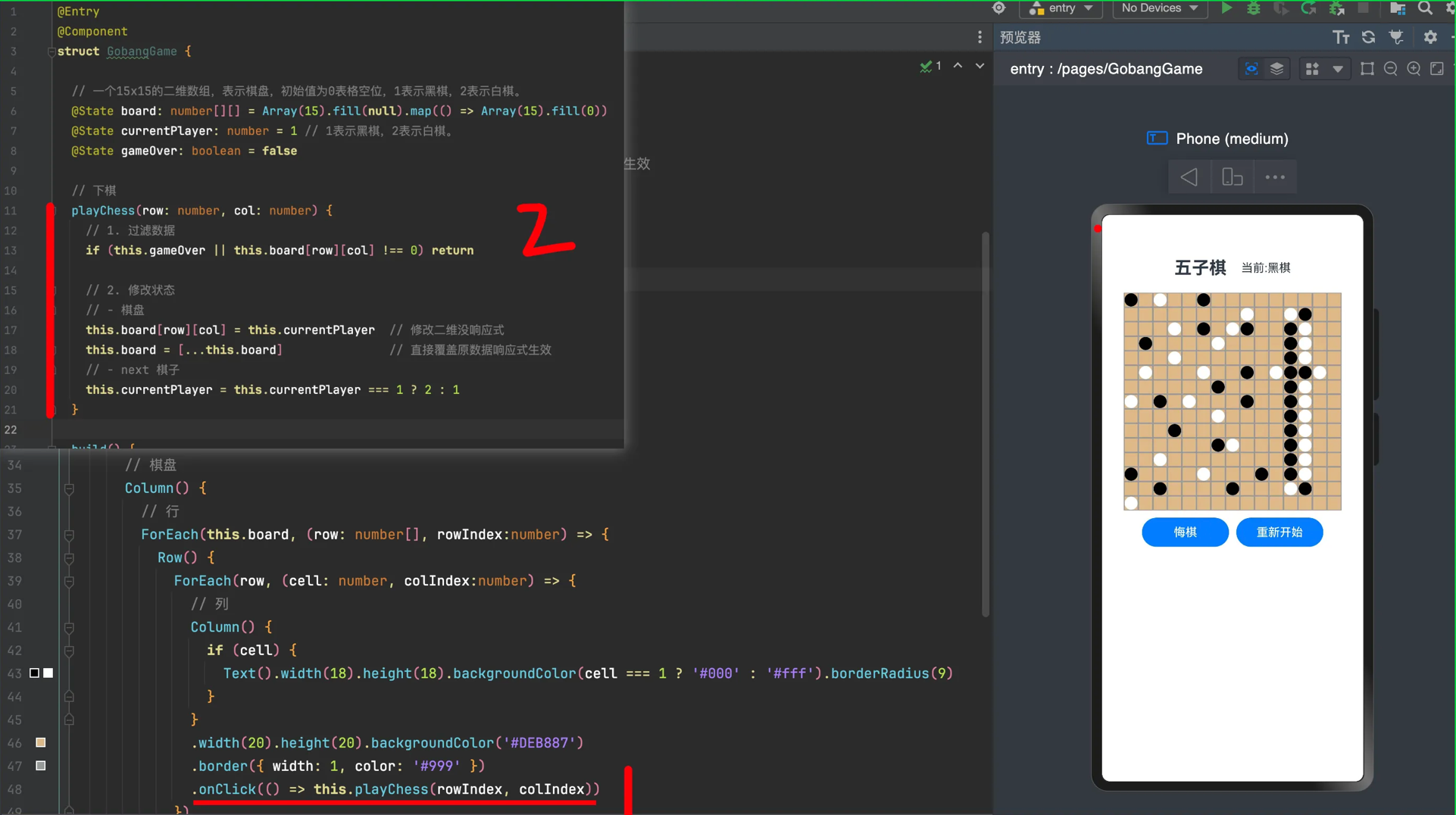
ets/pages/gobang/02-棋子.ets
@Entry
@Component
struct Study {

  // 一个15x15的二维数组,表示棋盘,初始值为0表格空位,1表示黑棋,2表示白棋。
  @State board: number[][] = Array(15).fill(null).map(() => Array(15).fill(0))
  @State currentPlayer: number = 1 // 1表示黑棋,2表示白棋。
  @State gameOver: boolean = false

  // 下棋
  playChess(row: number, col: number) {
    // 1. 过滤数据
    if (this.gameOver || this.board[row][col] !== 0) return

    // 2. 修改状态
    // - 棋盘
    this.board[row][col] = this.currentPlayer  // 修改二维没响应式
    this.board = [...this.board]               // 直接覆盖原数据响应式生效
    // - next 棋子
    this.currentPlayer = this.currentPlayer === 1 ? 2 : 1
  }

  build() {
    Column() {
      // 游戏标题和状态显示
      Row() {
        Text('五子棋').fontSize(24).fontWeight(FontWeight.Bold)
        Text(`当前:${this.currentPlayer==1?'黑':'白'}棋`).fontSize(16).margin({ left: 20 })
      }
      .width('100%')
        .margin({ bottom: 10 })
        .justifyContent(FlexAlign.Center)

      // 棋盘
      Column() {
        // 行
        ForEach(this.board, (row: number[], rowIndex:number) => {
          Row() {
            ForEach(row, (cell: number, colIndex:number) => {
              // 列
              Column() {
                if (cell) {
                  Text().width(18).height(18).backgroundColor(cell === 1 ? '#000' : '#fff').borderRadius(9)
                }
              }
              .width(20).height(20).backgroundColor('#DEB887')
                    .border({ width: 1, color: '#999' })
                    .onClick(() => this.playChess(rowIndex, colIndex))
                    })
          }
        })
      }.margin(10)

      // 操作按钮
      Row() {
        Button('悔棋').width(120)
        Button('重新开始').width(120).margin({ left: 10 })
      }
      .width('100%')
        .justifyContent(FlexAlign.Center)
    }.padding(20)
  }
}
3. 检查胜负
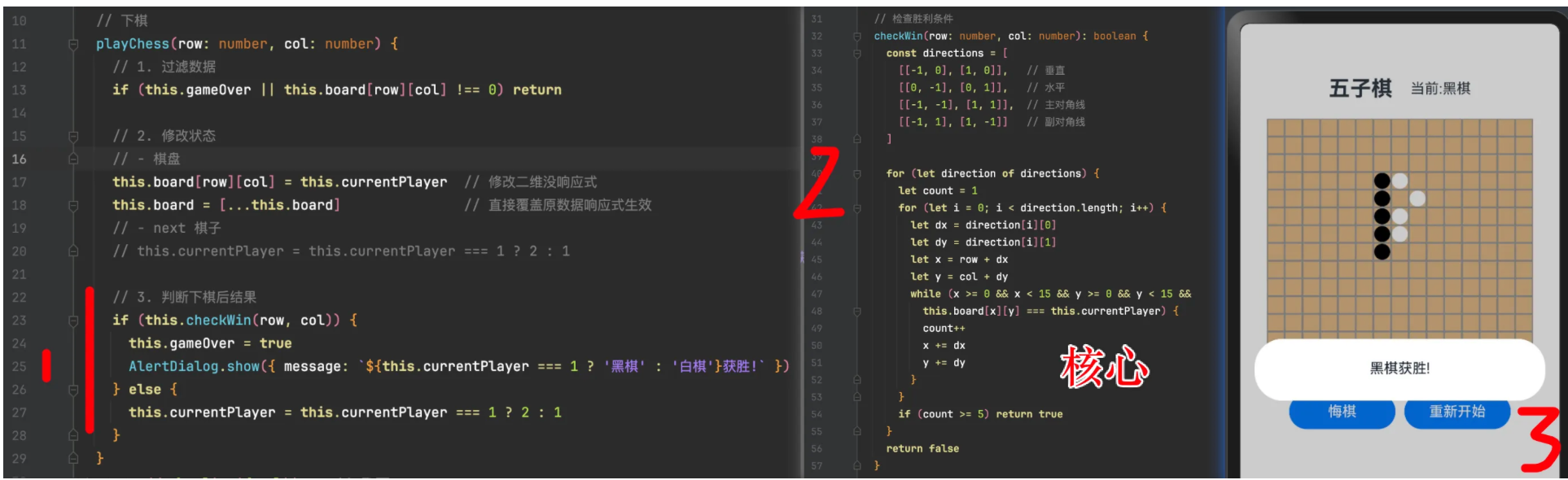
ets/pages/gobang/03-检查胜负.ets
@Entry
@Component
struct Study {

  // 一个15x15的二维数组,表示棋盘,初始值为0表格空位,1表示黑棋,2表示白棋。
  @State board: number[][] = Array(15).fill(null).map(() => Array(15).fill(0))
  @State currentPlayer: number = 1 // 1表示黑棋,2表示白棋。
  @State gameOver: boolean = false

  // 下棋
  playChess(row: number, col: number) {
    // 1. 过滤数据
    if (this.gameOver || this.board[row][col] !== 0) return

    // 2. 修改状态
    // - 棋盘
    this.board[row][col] = this.currentPlayer  // 修改二维没响应式
    this.board = [...this.board]               // 直接覆盖原数据响应式生效
    // - next 棋子
    // this.currentPlayer = this.currentPlayer === 1 ? 2 : 1

    // 3. 判断下棋后结果
    if (this.checkWin(row, col)) {
      this.gameOver = true
      AlertDialog.show({ message: `${this.currentPlayer === 1 ? '黑棋' : '白棋'}获胜!` })
    } else {
      this.currentPlayer = this.currentPlayer === 1 ? 2 : 1
    }
  }

  // 检查胜负
  checkWin(row: number, col: number): boolean {
    const directions = [
      [[-1, 0], [1, 0]],   // 垂直
      [[0, -1], [0, 1]],   // 水平
      [[-1, -1], [1, 1]],  // 主对角线
      [[-1, 1], [1, -1]]   // 副对角线
    ]

    for (let direction of directions) {
      let count = 1
      for (let i = 0; i < direction.length; i++) {
        let dx = direction[i][0]
        let dy = direction[i][1]
        let x = row + dx
        let y = col + dy
        while (x >= 0 && x < 15 && y >= 0 && y < 15 &&
               this.board[x][y] === this.currentPlayer) {
          count++
          x += dx
          y += dy
        }
      }
      if (count >= 5) return true
    }
    return false
  }


  build() {
    Column() {
      // 游戏标题和状态显示
      Row() {
        Text('五子棋').fontSize(24).fontWeight(FontWeight.Bold)
        Text(`当前:${this.currentPlayer==1?'黑':'白'}棋`).fontSize(16).margin({ left: 20 })
      }
      .width('100%')
        .margin({ bottom: 10 })
        .justifyContent(FlexAlign.Center)

      // 棋盘
      Column() {
        // 行
        ForEach(this.board, (row: number[], rowIndex:number) => {
          Row() {
            ForEach(row, (cell: number, colIndex:number) => {
              // 列
              Column() {
                if (cell) {
                  Text().width(18).height(18).backgroundColor(cell === 1 ? '#000' : '#fff').borderRadius(9)
                }
              }
              .width(20).height(20).backgroundColor('#DEB887')
                    .border({ width: 1, color: '#999' })
                    .onClick(() => this.playChess(rowIndex, colIndex))
                    })
          }
        })
      }.margin(10)

      // 操作按钮
      Row() {
        Button('悔棋').width(120)
        Button('重新开始').width(120).margin({ left: 10 })
      }
      .width('100%')
        .justifyContent(FlexAlign.Center)
    }.padding(20)
  }
}
4. 重新开始
ets/pages/gobang/04-重新开始.ets
// 重新开发
resetGame() {
  this.board = Array(15).fill(null).map(() => Array(15).fill(0))
  this.currentPlayer = 1
  this.gameOver = false
}
5. 悔棋 选写
- 下棋playChess时,保存row、col索引
- 点击悔棋修改改索引状态为空格
- 并且把currentPlayer修改
6. 面向对象封装
ets/gobang/Control.ets
export class Control {

  private currentPlayer: number = 1 // 1表示黑棋,2表示白棋。
  private gameOver: boolean = false

  // 下棋
  playChess(board:number[][], row: number, col: number) {
    // 1. 过滤数据
    if (this.gameOver || board[row][col] !== 0) return

    // 2. 修改状态
    // - 棋盘
    board[row][col] = this.currentPlayer
    // - next 棋子
    // this.currentPlayer = this.currentPlayer === 1 ? 2 : 1

    // 3. 判断下棋后结果
    if (this.checkWin(board, row, col)) {
      this.gameOver = true
      AlertDialog.show({ message: `${this.currentPlayer === 1 ? '黑棋' : '白棋'}获胜!` })
    } else {
      this.currentPlayer = this.currentPlayer === 1 ? 2 : 1
    }

    return [...board]
  }

  // 检查胜负
  checkWin(board:number[][], row: number, col: number): boolean {
    const directions = [
      [[-1, 0], [1, 0]],   // 垂直
      [[0, -1], [0, 1]],   // 水平
      [[-1, -1], [1, 1]],  // 主对角线
      [[-1, 1], [1, -1]]   // 副对角线
    ]

    for (let direction of directions) {
      let count = 1
      for (let i = 0; i < direction.length; i++) {
        let dx = direction[i][0]
        let dy = direction[i][1]
        let x = row + dx
        let y = col + dy
        while (x >= 0 && x < 15 && y >= 0 && y < 15 &&
          board[x][y] === this.currentPlayer) {
          count++
          x += dx
          y += dy
        }
      }
      if (count >= 5) return true
    }
    return false
  }

  // 重新开始
  resetGame():number[][] {
    this.currentPlayer = 1
    this.gameOver = false
    return this.sourceData()
  }

  // 数据源
  sourceData():number[][] {
    return Array(15).fill(null).map(() => Array(15).fill(0))
  }
}
ets/pages/gobang/05-封装.ets
import { Control } from './Control'

@Entry
@Component
struct Study {

  private control1 = new Control()
  @State board1: number[][] = this.control1.sourceData()

  private control2 = new Control()
  @State board2: number[][] = this.control2.sourceData()

  build() {
    Column() {
      // 棋盘1
      Column() {
        // 行
        ForEach(this.board1, (row: number[], rowIndex:number) => {
          Row() {
            ForEach(row, (cell: number, colIndex:number) => {
              // 列
              Column() {
                if (cell) {
                  Text().width(18).height(18).backgroundColor(cell === 1 ? '#000' : '#fff').borderRadius(9)
                }
              }
              .width(20).height(20).backgroundColor('#DEB887')
              .border({ width: 1, color: '#999' })
              .onClick(() => {
                const data = this.control1.playChess(this.board1, rowIndex, colIndex)
                if (data) this.board1 = data
              })
            })
          }
        })
        Button('重新开始').onClick(() => this.board1 = this.control1.resetGame())
      }.margin(10)

      // 棋盘2
      Column() {
        // 行
        ForEach(this.board2, (row: number[], rowIndex:number) => {
          Row() {
            ForEach(row, (cell: number, colIndex:number) => {
              // 列
              Column() {
                if (cell) {
                  Text().width(18).height(18).backgroundColor(cell === 1 ? '#000' : '#fff').borderRadius(9)
                }
              }
              .width(20).height(20).backgroundColor('#DEB887')
              .border({ width: 1, color: '#999' })
              .onClick(() => {
                const data = this.control2.playChess(this.board2, rowIndex, colIndex)
                if (data) this.board2 = data
              })
            })
          }
        })
        Button('重新开始').onClick(() => this.board2 = this.control2.resetGame())
      }.margin(10)
    }.padding(20)
  }
}

在HarmonyOS Next中实现五子棋游戏,主要使用ArkTS开发。通过Canvas组件绘制棋盘和棋子,结合Touch事件处理落子交互。利用二维数组存储棋盘状态,实现胜负判断逻辑。可封装游戏逻辑与UI组件,通过状态管理更新界面。

在HarmonyOS Next中实现五子棋小游戏,主要涉及UI绘制、触摸交互和胜负判定三个核心模块。以下是关键实现步骤:
-
UI绘制
- 使用
Canvas组件绘制棋盘(网格)和棋子。 - 通过
CanvasRenderingContext2D的strokeLine方法绘制棋盘线,fillCircle方法绘制黑白棋子。 - 建议将棋盘数据(二维数组)与UI分离,数组存储落子状态(如0空、1黑、2白)。
- 使用
-
触摸交互
- 为
Canvas添加onTouch事件监听,通过触摸坐标计算落子位置(行列索引)。 - 将有效落子更新到棋盘数据中,并触发UI重绘。
- 为
-
胜负判定
- 每次落子后,以该位置为中心,检测横、竖、斜四个方向是否存在连续五子。
- 使用循环遍历相邻棋子状态,匹配相同颜色即计数,达到5则结束游戏。
示例代码片段(ArkTS):
// 棋盘数据
private board: number[][] = Array.from({ length: 15 }, () => new Array(15).fill(0));

// 绘制棋盘
private drawBoard(context: CanvasRenderingContext2D) {
  // 绘制网格线
  for (let i = 0; i <= 15; i++) {
    context.strokeLine(...计算坐标);
  }
  // 绘制已有棋子
  this.board.forEach((row, i) => {
    row.forEach((cell, j) => {
      if (cell !== 0) {
        context.fillCircle(...计算坐标, cell === 1 ? 'black' : 'white');
      }
    });
  });
}

// 触摸事件处理
onTouch(event: TouchEvent) {
  const { x, y } = 转换坐标(event);
  const row = Math.floor(y / 格子尺寸);
  const col = Math.floor(x / 格子尺寸);
  if (this.board[row][col] === 0) {
    this.board[row][col] = 当前玩家;
    this.checkWin(row, col);
  }
}

// 胜负判定
private checkWin(row: number, col: number) {
  const directions = [[1,0], [0,1], [1,1], [1,-1]];
  for (const [dx, dy] of directions) {
    let count = 1;
    // 正反方向计数
    count += this.countDirection(row, col, dx, dy);
    count += this.countDirection(row, col, -dx, -dy);
    if (count >= 5) {
      // 游戏结束处理
    }
  }
}
优化建议:
- 使用
Stack布局叠加Canvas和提示层。 - 通过
@State装饰器管理游戏状态(当前玩家、胜负状态)。 - 可添加悔棋功能(用栈记录落子历史)。
注意:需在module.json5中声明ohos.permission.SYSTEM_FLOAT_WINDOW权限(若需要悬浮窗功能)。实际开发中应根据棋盘尺寸动态计算坐标,并处理触摸事件防抖。
