




Golang REST API与MongoDB在VSCODE中插入数据失败问题
Golang REST API与MongoDB在VSCODE中插入数据失败问题 大家好,
我正在尝试在VSCODE上运行一个使用MongoDB的Golang REST API。但是,我的数据无法插入到数据库中。 我是Golang、REST API和MongoDB的新手。能否请您帮我看看下面的代码,并告诉我为什么它没有将数据插入到MongoDB中。
package main

import (
	"context"

	"encoding/json"

	"fmt"

	"github.com/gorilla/mux"

	"go.mongodb.org/mongo-driver/bson"

	"go.mongodb.org/mongo-driver/bson/primitive"

	"go.mongodb.org/mongo-driver/mongo"

	"go.mongodb.org/mongo-driver/mongo/options"

	"net/http"

	"time"
)

var client *mongo.Client

type Person struct {
	ID primitive.ObjectID `json:"_id,omitempty" bson:"_id,omitempty"`

	Firstname string `json:"firstname,omitempty" bson:"firstname,omitempty"`

	Lastname string `json:"lastname,omitempty" bson:"lastname,omitempty"`
}

//func CreatePersonEndpoint(response http.ResponseWriter, request *http.Request) {}

//func GetPeopleEndpoint(response http.ResponseWriter, request *http.Request) {}

//func GetPersonEndpoint(response http.ResponseWriter, request *http.Request) {}

func main() {

	fmt.Println("Starting the application...")

	ctx, cancel := context.WithTimeout(context.Background(), 10*time.Second)
	defer cancel()
	clientOptions := options.Client().ApplyURI("mongodb://localhost:27017")

	client, _ = mongo.Connect(ctx, clientOptions)

	router := mux.NewRouter()

	router.HandleFunc("/person", CreatePersonEndpoint).Methods("POST")

	router.HandleFunc("/people", GetPeopleEndpoint).Methods("GET")

	router.HandleFunc("/person/{id}", GetPersonEndpoint).Methods("GET")

	http.ListenAndServe("localhost:8080", router)

}

func CreatePersonEndpoint(response http.ResponseWriter,
	request *http.Request) {

	response.Header().Set("content-type", "application/json")

	var person Person

	_ = json.NewDecoder(request.Body).Decode(&person)

	collection := client.Database("books").Collection("person")

	ctx, cancel := context.WithTimeout(context.Background(), 5*time.Second)
	defer cancel()
	result, _ := collection.InsertOne(ctx, person)

	json.NewEncoder(response).Encode(result)

}

func GetPersonEndpoint(response http.ResponseWriter,
	request *http.Request) {
	response.Header().Set("content-type", "application/json")

	params := mux.Vars(request)

	id, _ := primitive.ObjectIDFromHex(params["id"])

	var person Person

	collection := client.Database("books").Collection("authors")

	ctx, cancel := context.WithTimeout(context.Background(), 30*time.Second)
	defer cancel()
	err := collection.FindOne(ctx, Person{ID: id}).Decode(&person)

	if err != nil {

		response.WriteHeader(http.StatusInternalServerError)

		response.Write([]byte(`{ "message": "` + err.Error() + `" }`))

		return

	}

	json.NewEncoder(response).Encode(person)

}

func GetPeopleEndpoint(response http.ResponseWriter, request *http.Request) {

	response.Header().Set("content-type", "application/json")

	var people []Person

	collection := client.Database("books").Collection("person")

	ctx, cancel := context.WithTimeout(context.Background(), 30*time.Second)
	defer cancel()
	cursor, err := collection.Find(ctx, bson.M{})

	if err != nil {

		response.WriteHeader(http.StatusInternalServerError)

		response.Write([]byte(`{ "message": "` + err.Error() + `" }`))

		return

	}

	defer cursor.Close(ctx)

	for cursor.Next(ctx) {

		var person Person

		cursor.Decode(&person)

		people = append(people, person)

	}

	if err := cursor.Err(); err != nil {
		response.WriteHeader(http.StatusInternalServerError)
		response.Write([]byte(`{ "message": "` + err.Error() + `" }`))
		return
	}
	json.NewEncoder(response).Encode(people)

}
PS D:\goprojects\gorilla_mux_mongodb> go run main.go Starting the application…
.
更多关于Golang REST API与MongoDB在VSCODE中插入数据失败问题的实战教程也可以访问 https://www.itying.com/category-94-b0.html
2 回复

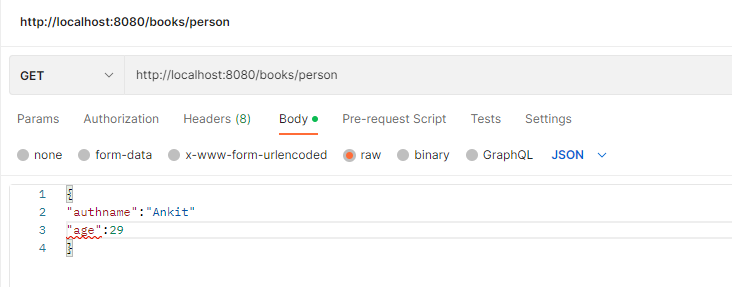
@christophberger 你在调用REST API时看到任何错误吗?我有一个名为“books”的数据库,并且我正在尝试在其中创建一个“person”集合。不知为何数据没有被插入。
更多关于Golang REST API与MongoDB在VSCODE中插入数据失败问题的实战系列教程也可以访问 https://www.itying.com/category-94-b0.html

你的代码存在几个关键问题导致数据插入失败:
- 错误处理缺失:所有数据库操作都忽略了错误返回值
- 数据库连接问题:没有验证MongoDB连接是否成功
- 集合名称不一致:插入和查询使用了不同的集合
以下是修正后的代码:
package main

import (
    "context"
    "encoding/json"
    "fmt"
    "log"
    "net/http"
    "time"

    "github.com/gorilla/mux"
    "go.mongodb.org/mongo-driver/bson"
    "go.mongodb.org/mongo-driver/bson/primitive"
    "go.mongodb.org/mongo-driver/mongo"
    "go.mongodb.org/mongo-driver/mongo/options"
)

var client *mongo.Client

type Person struct {
    ID        primitive.ObjectID `json:"_id,omitempty" bson:"_id,omitempty"`
    Firstname string             `json:"firstname,omitempty" bson:"firstname,omitempty"`
    Lastname  string             `json:"lastname,omitempty" bson:"lastname,omitempty"`
}

func main() {
    fmt.Println("Starting the application...")

    // 1. 修复数据库连接,添加错误处理
    ctx, cancel := context.WithTimeout(context.Background(), 10*time.Second)
    defer cancel()

    clientOptions := options.Client().ApplyURI("mongodb://localhost:27017")
    var err error
    client, err = mongo.Connect(ctx, clientOptions)
    if err != nil {
        log.Fatal(err)
    }

    // 验证连接
    err = client.Ping(ctx, nil)
    if err != nil {
        log.Fatal("MongoDB连接失败:", err)
    }
    fmt.Println("成功连接到MongoDB")

    router := mux.NewRouter()
    router.HandleFunc("/person", CreatePersonEndpoint).Methods("POST")
    router.HandleFunc("/people", GetPeopleEndpoint).Methods("GET")
    router.HandleFunc("/person/{id}", GetPersonEndpoint).Methods("GET")

    fmt.Println("服务器运行在 http://localhost:8080")
    log.Fatal(http.ListenAndServe(":8080", router))
}

func CreatePersonEndpoint(response http.ResponseWriter, request *http.Request) {
    response.Header().Set("content-type", "application/json")

    var person Person
    if err := json.NewDecoder(request.Body).Decode(&person); err != nil {
        response.WriteHeader(http.StatusBadRequest)
        json.NewEncoder(response).Encode(map[string]string{"error": "无效的JSON数据"})
        return
    }

    // 2. 确保使用正确的集合名称
    collection := client.Database("books").Collection("person")

    ctx, cancel := context.WithTimeout(context.Background(), 5*time.Second)
    defer cancel()

    // 3. 添加错误处理
    result, err := collection.InsertOne(ctx, person)
    if err != nil {
        response.WriteHeader(http.StatusInternalServerError)
        json.NewEncoder(response).Encode(map[string]string{"error": err.Error()})
        return
    }

    json.NewEncoder(response).Encode(result)
}

func GetPersonEndpoint(response http.ResponseWriter, request *http.Request) {
    response.Header().Set("content-type", "application/json")

    params := mux.Vars(request)
    id, err := primitive.ObjectIDFromHex(params["id"])
    if err != nil {
        response.WriteHeader(http.StatusBadRequest)
        json.NewEncoder(response).Encode(map[string]string{"error": "无效的ID格式"})
        return
    }

    var person Person
    // 4. 修复集合名称不一致问题
    collection := client.Database("books").Collection("person")

    ctx, cancel := context.WithTimeout(context.Background(), 30*time.Second)
    defer cancel()

    // 5. 使用正确的查询语法
    err = collection.FindOne(ctx, bson.M{"_id": id}).Decode(&person)
    if err != nil {
        if err == mongo.ErrNoDocuments {
            response.WriteHeader(http.StatusNotFound)
            json.NewEncoder(response).Encode(map[string]string{"error": "未找到记录"})
        } else {
            response.WriteHeader(http.StatusInternalServerError)
            json.NewEncoder(response).Encode(map[string]string{"error": err.Error()})
        }
        return
    }

    json.NewEncoder(response).Encode(person)
}

func GetPeopleEndpoint(response http.ResponseWriter, request *http.Request) {
    response.Header().Set("content-type", "application/json")

    var people []Person
    collection := client.Database("books").Collection("person")

    ctx, cancel := context.WithTimeout(context.Background(), 30*time.Second)
    defer cancel()

    cursor, err := collection.Find(ctx, bson.M{})
    if err != nil {
        response.WriteHeader(http.StatusInternalServerError)
        json.NewEncoder(response).Encode(map[string]string{"error": err.Error()})
        return
    }

    defer cursor.Close(ctx)

    for cursor.Next(ctx) {
        var person Person
        if err := cursor.Decode(&person); err != nil {
            response.WriteHeader(http.StatusInternalServerError)
            json.NewEncoder(response).Encode(map[string]string{"error": err.Error()})
            return
        }
        people = append(people, person)
    }

    if err := cursor.Err(); err != nil {
        response.WriteHeader(http.StatusInternalServerError)
        json.NewEncoder(response).Encode(map[string]string{"error": err.Error()})
        return
    }

    json.NewEncoder(response).Encode(people)
}
主要修改点:
- 添加了完整的错误处理
- 验证MongoDB连接状态
- 统一使用"person"集合(原代码中GetPersonEndpoint使用了"authors"集合)
- 修正了查询语法,使用
bson.M{"_id": id}而不是Person{ID: id}
运行前确保:
- MongoDB服务正在运行:
mongod - 已安装依赖:
go mod init然后go mod tidy - 使用正确的导入路径
测试插入数据:
curl -X POST http://localhost:8080/person \
  -H "Content-Type: application/json" \
  -d '{"firstname":"John","lastname":"Doe"}'
