




HarmonyOS 鸿蒙Next中如何实现地理位置编码与距离计算?
HarmonyOS 鸿蒙Next中如何实现地理位置编码与距离计算? 如何通过应用来实现计算经纬度定位和距离 呢?

实现思路
首先使用 geoLocationManager 初始化定位请求参数。获取当前位置经纬度后,调用 geoLocationManager.getAddressesFromLocation。
其次通过 Callback 或 Promise 处理返回的 GeoAddress 数组,解析出详细地址(如街道、城市)。
最后实现本地距离计算.
应用场景
如判断员工是否在以公司为中心的500米半径内的场景,则可使用通过经纬度定位计算这样的工具。
效果
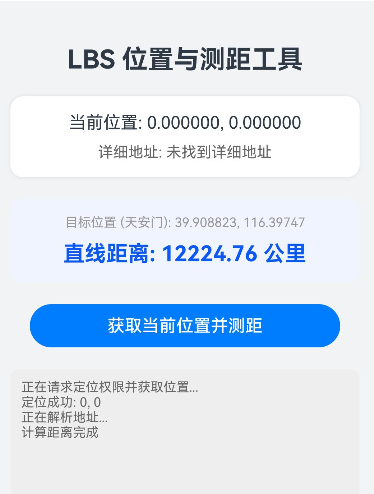
完整代码
需要注意:获取经纬度需要在真机上使用
import { geoLocationManager } from '@kit.LocationKit';
import { BusinessError } from '@kit.BasicServicesKit';
import { hilog } from '@kit.PerformanceAnalysisKit';

// 定义地址信息模型
class AddressInfo {
  latitude: number = 0;
  longitude: number = 0;
  administrativeArea: string = "未知"; // 省/市
  subAdministrativeArea: string = ""; // 区
  street: string = ""; // 街道
  distanceToTarget?: number; // 距离目标点的距离
}

interface GeneratedObjectLiteralInterface_1 {
  lat: number;
  lon: number;
}

@Entry
@Component
struct LocationAndDistancePage {
  @State currentAddress: AddressInfo = new AddressInfo();
  @State distanceText: string = "未计算";
  @State isLoading: boolean = false;
  @State logText: string = "准备就绪,请点击获取位置";

  // 目标位置
  private readonly TARGET_LOCATION: GeneratedObjectLiteralInterface_1 = { lat: 39.908823, lon: 116.397470 };

  build() {
    Column() {
      Text("LBS 位置与测距工具")
        .fontSize(24)
        .fontWeight(FontWeight.Bold)
        .margin({ top: 40, bottom: 20 })

      // 位置信息卡片
      Column({ space: 10 }) {
        Text(`当前位置: ${this.currentAddress.latitude.toFixed(6)}, ${this.currentAddress.longitude.toFixed(6)}`)
          .fontSize(16)
        Text(`详细地址: ${this.currentAddress.street || "正在解析..."}`)
          .fontSize(14)
          .fontColor("#666")
          .maxLines(2)
          .textOverflow({ overflow: TextOverflow.Ellipsis })
      }
      .width('90%')
      .padding(15)
      .backgroundColor(Color.White)
      .borderRadius(12)
      .shadow({ radius: 8, color: '#1A000000' })
      .margin({ bottom: 20 })

      // 测距演示卡片
      Column({ space: 10 }) {
        Text(`目标位置: ${this.TARGET_LOCATION.lat}, ${this.TARGET_LOCATION.lon}`)
          .fontSize(12)
          .fontColor("#999")
        Text(`直线距离: ${this.distanceText}`)
          .fontSize(20)
          .fontWeight(FontWeight.Bold)
          .fontColor("#0A59F7")
      }
      .width('90%')
      .padding(15)
      .backgroundColor('#F0F4FF')
      .borderRadius(12)
      .margin({ bottom: 20 })

      // 操作按钮
      Button(this.isLoading ? "定位中..." : "获取当前位置并测距")
        .width('80%')
        .enabled(!this.isLoading)
        .onClick(() => {
          this.startLocationProcess();
        })

      // 日志区域
      Scroll() {
        Text(this.logText)
          .fontSize(12)
          .fontColor("#666")
          .width('100%')
      }
      .width('90%')
      .height('150')
      .backgroundColor('#EEEEEE')
      .borderRadius(8)
      .margin({ top: 20 })
      .padding(10)
      .align(Alignment.TopStart)
      .scrollable(ScrollDirection.Vertical)
      .scrollBar(BarState.Auto)

    }
    .width('100%')
    .height('100%')
    .backgroundColor('#F1F3F5')
  }

  /**
   * 核心流程:发起定位 -> 逆地理编码 -> 计算距离
   */
  async startLocationProcess() {
    this.isLoading = true;
    this.logText = "正在请求定位权限并获取位置...";

    try {
      // 1. 请求单次定位
      const requestInfo: geoLocationManager.LocationRequest = {
        'priority': geoLocationManager.LocationRequestPriority.FIRST_FIX,
        'scenario': geoLocationManager.LocationRequestScenario.UNSET,
        'timeInterval': 1,
        'distanceInterval': 0,
        'maxAccuracy': 0
      };

      const location = await geoLocationManager.getCurrentLocation(requestInfo);

      if (location) {
        this.currentAddress.latitude = location.latitude;
        this.currentAddress.longitude = location.longitude;
        this.logText += `\n定位成功: ${location.latitude}, ${location.longitude}`;

        // 2. 执行逆地理编码
        await this.reverseGeocode(location.latitude, location.longitude);

        // 3. 计算距离
        this.calculateDistanceToTarget();
      } else {
        this.logText += "\n定位失败,返回数据为空";
      }

    } catch (err) {
      const error = err as BusinessError;
      this.logText += `\n错误: Code ${error.code}, Msg: ${error.message}`;


      if (error.code === 3301000 || error.code === 3301100) { // 位置服务未开启或无权限
        this.logText += "\n使用默认坐标演示功能...";
        this.currentAddress.latitude = 39.904200; // 模拟一个位置
        this.currentAddress.longitude = 116.407400;
        await this.reverseGeocode(this.currentAddress.latitude, this.currentAddress.longitude);
        this.calculateDistanceToTarget();
      }
    } finally {
      this.isLoading = false;
    }
  }

  /**
   * 逆地理编码:经纬度 -> 地址
   */
  async reverseGeocode(lat: number, lon: number) {
    try {
      this.logText += "\n正在解析地址...";
      const reverseGeocodeRequest: geoLocationManager.ReverseGeoCodeRequest = {
        "latitude": lat,
        "longitude": lon,
        "maxItems": 1
      };

      const data = await geoLocationManager.getAddressesFromLocation(reverseGeocodeRequest);

      if (data && data.length > 0) {
        const geoAddress = data[0];
        this.currentAddress.administrativeArea = geoAddress.administrativeArea || "";
        this.currentAddress.subAdministrativeArea = geoAddress.subAdministrativeArea || "";
        this.currentAddress.street = geoAddress.roadName || "未知街道";
        this.logText += `\n解析成功: ${this.currentAddress.street}`;
      } else {
        this.currentAddress.street = "未找到详细地址";
      }
    } catch (err) {
      this.logText += "\n地址解析失败";
    }
  }

  /**
   * 本地高性能距离计算 (Haversine 公式)
   */
  calculateDistanceToTarget() {
    const dist = this.getDistanceFromLatLonInKm(
      this.currentAddress.latitude,
      this.currentAddress.longitude,
      this.TARGET_LOCATION.lat,
      this.TARGET_LOCATION.lon
    );

    if (dist < 1) {
      this.distanceText = `${Math.round(dist * 1000)} 米`;
    } else {
      this.distanceText = `${dist.toFixed(2)} 公里`;
    }
    this.logText += `\n计算距离完成`;
  }

  /**
   * 数学工具:计算两个经纬度坐标间的球面距离
   * @returns 距离(千米)
   */
  private getDistanceFromLatLonInKm(lat1: number, lon1: number, lat2: number, lon2: number): number {
    const R = 6371; // 地球半径
    const dLat = this.deg2rad(lat2 - lat1);
    const dLon = this.deg2rad(lon2 - lon1);
    const a =
      Math.sin(dLat / 2) * Math.sin(dLat / 2) +
        Math.cos(this.deg2rad(lat1)) * Math.cos(this.deg2rad(lat2)) *
        Math.sin(dLon / 2) * Math.sin(dLon / 2);
    const c = 2 * Math.atan2(Math.sqrt(a), Math.sqrt(1 - a));
    return R * c;
  }

  private deg2rad(deg: number): number {
    return deg * (Math.PI / 180);
  }
}
更多关于HarmonyOS 鸿蒙Next中如何实现地理位置编码与距离计算?的实战系列教程也可以访问 https://www.itying.com/category-93-b0.html


鸿蒙Next中可通过@ohos.geoLocationManager模块实现地理位置编码。使用geoLocationManager.getAddressesFromLocation进行正向地理编码,getAddressesFromLocationName进行反向地理编码。距离计算可通过坐标点使用Haversine公式或直接调用geoLocationManager.getDistance方法获取两点间直线距离。

在HarmonyOS Next中,实现地理位置编码与距离计算主要依赖于geoLocationManager和geoConvertManager等位置服务能力。以下是核心实现方法:
1. 获取设备经纬度
使用geoLocationManager获取当前设备位置:
import { geoLocationManager } from '@kit.LocationKit';

// 请求位置权限后获取位置
geoLocationManager.getCurrentLocation()
  .then(location => {
    const latitude = location.latitude;  // 纬度
    const longitude = location.longitude; // 经度
  });
2. 地理编码与逆编码
通过geoConvertManager实现地址与坐标的相互转换:
import { geoConvertManager } from '@kit.LocationKit';

// 地理编码(地址转坐标)
geoConvertManager.getAddressFromLocation('北京市海淀区')
  .then(result => {
    const coords = result[0]; // 获取第一个结果
  });

// 逆地理编码(坐标转地址)
geoConvertManager.getAddressFromCoordinate({latitude: 39.9, longitude: 116.4})
  .then(result => {
    const address = result[0]; // 获取地址信息
  });
3. 计算两点间距离
使用geoLocationManager提供的距离计算方法:
import { geoLocationManager } from '@kit.LocationKit';

const pointA = {latitude: 39.9, longitude: 116.4};
const pointB = {latitude: 31.2, longitude: 121.5};

// 计算直线距离(米)
const distance = geoLocationManager.getDistance(pointA, pointB);

// 计算沿地球表面的距离
const geodesicDistance = geoLocationManager.getGeodesicDistance(pointA, pointB);
4. 关键配置
- 在
module.json5中声明位置权限:
{
  "module": {
    "requestPermissions": [
      {
        "name": "ohos.permission.LOCATION",
        "reason": "需要获取位置信息"
      }
    ]
  }
}
注意事项
- 需要动态申请位置权限(
ohos.permission.LOCATION) - 距离计算提供平面和大地线两种算法,根据场景选择
- 地理编码服务依赖网络连接
- 建议使用逆地理编码时添加超时处理
这些API提供了完整的位置服务能力,可以满足大多数地理位置处理需求。
