




HarmonyOS鸿蒙Next中0.72RN按照@gorhom/bottom-sheet指导文档运行demo报错
HarmonyOS鸿蒙Next中0.72RN按照@gorhom/bottom-sheet指导文档运行demo报错 【问题描述】:0.72RN按照[@gorhom/bottom-sheet](https://gitee.com/react-native-oh-library/usage-docs/blob/master/zh-cn/gorhom-bottom-sheet.md)指导文档运行上面的demo报错
- 希望能优化一下指导文档上面的demo
- 我看了下这个库本身是不含原生侧的代码的,指导文档上那个codegen应该不需要配置吧?是否能优化这点
【问题现象】:看报错信息是手势库的问题,但是我直接运行手势库的demo是正常的。
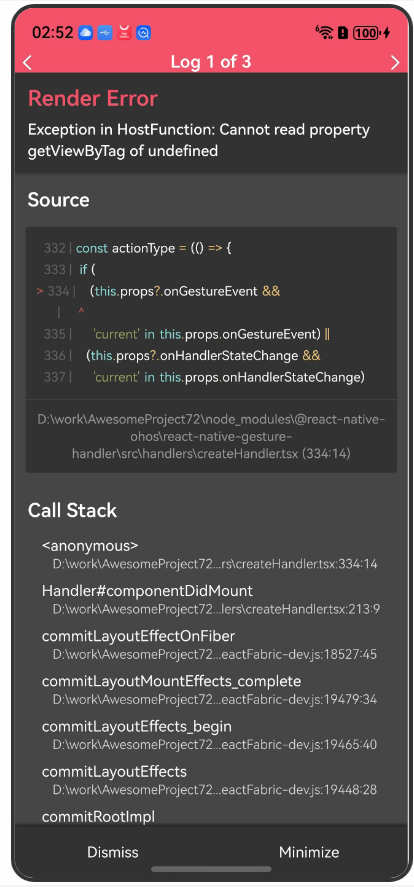
【版本信息】:
harmony:
"targetSdkVersion": "6.0.0(20)",
"compatibleSdkVersion": "5.0.0(12)",
package.json:
{
  "name": "AwesomeProject",
  "version": "0.0.1",
  "private": true,
  "scripts": {
    "android": "react-native run-android",
    "ios": "react-native run-ios",
    "lint": "eslint .",
    "start": "hdc rport tcp:8081 tcp:8081 && react-native start --config metro.config.harmony.js",
    "test": "jest",
    "codegen": "react-native codegen-harmony --cpp-output-path ./harmony/entry/src/main/cpp/generated --rnoh-module-path ./harmony/entry/oh_modules/@rnoh/react-native-openharmony",
    "dev": "react-native bundle-harmony --dev"
  },
  "dependencies": {
    "@react-native-oh-tpl/bottom-sheet": "^4.6.4-0.0.2",
    "@react-native-oh/react-native-harmony": "^0.72.96",
    "@react-native-ohos/react-native-gesture-handler": "^2.14.18-rc.3",
    "@react-native-ohos/react-native-reanimated": "^3.6.5-rc.2",
    "@react-native-ohos/react-native-webview": "^13.10.5-rc.5",
    "react": "18.2.0",
    "react-native": "0.72.5",
    "react-native-echarts-pro": "^1.9.1",
    "react-native-reanimated": "^3.6.0"
  },
  "devDependencies": {
    "@babel/core": "^7.20.0",
    "@babel/preset-env": "^7.20.0",
    "@babel/runtime": "^7.20.0",
    "@react-native/eslint-config": "^0.72.2",
    "@react-native/metro-config": "^0.72.11",
    "@tsconfig/react-native": "^3.0.0",
    "@types/react": "^18.0.24",
    "@types/react-test-renderer": "^18.0.0",
    "babel-jest": "^29.2.1",
    "eslint": "^8.19.0",
    "jest": "^29.2.1",
    "metro-react-native-babel-preset": "0.76.8",
    "prettier": "^2.4.1",
    "react-test-renderer": "18.2.0",
    "typescript": "4.8.4"
  },
  "engines": {
    "node": ">=16"
  }
}
【复现代码】:
// bottom-sheet组件
import React, { useCallback, useRef, useMemo } from "react";
import { StyleSheet, View, Text, Button } from "react-native";
import BottomSheet, { BottomSheetView } from "[@gorhom](/user/gorhom)/bottom-sheet";

const App = () => {
  // hooks
  const sheetRef = useRef<BottomSheet>(null);

  // variables
  const snapPoints = useMemo(() => ["25%", "50%", "90%"], []);

  // callbacks
  const handleSheetChange = useCallback((index) => {
    console.log("handleSheetChange", index);
  }, []);
  const handleSnapPress = useCallback((index) => {
    sheetRef.current?.snapToIndex(index);
  }, []);
  const handleClosePress = useCallback(() => {
    sheetRef.current?.close();
  }, []);

  // render
  return (
    <View style={styles.container}>
      <Button title="Snap To 90%" onPress={() => handleSnapPress(2)} />
      <Button title="Snap To 50%" onPress={() => handleSnapPress(1)} />
      <Button title="Snap To 25%" onPress={() => handleSnapPress(0)} />
      <Button title="Close" onPress={() => handleClosePress()} />
      <BottomSheet
        ref={sheetRef}
        snapPoints={snapPoints}
        onChange={handleSheetChange}
      >
        <BottomSheetView>
          <Text>Awesome 🔥</Text>
        </BottomSheetView>
      </BottomSheet>
    </View>
  );
};

const styles = StyleSheet.create({
  container: {
    flex: 1,
    paddingTop: 200,
  },
});

export default App;
【尝试解决方案】:
更多关于HarmonyOS鸿蒙Next中0.72RN按照@gorhom/bottom-sheet指导文档运行demo报错的实战教程也可以访问 https://www.itying.com/category-93-b0.html

View不支持手势操作,需要使用GestureHandlerRootView,可以使用GestureHandlerRootView代替View
<GestureHandlerRootView style={styles.container}>

</GestureHandlerRootView>
【背景知识】 react-native-gesture-handler是一个用于React Native的库,它提供了丰富的手势识别功能,包括拖拽、捏合等,使得开发者可以更容易地实现复杂的交互效果。
更多关于HarmonyOS鸿蒙Next中0.72RN按照@gorhom/bottom-sheet指导文档运行demo报错的实战系列教程也可以访问 https://www.itying.com/category-93-b0.html

我试了下,改为 GestureHandlerRootView 标签就没报错且功能正常,那这样的话鸿蒙化的 @gorhom/bottom-sheet 库的指导文档上面的 demo 是否需要更改一下,因为他上面用的就是 View 标签写的,并且指导文档上面还有配置codegen的信息,这个库应该不需要配置codegen吧?希望能修改一下,谢谢,

这个报错(Cannot read property 'getViewByTag' of undefined)是鸿蒙适配版 RN 环境下的依赖冲突 + 配置缺失 + 导入错误导致的,结合你的环境和代码,按以下步骤解决:
一、先修复「依赖冲突 + 导入错误」(核心原因)
你的package.json存在重复依赖 + 导入路径错误,这是底层报错的关键:
1. 卸载重复 / 不兼容的依赖
你同时装了普通 RN 的react-native-reanimated和鸿蒙适配版的@react-native-ohos/react-native-reanimated,两者冲突;且@gorhom/bottom-sheet实际装的是鸿蒙适配包,不能直接导入原包:
# 卸载普通RN的reanimated(鸿蒙环境用适配版)
npm uninstall react-native-reanimated

# 卸载原包(实际用鸿蒙适配版)
npm uninstall @gorhom/bottom-sheet
2. 修正导入路径
你装的是鸿蒙适配版的@react-native-oh-tpl/bottom-sheet,代码中却导入了原包@gorhom/bottom-sheet,导致组件未正确初始化,需修改导入:
// 原错误导入
// import BottomSheet, { BottomSheetView } from "@gorhom/bottom-sheet";

// 修正为鸿蒙适配包的导入
import BottomSheet, { BottomSheetView } from "@react-native-oh-tpl/bottom-sheet";
二、补充「手势库根容器」(必须配置)
react-native-gesture-handler(鸿蒙适配版)要求所有手势组件必须包裹在GestureHandlerRootView中,你的代码缺失这个根容器,导致手势系统初始化失败:
// 从鸿蒙适配的手势库中导入根容器
import { GestureHandlerRootView } from "@react-native-ohos/react-native-gesture-handler";

const App = () => {
  // ...你的hooks和回调逻辑保持不变

  // 外层包裹GestureHandlerRootView
  return (
    <GestureHandlerRootView style={styles.containerRoot}>
      <View style={styles.container}>
        {/* 你的Button和BottomSheet代码保持不变 */}
        <Button title="Snap To 90%" onPress={() => handleSnapPress(2)} />
        {/* ...其他Button */}
        <BottomSheet
          ref={sheetRef}
          snapPoints={snapPoints}
          onChange={handleSheetChange}
        >
          <BottomSheetView>
            <Text>Awesome 🔥</Text>
          </BottomSheetView>
        </BottomSheet>
      </View>
    </GestureHandlerRootView>
  );
};

const styles = StyleSheet.create({
  containerRoot: { // 根容器占满全屏
    flex: 1,
  },
  container: {
    flex: 1,
    paddingTop: 200,
  },
});
三、配置 Reanimated 的 Babel 插件(确保动画生效)
@react-native-ohos/react-native-reanimated需要 Babel 插件转译,修改babel.config.js:
module.exports = {
  presets: ['module:metro-react-native-babel-preset'],
  plugins: [
    // 添加Reanimated的Babel插件
    '@react-native-ohos/react-native-reanimated/plugin'
  ]
};
四、清理缓存并重新构建
依赖和配置修改后,必须清理缓存避免残留冲突:
# 清理RN缓存
npm cache clean --force

# 删除node_modules和锁文件
rm -rf node_modules package-lock.json

# 重新安装依赖
npm install

# 重新编译鸿蒙项目
npm run codegen
npm run dev
补充说明(避坑点)
- 鸿蒙适配包的版本匹配:
@react-native-oh-tpl/bottom-sheet依赖@react-native-ohos/react-native-gesture-handler和@react-native-ohos/react-native-reanimated,确保这三个包的版本是适配 RN 0.72 的(你的版本2.14.18-rc.3和3.6.5-rc.2是兼容的); - 不要混用普通 RN 包和鸿蒙适配包:所有依赖都要选
@react-native-ohos/xxx或@react-native-oh-tpl/xxx前缀的,避免普通 RN 包在鸿蒙环境下无法运行; - BottomSheet 的必填属性:若后续仍报错,可给
BottomSheet添加enablePanDownToClose={true}等基础属性,确保组件初始化完整。
按以上步骤操作后,BottomSheet 的手势系统会正常初始化,getViewByTag的未定义错误会被解决。

在HarmonyOS Next中运行@gorhom/bottom-sheet的RN 0.72 demo报错,通常是由于依赖包版本不兼容或环境配置问题导致。请检查项目依赖的React Native、React及鸿蒙相关库的版本是否与0.72匹配。确保已正确安装并链接所有必要的原生模块。

根据你提供的报错信息和代码,问题主要出在依赖版本冲突和配置上。错误信息显示 react-native-gesture-handler 库的 GestureHandlerRootView 组件在渲染时出现了问题,这通常是由于版本不匹配或配置不当引起的。
从你的 package.json 来看,你同时安装了 @react-native-ohos/react-native-reanimated 和 react-native-reanimated 两个版本,这会导致冲突。@gorhom/bottom-sheet 依赖于 react-native-reanimated 和 react-native-gesture-handler,但在 HarmonyOS Next 环境下,需要使用对应的鸿蒙适配版本。
请按照以下步骤解决:
-
移除冲突的依赖:卸载
react-native-reanimated的 npm 版本,确保只使用鸿蒙适配的版本。npm uninstall react-native-reanimated -
检查并统一依赖版本:确保你的依赖都是鸿蒙适配的。你的
package.json中已经正确引入了@react-native-ohos/react-native-gesture-handler和@react-native-ohos/react-native-reanimated,这是正确的。但需要确保@gorhom/bottom-sheet使用的是鸿蒙移植的版本@react-native-oh-tpl/bottom-sheet,你已安装,这很好。 -
关于 codegen 配置:你的判断是正确的。
@gorhom/bottom-sheet是一个纯 JavaScript 库,不包含原生(Native)代码。因此,在 HarmonyOS 项目中,不需要为其运行codegen命令或进行相关配置。指导文档中提到的codegen步骤可能是针对其他包含原生代码的库的通用说明,对于这个库可以忽略。 -
关键配置步骤:确保
react-native-gesture-handler的鸿蒙适配库被正确初始化。这通常在应用入口文件(例如index.js或App.js)中完成。你需要导入并应用gestureHandlerRootHOC,或者确保GestureHandlerRootView包裹了你的根组件。由于你直接运行手势库的 demo 正常,说明库本身安装是正确的,问题可能出在@gorhom/bottom-sheet使用手势库的上下文上。请检查你的应用根组件是否被正确包裹。一个常见的入口文件修正示例如下:
// index.js 或 App.js
import { gestureHandlerRootHOC } from '@react-native-ohos/react-native-gesture-handler';
import App from './src/App'; // 你的主组件

// 使用 gestureHandlerRootHOC 包裹你的 App 组件
export default gestureHandlerRootHOC(App);
或者,在你的
App组件最外层使用GestureHandlerRootView:import { GestureHandlerRootView } from '@react-native-ohos/react-native-gesture-handler'; const App = () => { return ( <GestureHandlerRootView style={{ flex: 1 }}> {/* 你的其他组件 */} </GestureHandlerRootView> ); }; -
清理并重新运行:在修改依赖和配置后,执行以下命令清理项目并重新运行:
npm install
# 清理 Metro 缓存
npx react-native start --reset-cache
# 重新运行你的 HarmonyOS 应用
总结,问题根源在于 JavaScript 依赖冲突(重复的 reanimated 包)以及可能缺失的 react-native-gesture-handler 根组件包裹。按照上述步骤操作后,应该能解决 demo 运行报错的问题。关于文档优化建议,可以反馈给文档维护者,明确纯 JS 库无需 codegen 步骤。
