




uni-app 在app端nvue文件下swiper-item无法占满swiper
uni-app 在app端nvue文件下swiper-item无法占满swiper
测试过的手机:
- iPhone 8 15.2系统
- realme 安卓11
示例代码:
<view class="swiper__calendar-days">
    <swiper class="swiper__container" :duration="800"
        :current="activeCurrent" circular @change="switchChangeMonth">
        <swiper-item>
            <view class="days-content">
                <view class="day__item" v-for="sub in dayList" :key="sub.yearmonthday"
                    @click.stop="handleChooseDay(sub)">
                    <view class="day__item__wrapper">
                        <text :class="['day__item__text']">{{sub.day}}</text>
                    </view>
                </view>
            </view>
        </swiper-item>
    </swiper>
</view>
操作步骤:
.swiper__container {
    flex: 1;
    transition: height .5s ease;
    background-color: red;
    height: 250px;
}

.days-content {
    flex: 1;
    flex-direction: row;
    flex-wrap: wrap;
    justify-content: flex-start;
}

.day__item {
    width: 125rpx;
    // flex: 1;
    height: 50px;
    flex-direction: column;
    justify-content: center;
    align-items: center;
    background-color: antiquewhite;
}

.day__item__wrapper {
    flex: 1;
    flex-direction: row;
}

.day__item__text {
    color: #303133;
    text-align: center;
}

.day__item__text--disabled {
    color: #c8c9cc;
}

.day__item__text--selected {
    color: #2979ff;
}
预期结果:
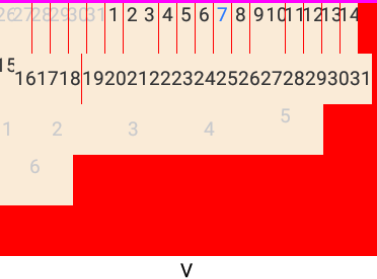
- 占满swiper
实际结果:
- 没有占满
bug描述:
红边是swiper容器的背景,swiper-item里的子view一直无法占满。
更多关于uni-app 在app端nvue文件下swiper-item无法占满swiper的实战教程也可以访问 https://www.itying.com/category-93-b0.html
7 回复

在vue文件模式下是没有问题的。
更多关于uni-app 在app端nvue文件下swiper-item无法占满swiper的实战教程也可以访问 https://www.itying.com/category-93-b0.html




在 nvue 中,swiper-item 默认不会自动撑满父容器 swiper。这是因为 nvue 的布局机制与 Vue 页面不同,它更接近原生渲染,需要显式设置尺寸。
解决方案:
- 为
swiper-item添加样式flex: 1,使其填充swiper的剩余空间。 - 确保
swiper本身有明确的高度(如你已设置的height: 250px)。
修改后的 swiper-item 示例:
<swiper-item style="flex: 1;">
    <view class="days-content">
        <!-- 内容 -->
    </view>
</swiper-item>