




HarmonyOS鸿蒙Next中Navgation的title高度问题
HarmonyOS鸿蒙Next中Navgation的title高度问题
怎么能将标题栏高度设置为扩展到安全区域,就像系统设置那样: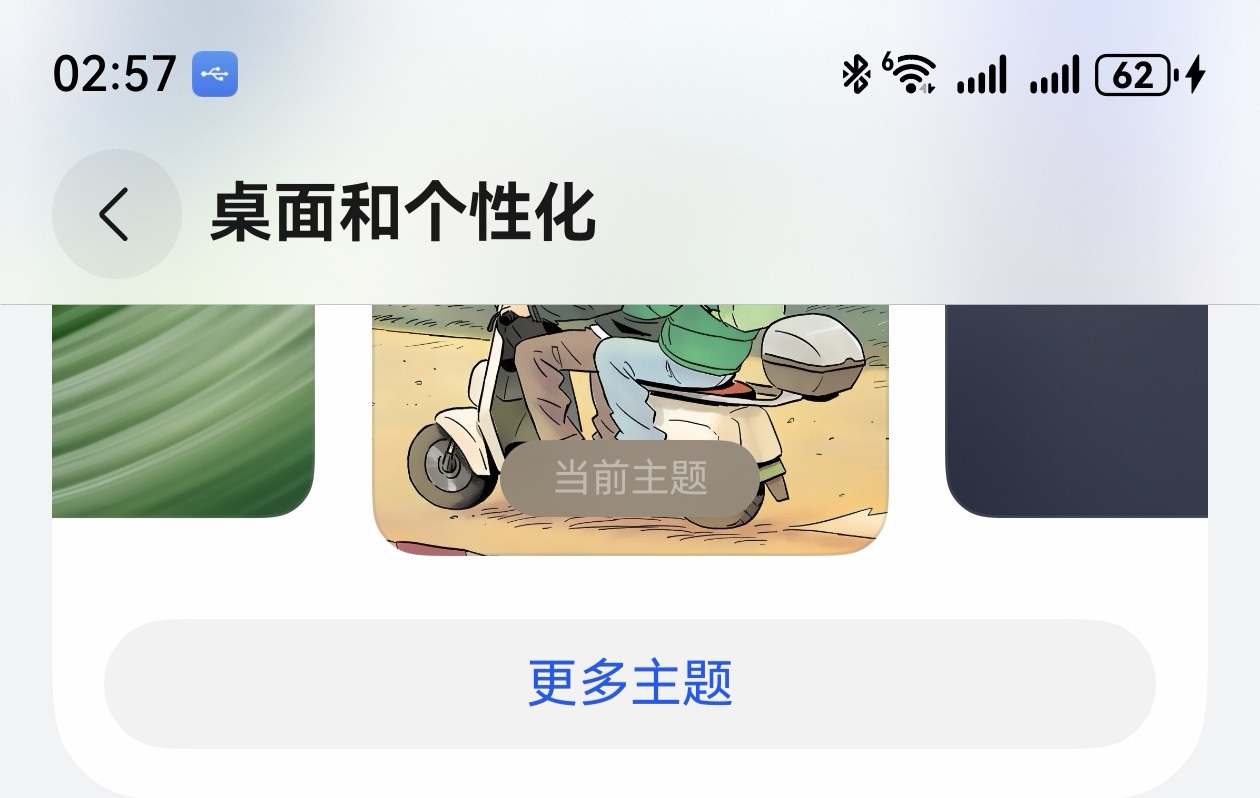 下面是我想尝试的: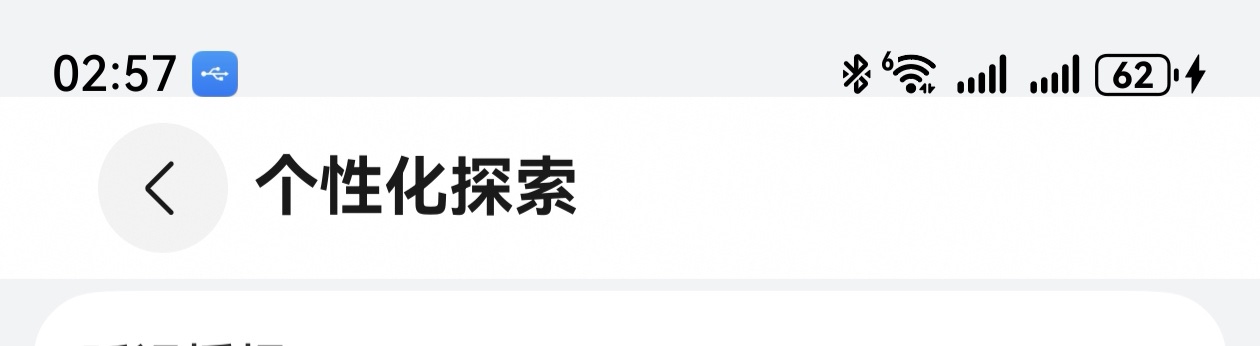
更多关于HarmonyOS鸿蒙Next中Navgation的title高度问题的实战教程也可以访问 https://www.itying.com/category-93-b0.html

尊敬的开发者您好!
Navigation、NavDestination组件都可以自定义title,参考如下代码:
import { window } from '@kit.ArkUI';

@Component
struct PortraitPage {
  @State info: string = '';
  private stack: NavPathStack | undefined = undefined;
  build() {
    NavDestination() {
      Stack({alignContent: Alignment.Center}) {
        Button('...').onClick(() => {
          this.stack?.pushPath({name: ''});
        })
      }.width('100%').height('100%')
    }
    .width('100%').height('100%')
    .title('PortraitPage',{
      backgroundBlurStyle: BlurStyle.COMPONENT_THICK,
      barStyle: BarStyle.STANDARD,
    })
    .preferredOrientation(window.Orientation.PORTRAIT) // 竖屏方向
    .enableStatusBar(true) // 显示状态栏
    .enableNavigationIndicator(true) // 显示导航条
    .backgroundColor('#ffbaece9')
    .onResult((result: ESObject)=>{
      this.info = result as string;
    })
    .onReady((ctx: NavDestinationContext) => {
      this.stack = ctx.pathStack;
    })
  }
}

@Entry
@Component
struct ExamplePage {
  private stack: NavPathStack = new NavPathStack();

  @Builder
  MyPageMap(name: string) {
    if (name === 'portrait') {
      PortraitPage();
      }
  }

  build() {
    Navigation(this.stack) {
      Column(){
        Button("跳转")
          .onClick(()=>{
            this.stack.pushPath({name: "portrait"});
          })
      }
      .width('100%')
      .height('100%')
    }
    .title(
      {
        main: 'NavTitle',
        sub: 'subtitle'
      },
      {
        backgroundBlurStyle: BlurStyle.COMPONENT_THICK,
        barStyle: BarStyle.STANDARD,
      }
    )
    .titleMode(NavigationTitleMode.Mini)
    .width('100%')
    .height('100%')
    .navDestination(this.MyPageMap)
  }
}
title详情请参考官网说明:https://developer.huawei.com/consumer/cn/doc/harmonyos-references/ts-basic-components-navigation#title
更多关于HarmonyOS鸿蒙Next中Navgation的title高度问题的实战系列教程也可以访问 https://www.itying.com/category-93-b0.html
api≥18 在不考虑ohos适配下可以切换成hdsnavigation , ∥伪代码 hdsnavigation(){ //这里大抵是放UI } .titleBar({ avoidLayoutSafeArea:true, content:{ title: {maintitle:‘首页’} } }) .expandSafeArea(),


找HarmonyOS工作还需要会Flutter的哦,有需要Flutter教程的可以学学大地老师的教程,很不错,B站免费学的哦:https://www.bilibili.com/video/BV1S4411E7LY/?p=17
navigation有个ignoreLayoutSafeArea属性,加上.ignoreLayoutSafeArea() 试试。https://developer.huawei.com/consumer/cn/doc/harmonyos-references/ts-basic-components-navigation#ignorelayoutsafearea12,


参加以下代码,给你的容器组件加上expandSafeArea,例如:
Row() {
}

// 设置顶部绘制延伸到状态栏

.expandSafeArea([SafeAreaType.SYSTEM], [SafeAreaEdge.TOP])


在HarmonyOS Next中,Navigation的标题栏高度由系统默认主题控制,开发者无法直接自定义其具体像素值。标题栏高度通常与设备状态栏、导航栏等系统UI元素适配,以确保在不同设备上的一致性。若需调整标题区域布局,可通过自定义标题组件或修改页面整体样式间接影响视觉表现,但无法精确设定标题栏的固定高度值。
在HarmonyOS Next中,要实现Navigation的标题栏(Title Bar)扩展到安全区域(Safe Area)顶部,即实现沉浸式状态栏效果,可以通过配置窗口属性来实现。这通常不是直接设置Navigation组件本身的高度,而是通过调整其所在页面的窗口布局方式。
核心方法是使用window模块的Window类,为当前窗口设置全屏布局,并允许内容延伸到系统栏区域。具体步骤如下:
- 获取当前窗口:在UIAbility的
onWindowStageCreate生命周期中,获取当前窗口对象。 - 设置窗口布局:通过窗口对象的
setWindowLayoutFullScreen方法,设置为true,使窗口使用全屏布局。 - 设置内容延伸:通过
setWindowSystemBarEnable方法,设置系统栏(状态栏、导航栏)为透明并允许内容延伸到其下方。通常需要传递一个数组,例如["status", "navigation"]。 - 调整页面布局:在ArkUI页面中,通常需要为顶部标题栏区域显式设置一个
padding,其值通过getSystemBarHeight获取状态栏高度,以确保标题内容不会被状态栏图标遮挡。
示例代码片段(UIAbility中):
import window from '@ohos.window';

onWindowStageCreate(windowStage: window.WindowStage) {
  // ... 其他代码,如设置页面路径
  windowStage.getMainWindow().then((mainWindow) => {
    // 设置为全屏布局
    mainWindow.setWindowLayoutFullScreen(true);
    // 设置状态栏和导航栏透明,并允许内容延伸
    mainWindow.setWindowSystemBarEnable(["status", "navigation"]);
    // 可选:设置系统栏的深浅色模式
    mainWindow.setWindowSystemBarProperties({
      statusBarColor: '#00000000', // 完全透明
      statusBarContentColor: '#FF000000' // 状态栏图标和文字颜色(例如黑色)
    });
  });
}
在ArkUI页面中:
import { getSystemBarHeight } from '@kit.ArkUI';

@Entry
@Component
struct MyPage {
  private statusBarHeight: number = getSystemBarHeight(window.SystemBarType.STATUS);

  build() {
    Column() {
      // 你的标题栏,通过padding-top预留出状态栏高度
      Column() {
        Text('我的标题')
          .fontSize(20)
          .fontWeight(FontWeight.Bold)
      }
      .width('100%')
      .height(60) // 你期望的标题栏基础高度
      .padding({ top: this.statusBarHeight }) // 关键:加上状态栏高度
      .backgroundColor('#F1F3F5')

      // 页面其他内容
      // ...
    }
    .width('100%')
    .height('100%')
  }
}
关键点:
setWindowLayoutFullScreen(true)是基础,它使窗口布局模式变为全屏。setWindowSystemBarEnable(["status", "navigation"])使得页面内容可以延伸到系统栏区域,同时系统栏保持透明。- 页面UI需要自己通过
padding-top为标题栏留出状态栏高度的空间,这通过getSystemBarHeight(window.SystemBarType.STATUS)获取。这样标题文字就会从状态栏下方开始,达到与系统设置App类似的视觉效果。 - 如果不需要导航栏(底部栏)也透明,可以只传递
["status"]。
通过以上组合配置,即可实现Navigation标题栏扩展到安全区域顶部的效果。
