




HarmonyOS 鸿蒙Next中如何实现聊天中的表情面板
HarmonyOS 鸿蒙Next中如何实现聊天中的表情面板 支持 emoji 表情和图片表情
3 回复

预览效果:
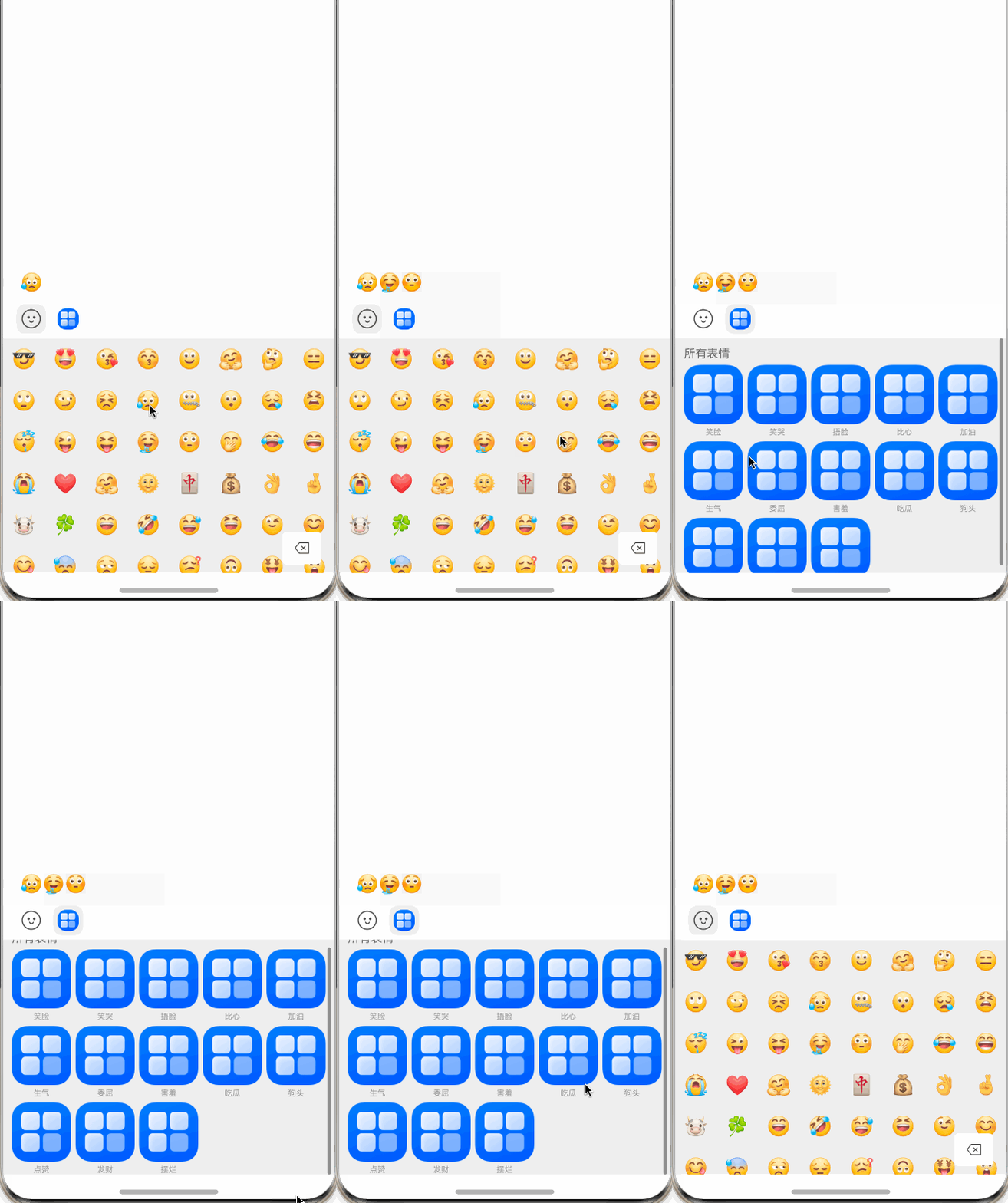
使用 Swiper + Grid 实现表情面板
1、定义懒加载DataSource
export abstract class BaseDataSource<T> implements IDataSource {
  private listeners: DataChangeListener[] = []

  public abstract totalCount(): number

  public abstract getData(index: number): T

  registerDataChangeListener(listener: DataChangeListener): void {
    if (this.listeners.indexOf(listener) < 0) {
      this.listeners.push(listener);
    }
  }

  unregisterDataChangeListener(listener: DataChangeListener): void {
    const pos = this.listeners.indexOf(listener)
    if (pos >= 0) {
      this.listeners.splice(pos, 1);
    }
  }

  notifyDataChangeAll(): void {
    const total = this.totalCount()
    for (let i = 0; i < total; i++) {
      this.notifyDataChange(i)
    }
  }

  notifyDataAdd(index: number, count: number = 1): void {
    this.notifyDatasetChange([{ type: DataOperationType.ADD, index: index, count: count }])
  }

  notifyDataChange(index: number, key?: string): void {
    this.notifyDatasetChange([{ type: DataOperationType.CHANGE, index: index, key: key }])
  }

  notifyDataDelete(index: number, count: number = 1): void {
    this.notifyDatasetChange([{ type: DataOperationType.DELETE, index: index, count: count }])
  }

  notifyDataMove(from: number, to: number): void {
    this.notifyDatasetChange([{ type: DataOperationType.MOVE, index: { from: from, to: to } }])
  }

  notifyDatasetChange(operations: DataOperation[]): void {
    this.listeners.forEach(listener => {
      listener.onDatasetChange(operations);
    })
  }

  notifyDataReload() {
    this.notifyDatasetChange([{ type: DataOperationType.RELOAD }])
  }
}
2、实现emoji表情view
/**
 * @fileName : EmojiView.ets
 * @author : @cxy
 * @date : 2025/12/19
 * @description : emoji 组件
 */
import { BaseDataSource } from "./BaseDataSource";


function emojiList(): string[] {
  return [
    "😎", "😍", "😘", "😚", "🙂", "🤗", "🤔", "😑",
    "🙄", "😏", "😣", "😥", "🤐", "😯", "😪", "😫",
    "😴", "😜", "😝", "🤤", "😳", "🤭", "😂", "😄",
    "😭", "❤️", "🤗", "🌞", "🀄", "💰", "👌", "🤞",
    "🐮", "🍀", "😁", "🤣", "😅", "😆", "😉", "😊",
    "😋", "😓", "😒", "😔", "😕", "🙃", "🤑", "😲",
    "👍", "🙁", "😖", "😤", "😢", "😨", "😩", "😬",
    "😰", "😱", "😵", "😡", "😠", "💪", "🤝", "🤩",
    "🥰", "💝", "🌷", "🌼", "🌻", "🌺", "💯", "🙏",
    "🏆", "🌛", "💣", "🚀", "🎉", "😷", "🤒", "🤕",
    "🤢", "🤧", "😇", "🤠", "🍺", "🌹", "🤡", "🤥",
    "🤓", "😈", "👹", "👺", "💀", "👻", "👽", "🤖",
    "💩", "😾", "😸", "😹", "😻", "😼", "😽", "🙀",
    "😿"
  ]
}

export class EmojiDataSource extends BaseDataSource<string> {
  list: string[] = [];

  public totalCount(): number {
    return this.list.length;
  }

  public getData(index: number): string {
    return this.list[index];
  }

  public initList(data: string[]): void {
    this.list.push(...data);
    this.notifyDataAdd(0, this.list.length)
  }
}

@Component
export default struct EmojiView {
  @Link enableDel: boolean
  onSelect?: (emoji: string) => void
  onDelete?: () => void
  private dataSource: EmojiDataSource = new EmojiDataSource()

  aboutToAppear(): void {
    this.dataSource.initList(emojiList())
  }

  build() {
    Stack() {
      Grid() {
        LazyForEach(this.dataSource, (e: string) => {
          GridItem() {
            Text(e).fontSize(22).textAlign(TextAlign.Center).width('100%').aspectRatio(1)
          }.onClick(() => {
            this.onSelect?.(e)
          })
        })
      }
      .edgeEffect(EdgeEffect.Spring, { alwaysEnabled: true })
      .width('100%')
      .height('100%')
      .cachedCount(16)
      .columnsTemplate('1fr '.repeat(8))
      .maxCount(this.dataSource.totalCount())

      Row() {
        Image($r('app.media.chat_em_del'))
          .width(16)
          .opacity(this.enableDel ? 1 : 0.3)
      }
      .borderRadius(5)
      .backgroundColor('#fff')
      .padding({
        left: 14,
        right: 14,
        top: 12,
        bottom: 12
      })
      .offset({ x: -15, y: -10 })
      .onClick(() => {
        if (this.enableDel) {
          this.onDelete?.()
        }
      })
    }
    .height('100%')
    .width('100%')
    .align(Alignment.BottomEnd)
  }
}
3、实现emotion图片view
/**
 * @fileName : EmotionImage.ets
 * @author : @cxy
 * @date : 2025/12/19
 * @description : 表情图片
 */

import { BaseDataSource } from './BaseDataSource';

export class Emotion {
  name: string = ''
  url: ResourceStr = ''

  constructor(name: string, url: ResourceStr) {
    this.name = name
    this.url = url
  }
}

export class EmotionDataSource extends BaseDataSource<Emotion> {
  list: Emotion[] = [];

  public totalCount(): number {
    return this.list.length;
  }

  public getData(index: number): Emotion {
    return this.list[index];
  }

  public initList(data: Emotion[]): void {
    this.list.push(...data);
    this.notifyDataAdd(0, this.list.length)
  }
}

export const EmotionList: Emotion[] = [
  new Emotion('笑脸', $r('app.media.startIcon')),
  new Emotion('笑哭', $r('app.media.startIcon')),
  new Emotion('捂脸', $r('app.media.startIcon')),
  new Emotion('比心', $r('app.media.startIcon')),
  new Emotion('加油', $r('app.media.startIcon')),
  new Emotion('生气', $r('app.media.startIcon')),
  new Emotion('委屈', $r('app.media.startIcon')),
  new Emotion('害羞', $r('app.media.startIcon')),
  new Emotion('吃瓜', $r('app.media.startIcon')),
  new Emotion('狗头', $r('app.media.startIcon')),
  new Emotion('点赞', $r('app.media.startIcon')),
  new Emotion('发财', $r('app.media.startIcon')),
  new Emotion('摆烂', $r('app.media.startIcon'))
];

@Component
export struct EmotionImage {
  onSend?: (e?: Emotion) => void
  private dataSource: EmotionDataSource = new EmotionDataSource()

  async aboutToAppear(): Promise<void> {
    this.dataSource.initList(EmotionList)
  }

  build() {
    Grid() {
      GridItem() {
        Text('所有表情').fontSize(13).fontColor('#666').width('100%')
      }
      .columnStart(0)
      .columnEnd(this.columnCount() - 1)

      LazyForEach(this.dataSource, (e: Emotion) => {
        GridItem() {
          Column({ space: 4 }) {
            Image(e.url).width('100%').aspectRatio(1)
            Text(e.name).fontSize(9).fontColor('#999').maxLines(1)
          }
          .width('100%')
          .alignItems(HorizontalAlign.Center)
        }
        .onClick(() => {
          this.onSend?.(e)
        })
      })
    }
    .edgeEffect(EdgeEffect.Spring, { alwaysEnabled: true })
    .cachedCount(4)
    .width('100%')
    .height('100%')
    .rowsGap(5)
    .columnsGap(5)
    .columnsTemplate('1fr '.repeat(this.columnCount()))
    .padding({
      top: 10,
      left: 10,
      right: 10
    })
    .maxCount(this.dataSource.totalCount() + 1)
  }

  columnCount(): number {
    return 5
  }
}
4、完成emoji+emotion图片结合
/**
 * @fileName : EmotionImageView.ets
 * @author : @cxy
 * @date : 2025/12/19
 * @description : 表情组件
 */

import EmojiView from './EmojiView'
import { Emotion, EmotionImage } from './EmotionImage'

@Component
export struct EmotionComponent {
  @Link enableSend: boolean
  onSelectEmoji?: (value: string) => void
  onDeleteEmoji?: () => void
  onSendEmotion?: (e?: Emotion) => void
  @State selectedIndex: number = 0
  @Prop emotionHeight: number = 310

  build() {
    Column() {
      Row({ space: 8 }) {
        Image($r('app.media.chatbar_emoji'))
          .width(34)
          .height(34)
          .borderRadius(10)
          .backgroundColor(this.selectedIndex === 1 ? '#fff' : '#eee')
          .padding(6)
          .onClick(() => {
            this.selectedIndex = 0
          })
        Image($r('app.media.startIcon'))
          .width(34)
          .height(34)
          .borderRadius(10)
          .padding(5)
          .backgroundColor(this.selectedIndex === 0 ? '#fff' : '#eee')
          .onClick(() => {
            this.selectedIndex = 1
          })
      }
      .justifyContent(FlexAlign.Start)
      .alignItems(VerticalAlign.Center)
      .width('100%')
      .padding({ left: 15, top: 5, bottom: 5 })
      .backgroundColor('#fff')

      Swiper() {
        EmojiView({
          enableDel: this.enableSend,
          onSelect: this.onSelectEmoji,
          onDelete: this.onDeleteEmoji
        })

        EmotionImage({
          onSend: this.onSendEmotion
        })
      }
      .index(this.selectedIndex)
      .layoutWeight(1)
      .width('100%')
      .indicator(false)
      .loop(false)
      .backgroundColor('#efefef')
      .onChange((index: number) => {
        this.selectedIndex = index
      })
    }
    .alignItems(HorizontalAlign.Start)
    .justifyContent(FlexAlign.Start)
    .width('100%')
    .height(this.emotionHeight)
  }
}
完整的demo
更多关于HarmonyOS 鸿蒙Next中如何实现聊天中的表情面板的实战系列教程也可以访问 https://www.itying.com/category-93-b0.html

在HarmonyOS Next中,实现聊天表情面板主要使用ArkUI组件。核心是Panel组件,它作为滑动面板可以承载表情内容。通常将Panel的type属性设置为PanelType.Foldable,并配合Column或Grid容器来布局表情图标。表情资源建议使用Resource管理,通过Image组件加载显示。可以通过绑定Panel的onChange事件来控制面板的展开与收起状态,实现与输入框的联动。

在HarmonyOS Next中实现聊天表情面板,可通过以下核心步骤完成:
1. UI布局设计
- 使用
TabContent与Tabs组件构建分类切换(如emoji、收藏表情、图片表情)。 - 表情区建议采用
Grid或Flow布局,配合Scroll实现滚动浏览。 - 底部常驻栏可使用
Row或Flex布局放置发送按钮等操作项。
2. 表情资源管理
- Emoji表情:直接使用Unicode字符或系统字体渲染,可通过
Text组件显示。 - 图片表情:将图片资源放入
resources/base/media/目录,通过Image组件加载,建议使用PixelMap处理动态图。 - 资源索引建议使用JSON配置文件管理,便于扩展。
3. 交互与事件处理
- 表情点击事件通过组件
onClick回调实现,返回对应表情的标识符(如Unicode码或图片路径)。 - 支持长按预览(弹窗显示放大表情)和拖拽发送(通过
Gesture组件的拖拽事件实现)。 - 集成输入框联动:选中表情后,通过
TextInput的insert方法插入表情标识符或占位符。
4. 关键代码示例
// 表情面板容器
@Builder
EmojiPanel() {
  Tabs() {
    TabContent() {
      Grid() {
        ForEach(this.emojiList, (item: string) => {
          GridItem() {
            Text(item) // emoji字符
              .onClick(() => {
                this.insertEmoji(item);
              })
          }
        })
      }
    }
    .tabBar('Emoji')

    TabContent() {
      Flow() {
        ForEach(this.imageList, (item: Resource) => {
          FlowItem() {
            Image(item)
              .onClick(() => {
                this.insertImage(item);
              })
          }
        })
      }
    }
    .tabBar('图片')
  }
}
5. 性能优化
- 表情较多时采用懒加载(
LazyForEach)避免内存压力。 - 图片表情使用
Image的缓存机制或预加载。 - 频繁操作时通过状态管理(如
@State)局部更新UI。
6. 扩展功能建议
- 添加表情搜索栏(
Search组件配合过滤逻辑)。 - 支持自定义表情上传(通过
Picker选择图片,使用媒体库接口保存)。 - 集成动效:面板弹出/收起时添加
transition动画提升体验。
注意事项
- 表情标识符需与服务端约定格式(如[emoji]U+1F600[/emoji])。
- 图片表情建议限制单张大小,避免传输负载。
- 多设备适配时,通过
mediaQuery或栅格系统调整面板尺寸。
以上方案可快速构建高可用的表情面板,兼顾性能与扩展性。
