




HarmonyOS 鸿蒙Next中设置背景模糊后,触发UI渲染后,UI界面展示异常
HarmonyOS 鸿蒙Next中设置背景模糊后,触发UI渲染后,UI界面展示异常
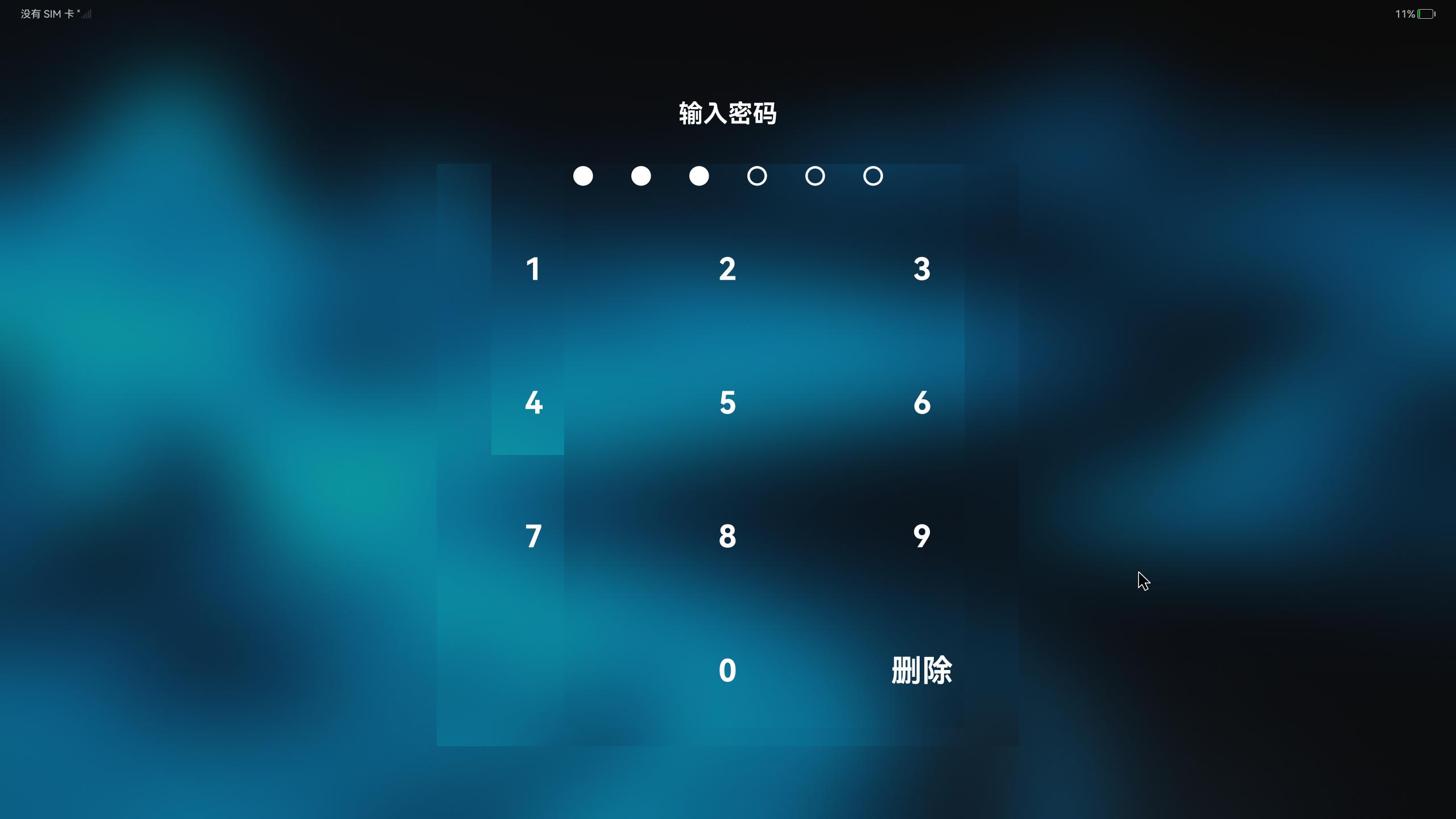
为容器组件设置背景图片和模糊背景后,点击数字,触发UI渲染后,界面会出现图中所示的问题。这个问题已经定位到是因为UI动态渲染导致的,这是为什么呢
更多关于HarmonyOS 鸿蒙Next中设置背景模糊后,触发UI渲染后,UI界面展示异常的实战教程也可以访问 https://www.itying.com/category-93-b0.html

感谢您的提问,为了更快解决您的问题,麻烦请补充以下信息:
复现代码(如最小复现demo);
版本信息(如:开发工具、手机系统版本信息);
更多关于HarmonyOS 鸿蒙Next中设置背景模糊后,触发UI渲染后,UI界面展示异常的实战系列教程也可以访问 https://www.itying.com/category-93-b0.html

无论是使用backgroundBlurStyle,forgroundBlurStyle,Blur,backDropBlur都会有这个问题,那没办法,就只能用effectKit图像效果的API将模糊效果直接写到图片中间去了。这样也能解决这个问题。但是还是不知道为什么在开发板上用上述的那些属性,在界面交互时会出现这个问题

import { promptAction } from '@kit.ArkUI'

@Entry
@Component
struct Index {
  //屏幕宽度
  @StorageProp('screenWidth') screenWidth: number = 0
  @State currentIndex: number = -1//当前点击的密码数字
  @State currentPassword: string[] = []
  build() {
    Column() {
    Column() {
      Column({space: 20}) {
        Text('输入密码')
          .fontSize(this.screenWidth * 0.007)
          .textAlign(TextAlign.Center)
          .width('100%')
          .fontColor(Color.White)
          .fontWeight(FontWeight.Bold)

        Row({space: 8}) {
          ForEach(Array.from({length: 6}),(item: string, index: number) => {
            Row() {

            }
            .width(this.screenWidth * 0.0135)
            .aspectRatio(1)
            .border({width: 2,color: Color.White})
            .borderRadius(this.screenWidth * 0.0135 / 2)
            .backgroundColor(index < this.currentPassword.length ? Color.White : Color.Transparent)
          })
        }
        .padding({left: '11%',right: '11%',top: '5%'})
        .width('100%')
        .justifyContent(FlexAlign.SpaceAround)

        Grid() {
          ForEach(['1','2','3','4','5','6','7','8','9',' ','0','删除'],(item: string,index) => {
            GridItem() {
              Text(item)
                .fontSize(this.screenWidth * 0.02125)
                .fontColor(Color.White)
                .fontWeight(FontWeight.Bold)
                .width(this.screenWidth * 0.0525)
                .height(this.screenWidth * 0.0525)
                .borderRadius(this.screenWidth * 0.0525 / 2)
                .backgroundColor(this.currentIndex === index ?'#25ffffff' : Color.Transparent)
                .textAlign(TextAlign.Center)
                .onTouch((event: TouchEvent) => {
                  if(event.type === TouchType.Down) {//手指按下事件
                    this.currentIndex = index
                  }
                  if(event.type === TouchType.Up) {//手指松开
                    this.currentIndex = -1
                    if(Number(item) >= 0 && Number(item) <= 9 && this.currentPassword.length < 6) {//是数字才添加
                      this.currentPassword.push(item)
                      console.log('当前密码:',this.currentPassword.length)
                    }
                    if(item === '删除' && this.currentPassword.length > 0) {//点击了删除
                      this.currentPassword.pop()
                    }

                    if(this.currentPassword.length === 6) {//6位数密码输入完成
                      //TODO ---> 验证密码
                      promptAction.showToast({
                        message: '密码验证成功'
                      })
                      setTimeout(() => {
                        this.currentPassword = []
                      },500)
                    }
                  }
                })
            }
          })
        }
        .width('100%')
        .columnsTemplate('1fr 1fr 1fr')
        .rowsTemplate('1fr 1fr 1fr 1fr')
      }
      .width('40%')
      .height('70%')
      .margin({top: this.screenWidth * 0.031})
    }
    .width('100%')
    .height('100%')
    .backgroundColor('#9a323030')
    .backgroundBlurStyle(BlurStyle.Thin, { colorMode: ThemeColorMode.DARK, adaptiveColor: AdaptiveColor.DEFAULT, scale: 1.0 })
    .justifyContent(FlexAlign.Start)
    .alignItems(HorizontalAlign.Center)
    }
    .width('100%')
    .height('100%')
    .backgroundImage($r('app.media.default_wallPaper16'))
    .backgroundImageSize(ImageSize.Cover)
    .backgroundImagePosition(Alignment.Center)
    .justifyContent(FlexAlign.SpaceBetween)
  }
}
这就是最简单的demo,在模拟器上运行时就没问题,但是在开发板上运行就会出问题


在HarmonyOS Next中,设置背景模糊后触发UI渲染导致界面异常,通常与渲染管线处理不当有关。可能涉及模糊效果与UI组件的图层叠加或合成顺序错误,导致视觉错乱。建议检查模糊效果的实现方式,确保其与UI渲染逻辑兼容,避免在渲染过程中产生冲突。
在HarmonyOS Next中,为容器组件同时设置背景图片和背景模糊效果后,触发动态UI渲染时出现界面异常,这通常与渲染管线中图层合成顺序及GPU资源管理有关。
核心原因在于:背景模糊(如backgroundBlurStyle)在渲染时会产生独立的离屏渲染层。当UI内容动态更新(如点击触发状态变化)时,系统需要重新计算模糊区域与前景组件的合成关系。若模糊半径较大或组件层级复杂,可能出现:
- 离屏缓冲区未及时同步更新,导致残留图像;
- 图层混合时Alpha通道计算异常;
- 硬件加速渲染路径中纹理绑定延迟。
建议排查:
- 检查模糊样式是否应用在正确的容器层级
- 尝试在动态更新前调用
invalidate()强制重绘 - 考虑使用固定尺寸的模糊遮罩替代实时模糊
可通过DevEco Studio的ArkUI Inspector观察组件边界,确认模糊层与内容层是否重叠异常。
