



HarmonyOS鸿蒙Next中接口有定义,但是还是会报Object literal must correspond to some explicitly declared class or interface (arkts-no-untyped-obj-literals)
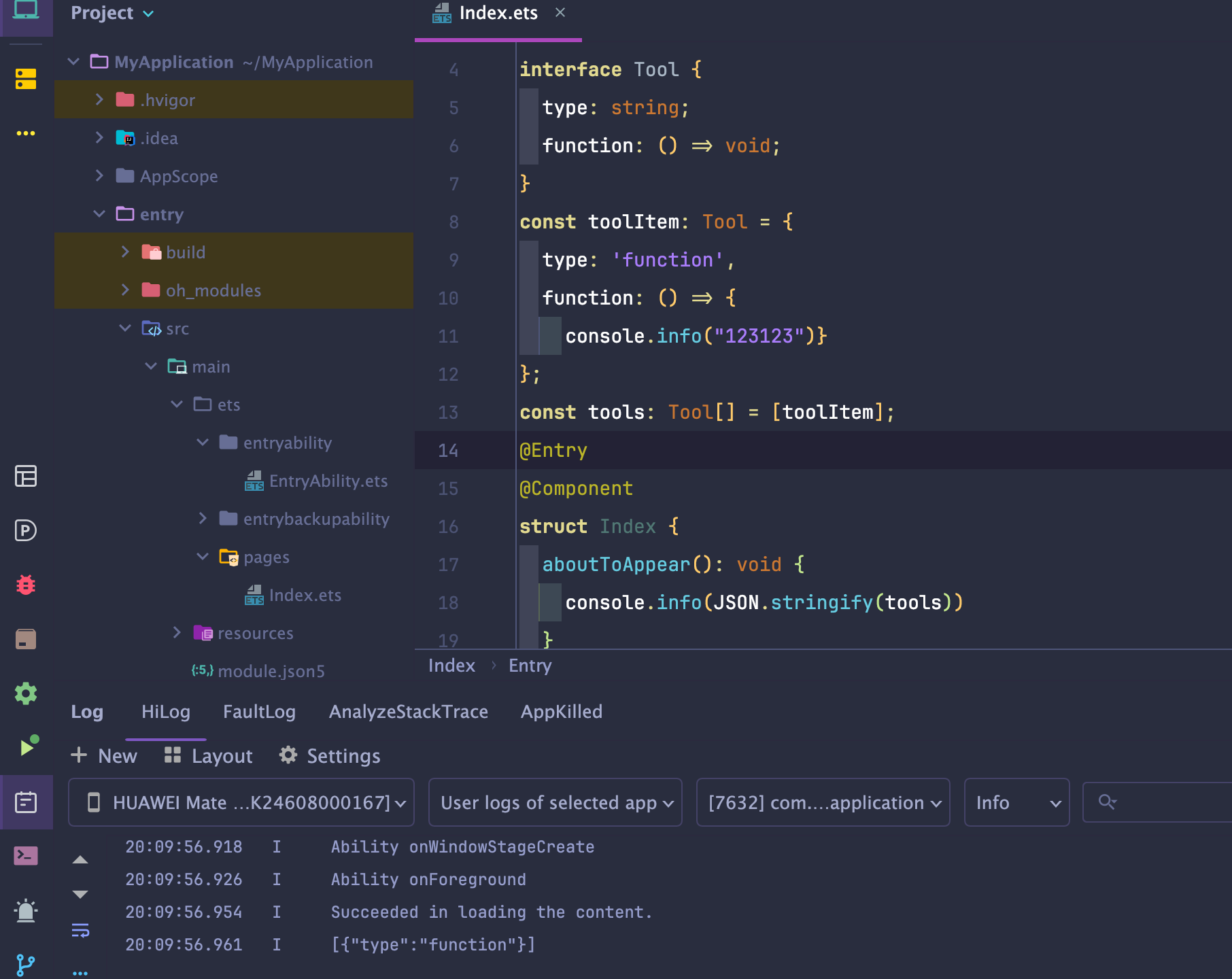
HarmonyOS鸿蒙Next中接口有定义,但是还是会报Object literal must correspond to some explicitly declared class or interface (arkts-no-untyped-obj-literals) 接口定义如下:
interface Tool {
  type: string;
  function: ToolFunction;
}
使用:
const toolItem: Tool = {
  type: 'function',
  function: functionDefinition
};
const tools: Tool[] = [toolItem];
报错:
1 ERROR: 10605038 ArkTS Compiler Error
Error Message: Object literal must correspond to some explicitly declared class or interface (arkts-no-untyped-obj-literals)
死活过不了,AI工具都给整死循环了:
Loop was detected in the model and the request has been interrupted. Please retry or rephrase your input.
DevEco Studio 6.1.0 Release
内部版本号 #6.1.0.830, built on April 17, 2026
Runtime version: 21.0.8+1-b1038.71 amd64 (JCEF 122.1.9)
VM: OpenJDK 64-Bit Server VM by JetBrains s.r.o.
Toolkit: sun.awt.windows.WToolkit
Windows 11.0
GC: G1 Young Generation, G1 Concurrent GC, G1 Old Generation
Memory: 2048M
Cores: 12
Registry:
ds.ide.experimental.ui=true
idea.plugins.compatible.build=IC-243.24978.46
更多关于HarmonyOS鸿蒙Next中接口有定义,但是还是会报Object literal must correspond to some explicitly declared class or interface (arkts-no-untyped-obj-literals)的实战教程也可以访问 https://www.itying.com/category-93-b0.html

这个报错的关键点不是你这层 Tool 接口本身,而是 ArkTS 对对象字面量的限制比 TS 严很多。
结论
你这段:
const toolItem: Tool = {
  type: 'function',
  function: functionDefinition
};
在 TypeScript 里通常没问题,但在 ArkTS 里,对象字面量的每一层都必须能落到“显式声明的 class 或 interface”上。
所以即使 Tool 已经声明了,只要下面任意一层不是 ArkTS 认可的显式类型,还是会报:
Object literal must correspond to some explicitly declared class or interfacearkts-no-untyped-obj-literals
最常见真正原因
通常不是 Tool 有问题,而是下面这些地方有一个没满足 ArkTS 规则:
1. ToolFunction 不是 interface/class
比如你如果是这样定义的:
type ToolFunction = {
  name: string;
  description: string;
}
在 ArkTS 里这种就很容易触发问题。
更稳妥的是改成:
interface ToolFunction {
  name: string;
  description: string;
}
或者直接用 class。
2. functionDefinition 本身是匿名对象字面量
例如你前面如果这么写:
const functionDefinition = {
  name: 'xxx',
  description: 'yyy'
};
即使后面赋给 Tool.function,ArkTS 也可能不认。
要改成:
const functionDefinition: ToolFunction = {
  name: 'xxx',
  description: 'yyy'
};
但如果 ToolFunction 内部还有嵌套对象,嵌套对象也要继续显式声明。
3. ToolFunction 里面还有嵌套匿名对象
例如:
interface ToolFunction {
  name: string;
  parameters: {
    type: string;
    properties: object;
  };
}
这种在 ArkTS 里也容易炸。
要拆开
interface ToolParameters {
  type: string;
  properties: ToolProperties;
}

interface ToolProperties {
  [key: string]: string; // 如果 ArkTS 版本支持这样写
}

interface ToolFunction {
  name: string;
  parameters: ToolParameters;
}
更稳的是继续拆成明确字段,不要大量依赖 object、匿名对象类型、复杂索引签名。
你这里最值得先检查的点
你贴出来的 Tool 这一层其实没毛病。
真正应该去看的是:
ToolFunction是怎么定义的functionDefinition是怎么声明的ToolFunction里面有没有:object- 匿名对象类型
type xxx = { ... }Record<string, any>anyunknown- 联合类型
- 泛型包装对象
这些在 ArkTS 里都很容易引出这个错。
推荐改法 1:全部改成 interface + 显式类型
比如这样:
interface ToolParameters {
  type: string;
}

interface ToolFunction {
  name: string;
  description: string;
  parameters: ToolParameters;
}

interface Tool {
  type: string;
  function: ToolFunction;
}

const functionDefinition: ToolFunction = {
  name: 'demo',
  description: 'demo desc',
  parameters: {
    type: 'object'
  }
};

const toolItem: Tool = {
  type: 'function',
  function: functionDefinition
};

const tools: Tool[] = [toolItem];
如果这里还报错,那基本就说明 parameters 这一层还要继续拆。
推荐改法 2:直接改成 class
ArkTS 对 class 往往最稳。
class ToolParameters {
  type: string = '';

  constructor(type: string) {
    this.type = type;
  }
}

class ToolFunction {
  name: string = '';
  description: string = '';
  parameters: ToolParameters = new ToolParameters('');

  constructor(name: string, description: string, parameters: ToolParameters) {
    this.name = name;
    this.description = description;
    this.parameters = parameters;
  }
}

class Tool {
  type: string = '';
  function: ToolFunction = new ToolFunction('', '', new ToolParameters(''));

  constructor(type: string, func: ToolFunction) {
    this.type = type;
    this.function = func;
  }
}

const functionDefinition = new ToolFunction(
  'demo',
  'demo desc',
  new ToolParameters('object')
);

const toolItem = new Tool('function', functionDefinition);
const tools: Tool[] = [toolItem];
如果你是做模型参数、JSON 结构、工具声明这类数据,ArkTS 下用 class 往往比 type/interface + 对象字面量更省心。
还有一个高频坑
不要用 object
像这种:
interface ToolFunction {
  parameters: object;
}
在 ArkTS 里非常容易埋雷。
建议改成明确接口:
interface ToolParameters {
  type: string;
  properties: string;
}
哪怕先把结构写死,也比 object 稳。
为什么 AI 会给你死循环
因为这是典型的:
- TypeScript 写法没问题
- 但 ArkTS 编译规则更严格
- AI 按 TS 思路一直重复修正
- 没抓到 ArkTS 的核心限制:禁止松散对象字面量/结构类型推导
所以它会一直在“加类型注解”这条路上打转,但真正要改的是:
- 去掉匿名对象类型
- 去掉
type = {}风格 - 去掉
object/any/Record - 必要时直接改
class
你现在可以直接这样排查
按这个顺序看:
ToolFunction是否是interface/classfunctionDefinition是否显式标注为ToolFunctionToolFunction内部是否有匿名对象类型- 是否使用了
object/Record/any - 如果还有报错,直接改成
class
我对你这个 case 的判断
大概率不是这句有问题:
const toolItem: Tool = {
  type: 'function',
  function: functionDefinition
};
而是 ToolFunction 或它内部嵌套字段的定义方式不符合 ArkTS 规则。
更多关于HarmonyOS鸿蒙Next中接口有定义,但是还是会报Object literal must correspond to some explicitly declared class or interface (arkts-no-untyped-obj-literals)的实战系列教程也可以访问 https://www.itying.com/category-93-b0.html


你这个报错 arkts-no-untyped-obj-literals 是说对象字面量的类型推断不够明确。
就是我在你的基础上进行了修改, 你看下直接拿去用就行, 同时 object 这个对象你可以单独在接一个 接口类型 来使用, 就行, 对于 接口类型定义这里 你可以看下 ts 的教程就行 基本上 2-3小时 就差不多了 , 如有帮助给个采纳谢谢
interface ToolFunction {
    name: string;
    description: string;
    parameters: object;
}
interface Tool {
    type: string;
    function: ToolFunction;
}
//  显式标注整个对象为 Tool 类型
const toolItem: Tool = {
    type: 'function',
    function: {
        name: 'getWeather',
        description: '获取天气信息',
        parameters: Object
    } as ToolFunction // 内部对象也要标注
};
@Entry
@Component
struct Test1 {
    @State message: string = 'Hello World';
    @State tools: Tool[] =  [toolItem];

    build() {
        RelativeContainer() {
            Text(this.message)
                .id('Test1HelloWorld')
                .fontSize($r('app.float.page_text_font_size'))
                .fontWeight(FontWeight.Bold)
                .alignRules({
                    center: { anchor: '__container__', align: VerticalAlign.Center },
                    middle: { anchor: '__container__', align: HorizontalAlign.Center }
                })
                .onClick(() => {
                    this.message = 'Welcome';
                })
        }
        .height('100%')
        .width('100%')
    }
}

这个错误通常不是外层 toolItem: Tool 没写类型,而是某个嵌套对象仍然没有明确类型。建议重点看 functionDefinition 的声明,如果它是直接写出来的对象字面量或从 any/ESObject/JSON.parse 来的,需要显式标成 ToolFunction。另外如果 ToolFunction 里声明的是方法签名,例如 foo(): string,ArkTS 对对象字面量不友好,建议改成函数属性:foo: () => string。可以先这样收敛:const functionDefinition: ToolFunction = { … },再 const toolItem: Tool = { type: ‘function’, function: functionDefinition }。


该错误是ArkTS的严格类型检查规则所致:对象字面量必须显式声明类或接口类型。即使接口已定义,仍需在变量声明时标注类型,例如 let obj: MyInterface = { ... },或使用 as MyInterface 进行类型断言。

