




HarmonyOS鸿蒙Next中想封装一下下拉刷新上拉加载。语法没报错,但是运行报错了
HarmonyOS鸿蒙Next中想封装一下下拉刷新上拉加载。语法没报错,但是运行报错了 1、我封装的PullRefresh
@Component
export struct PullRefresh{
  items : Object[] = []
  refresh : (refresh : boolean)=>void = (refresh : boolean)=>{}

  @BuilderParam itemBuilder: (item: object, index: number) => void;
  @State canLoad: boolean = false;
  @State isLoading: boolean = false;
  @State refreshing: boolean = false;
  @State refreshOffset: number = 0;
  @State refreshState: RefreshStatus = RefreshStatus.Inactive;

  @Builder
  refreshBuilder() {
    Stack({ alignContent: Alignment.Bottom }) {
      // 可以通过刷新状态控制是否存在Progress组件
      // 当刷新状态处于下拉中或刷新中状态时Progress组件才存在
      if (this.refreshState != RefreshStatus.Inactive && this.refreshState != RefreshStatus.Done) {
        Progress({ value: this.refreshOffset, total: 64, type: ProgressType.Ring })
          .width(32).height(32)
          .style({ status: this.refreshing ? ProgressStatus.LOADING : ProgressStatus.PROGRESSING })
          .margin(10)
      }
    }
    .clip(true)
    .height("100%")
    .width("100%")
  }

  @Builder
  footer() {
    Row() {
      LoadingProgress().height(32).width(48)
      Text("加载中")
    }.width("100%")
    .height(64)
    .justifyContent(FlexAlign.Center)
    // 当不处于加载中状态时隐藏组件
    .visibility(this.isLoading ? Visibility.Visible : Visibility.Hidden)
  }


  build() {
    Refresh({ refreshing: $$this.refreshing, builder: this.refreshBuilder() }) {
      List() {
        ForEach(this.items, this.itemBuilder)
        ListItem() {
          this.footer();
        }
      }
      .onScrollIndex((start: number, end: number) => {
        // 当达到列表末尾时,触发新数据加载
        if (this.canLoad && end >= this.items.length - 1) {
          this.canLoad = false;
          this.isLoading = true;

          this.refresh(false);
        }
      })
      .onScrollFrameBegin((offset: number, state: ScrollState) => {
        // 只有当向上滑动时触发新数据加载
        if (offset > 5 && !this.isLoading) {
          this.canLoad = true;
        }
        return { offsetRemain: offset };
      })
      .scrollBar(BarState.Off)
      // 开启边缘滑动效果
      .edgeEffect(EdgeEffect.Spring, { alwaysEnabled: true })
    }
    .layoutWeight(1)
    .onOffsetChange((offset: number) => {
      this.refreshOffset = offset;
    })
    .onStateChange((state: RefreshStatus) => {
      this.refreshState = state;
    })
    .onRefreshing(()=>{
      this.refresh(true);
    })
  }
}
2、在page中调用:
import { hilog } from '@kit.PerformanceAnalysisKit';
import { PullRefresh } from './pull_refresh';

@Entry
@Component
struct Refresh_page {
  @State items : string[] = ["1", "2", "", "", "2", "", "", "2", "", ""];

  @State refreshing: boolean = false;
  @State refreshOffset: number = 0;
  @State refreshState: RefreshStatus = RefreshStatus.Inactive;
  @State canLoad: boolean = false;
  @State isLoading: boolean = false;


  build() {
    Column(){
      Text("电梯信息")
        .fontSize(16)
        .fontColor(0x1a1a1a)
        .height(40)
        .onAppear(()=>{
          hilog.info(0x000, "TAGGG", "组件显示", "")
        })
      PullRefresh({
        items : this.items,
        refresh : this.getDate,
        itemBuilder : this.buildItem
      })
    }
    .width('100%')
    .height('100%')
    .background(0xf5f5f5)
  }

  @Builder
  buildItem(item : object, index : number){
    ListItem(){
      Column(){
        Text(){
          Span(index + ".")
            .fontSize(14)
            .fontColor(0x1a1a1a)
            .fontWeight(FontWeight.Bold)
          Span("标题1111")
            .fontSize(14)
            .fontColor(0x1a1a1a)
        }

        Text("编号:28495")
          .fontSize(14)
          .fontColor(0x808080)
          .margin({top :10})
        Text("单位:科技公司")
          .fontSize(14)
          .fontColor(0x808080)
          .margin({top :5})
        Text("品牌:斯达克")
          .fontSize(14)
          .fontColor(0x808080)
          .margin({top :5})
      }
      .width('calc(100% - 20vp)')
      .alignItems(HorizontalAlign.Start)
      .background(Color.White)
      .borderRadius(8)
      .padding(10)
    }
    .width('100%')
    .padding(10)
  }

  getDate(refresh : boolean){
    setTimeout(()=>{
      if (refresh) {
        this.items = [];
        for (let index = 0; index < 10; index++) {
          this.items.push("index === " + index);
        }
      }else {
        for (let index = this.items.length; index < this.items.length + 10; index++) {
          this.items.push("index === " + index);
        }
      }
    }, 3000)
  }
}
3、语法没有报错,当我尝试运行时,出现以下错误。
hvigor ERROR: Error Code: 00308018 Unknown Error
Cannot read properties of null (reading ‘kind’)
COMPILE RESULT:FAIL {ERROR:1 WARN:6}
- Try the following:
This error is unknown, view the detailed error logs in the ‘.hvigor > outputs > build-logs’ directory in the project directory for analysis, or contact the developer’s official website for help.
More info: https://developer.huawei.com/consumer/cn/doc/harmonyos-faqs/faqs-compiling-and-building
- Try:
Run with --stacktrace option to get the stack trace.
Run with --debug option to get more log output.
hvigor ERROR: BUILD FAILED in 5 s 748 ms
以上!有没有高手指正一下?难道我这种思路不可取吗?或者思路没问题,但是写法上有问题?
更多关于HarmonyOS鸿蒙Next中想封装一下下拉刷新上拉加载。语法没报错,但是运行报错了的实战教程也可以访问 https://www.itying.com/category-93-b0.html

问题点:
- @BuilderParam itemBuilder 没有初始化 @BuilderParam 要用一个 @Builder 方法初始化。
- ArkTS 本身推荐具体类型,不建议这种宽泛对象类型。你这个示例里实际就是字符串列表,object / Object[] 这种类型别用在这里,直接写成 string[] 和 string。
- refresh: this.getDate 会丢失父组件的 this,子组件里再调用 this.refresh(false) 时,函数内部的 this 已经不是父页面了。这个即便编过去,后面也很容易出运行时问题。要改成箭头函数包一层。
- 你的加载更多循环有逻辑 bug,这里会越 push 越长,条件也跟着变,可能导致死循环,因为 this.items.length 在循环过程中一直增长。应该先缓存起始长度。
- 建议在请求结束后把 refreshing 和 isLoading 复位。
优化点:
- @BuilderParam 给默认 @Builder
- 用具体类型 string
- 回调用箭头函数
- 数据更新用整体重新赋值,不要原地 push。
示例代码:
@Component
export struct PullRefresh {
  @Prop items: string[] = []
  onRequest: (isRefresh: boolean) => Promise<void> = async (_isRefresh: boolean) => {}

  [@Builder](/user/Builder)
  defaultItemBuilder(_item: string, _index: number) {
  }

  [@BuilderParam](/user/BuilderParam) itemBuilder: (item: string, index: number) => void = this.defaultItemBuilder

  @State canLoad: boolean = false
  @State isLoading: boolean = false
  @State refreshing: boolean = false
  @State refreshOffset: number = 0
  @State refreshState: RefreshStatus = RefreshStatus.Inactive

  [@Builder](/user/Builder)
  refreshBuilder() {
    Stack({ alignContent: Alignment.Bottom }) {
      if (this.refreshState !== RefreshStatus.Inactive && this.refreshState !== RefreshStatus.Done) {
        Progress({ value: this.refreshOffset, total: 64, type: ProgressType.Ring })
          .width(32)
          .height(32)
          .style({ status: this.refreshing ? ProgressStatus.LOADING : ProgressStatus.PROGRESSING })
          .margin(10)
      }
    }
    .clip(true)
    .height('100%')
    .width('100%')
  }

  [@Builder](/user/Builder)
  footer() {
    Row() {
      LoadingProgress().height(32).width(48)
      Text('加载中')
    }
    .width('100%')
    .height(64)
    .justifyContent(FlexAlign.Center)
    .visibility(this.isLoading ? Visibility.Visible : Visibility.Hidden)
  }

  build() {
    Refresh({ refreshing: $$this.refreshing, builder: this.refreshBuilder() }) {
      List() {
        ForEach(this.items, (item: string, index: number) => {
          this.itemBuilder(item, index)
        }, (item: string, index: number) => item + '_' + index)

        ListItem() {
          this.footer()
        }
      }
      .onScrollIndex((start: number, end: number) => {
        if (this.canLoad && !this.isLoading && end >= this.items.length - 1) {
          this.canLoad = false
          this.isLoading = true

          this.onRequest(false).finally(() => {
            this.isLoading = false
          })
        }
      })
      .onScrollFrameBegin((offset: number, state: ScrollState) => {
        if (offset > 5 && !this.isLoading) {
          this.canLoad = true
        }
        return { offsetRemain: offset }
      })
      .scrollBar(BarState.Off)
      .edgeEffect(EdgeEffect.Spring, { alwaysEnabled: true })
    }
    .layoutWeight(1)
    .onOffsetChange((offset: number) => {
      this.refreshOffset = offset
    })
    .onStateChange((state: RefreshStatus) => {
      this.refreshState = state
    })
    .onRefreshing(() => {
      this.refreshing = true
      this.onRequest(true).finally(() => {
        this.refreshing = false
      })
    })
  }
}
页面调用:
import { hilog } from '@kit.PerformanceAnalysisKit'
import { PullRefresh } from './pull_refresh'

@Entry
@Component
struct Refresh_page {
  @State items: string[] = ['1', '2', '', '', '2', '', '', '2', '', '']

  build() {
    Column() {
      Text('电梯信息')
        .fontSize(16)
        .fontColor(0x1a1a1a)
        .height(40)
        .onAppear(() => {
          hilog.info(0x000, 'TAGGG', '组件显示', '')
        })

      PullRefresh({
        items: this.items,
        onRequest: async (refresh: boolean) => {
          await this.getData(refresh)
        },
        itemBuilder: (item: string, index: number) => {
          this.buildItem(item, index)
        }
      })
    }
    .width('100%')
    .height('100%')
    .backgroundColor(0xf5f5f5)
  }

  [@Builder](/user/Builder)
  buildItem(item: string, index: number) {
    ListItem() {
      Column() {
        Text() {
          Span(index + '.')
            .fontSize(14)
            .fontColor(0x1a1a1a)
            .fontWeight(FontWeight.Bold)
          Span('标题1111')
            .fontSize(14)
            .fontColor(0x1a1a1a)
        }

        Text('编号:28495')
          .fontSize(14)
          .fontColor(0x808080)
          .margin({ top: 10 })

        Text('单位:科技公司')
          .fontSize(14)
          .fontColor(0x808080)
          .margin({ top: 5 })

        Text('品牌:斯达克')
          .fontSize(14)
          .fontColor(0x808080)
          .margin({ top: 5 })
      }
      .width('calc(100% - 20vp)')
      .alignItems(HorizontalAlign.Start)
      .backgroundColor(Color.White)
      .borderRadius(8)
      .padding(10)
    }
    .width('100%')
    .padding(10)
  }

  async getData(refresh: boolean): Promise<void> {
    await new Promise<void>((resolve) => {
      setTimeout(() => {
        if (refresh) {
          let newItems: string[] = []
          for (let index = 0; index < 10; index++) {
            newItems.push('index === ' + index)
          }
          this.items = newItems
        } else {
          let start: number = this.items.length
          let newItems: string[] = [...this.items]
          for (let index = start; index < start + 10; index++) {
            newItems.push('index === ' + index)
          }
          this.items = newItems
        }
        resolve()
      }, 3000)
    })
  }
}
更多关于HarmonyOS鸿蒙Next中想封装一下下拉刷新上拉加载。语法没报错,但是运行报错了的实战系列教程也可以访问 https://www.itying.com/category-93-b0.html

(个_个)。
封装的思路(适用一般设计):
我能提供哪些功能给使用者:下拉刷新,上拉加载。
我要做事前需要使用者给我哪些条件:要展示的数组数据,和列表项布局。
我做事时要调用者帮我做哪些事情及做的情况:获取新或更多数据。我要监听,要调用者回调。
事做完,我要做收尾善后,有时还要同步结果给调用者。
你的组件内部使用 @State isLoading: boolean = false来管理上拉加载的状态,但在 onScrollIndex触发加载后,isLoading被设置为 true,组件未提供任何机制让外部数据加载完成后重置该状态。这会导致加载指示器一直显示,且无法再次触发加载更多吧。
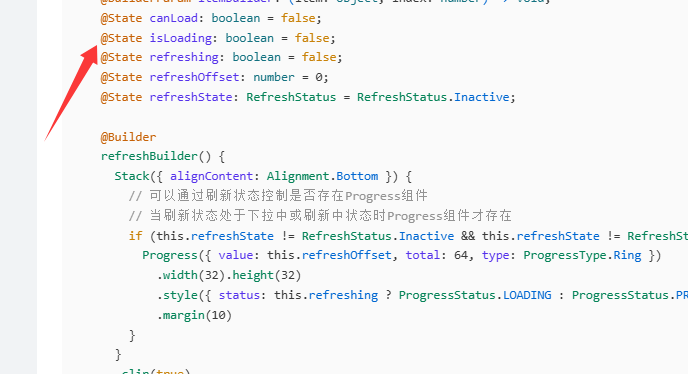
建议将 isLoading改为 @Link或 @Prop装饰器,由父组件通过绑定变量控制其状态。父组件在数据加载完成后,将绑定变量设为 false即可重置。或者,在组件内暴露一个回调函数(如 onLoadComplete),供父组件在数据加载完成后调用,内部自动重置 isLoading和 canLoad状态。
第二个:forEach组件需要三个参数:数据源数组、项目构建函数、以及一个为每个数组项生成唯一字符串键值的函数。你的代码只提供了前两个。缺少键值函数会导致框架无法正确识别列表项的身份,从而在数据变更(如刷新、加载更多)时无法高效更新UI,严重时会出现内容错乱
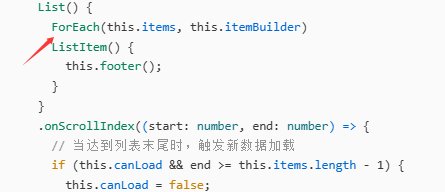
  // ForEach 必须传3个参数
          ForEach(
            this.items,
            (item: string, index: number) => {
              ListItem() {
                this.itemBuilder(item, index)
              }
            },
            (item: string, index: number) => index.toString()
          )
还有这个items : Object[] = []使用 Object类型过于宽泛,在 ArkTS 严格类型检查下可能导致编译警告或运行时类型错误。建议使用具体类型或泛型。

在HarmonyOS Next中封装下拉刷新上拉加载时,运行报错常见原因:使用了不兼容的API(如旧版scroll组件而非List+Refresh),或未正确绑定onRefresh/onLoadMore回调。另外,数据更新后未通过this.state触发观察机制也会导致崩溃。请检查组件层级、生命周期与API版本是否匹配。
错误在于 ForEach 不能直接接受 @BuilderParam 作为第二个参数,编译器内部因此抛出空指针异常。修改方法:在 ForEach 的尾随闭包中调用 this.itemBuilder。
修正关键代码(PullRefresh 的 build 方法内):
ForEach(this.items, (item: Object, index: number) => {
  this.itemBuilder(item, index)
})
完整调整后的 PullRefresh 核心部分如下(其余不变):
build() {
  Refresh({ refreshing: $$this.refreshing, builder: this.refreshBuilder() }) {
    List() {
      ForEach(this.items, (item: Object, index: number) => {
        this.itemBuilder(item, index)
      })
      ListItem() {
        this.footer()
      }
    }
    // ... 其余保持不变
  }
}
原因说明:
ForEach 要求第二个参数是 (item: any, index: number) => void 类型的尾随闭包或 @Builder 函数引用,而 @BuilderParam 是一种特殊的动态插槽,无法直接作为 ForEach 的参数引用,需要显式包装调用。上述写法即通过匿名函数间接调用,可消除编译期的空引用错误。
