




HarmonyOS 鸿蒙Next横向文案单选组件,这个是什么组件?
HarmonyOS 鸿蒙Next横向文案单选组件,这个是什么组件?
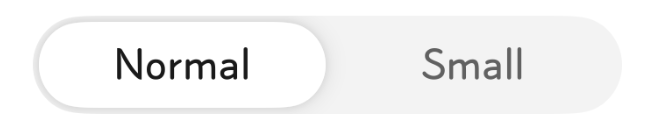
这个是什么组件?单选,椭圆部分有个横向滑动动画。
更多关于HarmonyOS 鸿蒙Next横向文案单选组件,这个是什么组件?的实战教程也可以访问 https://www.itying.com/category-93-b0.html
3 回复

核心代码示例(单选胶囊样式)
typescript
运行
@Entry
@Component
struct SegmentButtonExample {
  @State selectedIndex: number = 0; // 默认选中 Normal

  build() {
    Column({ space: 20 }) {
      SegmentButton({
        items: [
          { text: 'Normal' },
          { text: 'Small' }
        ],
        selectedIndex: this.selectedIndex,
        mode: SegmentButtonMode.NORMAL // 胶囊型单选模式
      })
      .onChange((index: number) => {
        this.selectedIndex = index;
        console.log('选中项索引:', index);
      })
      .width(300)
    }
    .padding(20)
  }
}
官方文档链接
更多关于HarmonyOS 鸿蒙Next横向文案单选组件,这个是什么组件?的实战系列教程也可以访问 https://www.itying.com/category-93-b0.html

在 HarmonyOS Next 中,横向文案单选组件指 RadioGroup 配合 Radio 实现,通过设置 orientation('Horizontal') 使选项横向排列。也可使用 Select 组件,其弹出菜单支持横向文案单选。

