




HarmonyOS 鸿蒙Next中用 '@ohos.request' 去上传一个 50M 的视频, 注册了 'progress' 进度监听. 但该回调只在上传完成后调用一次. 不应该是多次回调吗?

开发者您好,使用UploadAndDownLoad的demo未复现,使用on(‘progress’)订阅上传任务进度事件,事件预计1s回调1次,如果文件较小,上传会很快完成。 示例代码参考UploadAndDownLoad 通过示例代码中的environment目录的hfs工具即可构建本地服务器,使用hfs工具构建服务器请确保开发设备与本地环境处于同一网络下,详细操作参考上传下载应用服务器使用说明 文件上传以及上传回调逻辑实现:
class Upload {
  private config: request.agent.Config = {
    action: request.agent.Action.UPLOAD,
    headers: HEADER,
    url: '文件服务器的地址',
    mode: request.agent.Mode.FOREGROUND,
    method: 'POST',
    title: 'upload',
    network: request.agent.Network.ANY,
    data: [],
    token: UPLOAD_TOKEN
  }
  private context: common.UIAbilityContext | undefined = undefined;
  private uploadTask: request.agent.Task | undefined = undefined;
  progressCallback: Function | undefined = undefined;
  completedCallback: Function | undefined = undefined;
  failedCallback: Function | undefined = undefined;

  async uploadFiles(fileUris: Array<string>, callback: (progress: number, isSucceed: boolean) => void): Promise<void> {
    // ...
    try {
      this.uploadTask = await request.agent.create(context, this.config);
      this.uploadTask.on('progress', this.progressCallback = (progress: request.agent.Progress) => {
        console.info(TAG, `progress,  progress = ${progress.processed} ${progress.state}`);
        let processed = Number(progress.processed.toString()).valueOf();
        let size = progress.sizes[0];
        let process: number = Math.floor(processed / size * 100);
        if (process < 100) {
          callback(process, false);
        }
      });
      this.uploadTask.on('completed', this.completedCallback = (progress: request.agent.Progress) => {
        console.info(TAG, `complete,  progress = ${progress.processed} ${progress.state}`);
        callback(100, true);
        this.cancelTask();
      });
      this.uploadTask.on('failed', this.failedCallback = async (progress: request.agent.Progress) => {
        if (this.uploadTask) {
          let taskInfo = await request.agent.touch(this.uploadTask.tid, UPLOAD_TOKEN);
          console.error(TAG, `fail,  resean = ${taskInfo.reason}, faults = ${JSON.stringify(taskInfo.faults)}`);
        }
        callback(100, false);
        this.cancelTask();
      });
      await this.uploadTask.start();
    } catch (err) {
      console.error(TAG, `task  err, err  = ${JSON.stringify(err)}`);
      callback(100, false);
    }
    // ...
  }
}
更多关于HarmonyOS 鸿蒙Next中用 '@ohos.request' 去上传一个 50M 的视频, 注册了 'progress' 进度监听. 但该回调只在上传完成后调用一次. 不应该是多次回调吗?的实战系列教程也可以访问 https://www.itying.com/category-93-b0.html


您好,按照提供的demo测试120M+的MP4文件progress回调次数,会出现以下报错
begin 1 upload tid 120114688 index 0 sizes 132619240
120114688 response 413 Payload Too Large
task 120114688 failed
cb progress 120114688
upload progress: 64715/132619240
send 120114688 Fail
run_count:0
cb failed 120114688
当前定位是文件太大会导致对端返回413,麻烦排查一下服务端是否有什么具体限制


on(‘progress’) 正常不是只能完成时回一次,但它有几个容易踩的条件。先确认拿到 UploadTask 后立即注册 progress,不要等上传已经快结束;应用要保持前台,官方说明后台场景为功耗考虑不支持持续 progress 回调;调试时也尽量不要在 progress 回调里打断点。
另外 50M 在局域网或本机服务上可能很快传完,系统合并回调后看起来像只回了一次。建议用限速服务或较慢网络验证,再同时监听 complete/fail,并打印 uploadedSize、totalSize。如果你需要完全可控的实时进度条,且上传必须在前台交互完成,也可以考虑用 http 流式上传自己统计已写入字节。

你的应用在后台吗?
官方 API 文档明确说明:当应用处于后台时,为满足功耗性能要求,不支持调用此接口进行回调。如果上传过程中应用被切到后台(如用户按 Home 键、切换到其他应用),on(‘progress’)回调将被系统暂停,直到应用回到前台后,系统仅回调一次最终进度。
另外如果在DevEco Studio 断点调试的话
如果在 on(‘progress’)或 on(‘complete’)回调上设置了断点,会导致回调行为异常,表现为只触发一次。这是 IDE 调试器与异步回调机制冲突导致的。

参考一下下面的代码:
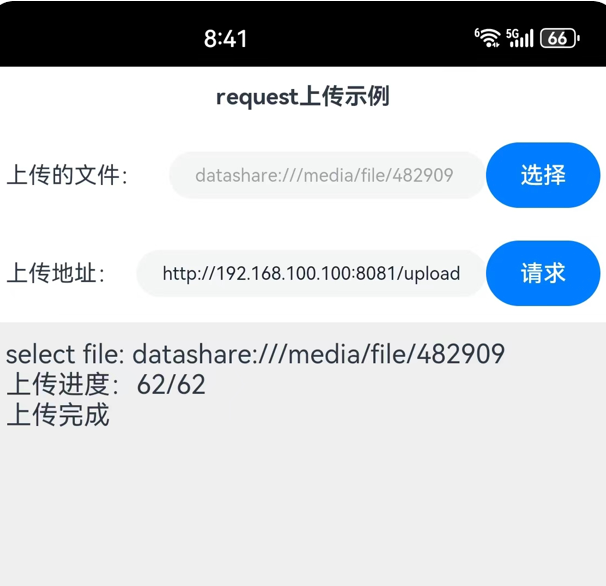
import http from '@ohos.net.http';
import util from '@ohos.util';
import fs from '@ohos.file.fs';
import picker from '@ohos.file.picker';
import systemDateTime from '@ohos.systemDateTime';
import request from '@ohos.request';

@Entry
@Component
struct Index {
  //连接、通讯历史记录
  @State msgHistory: string = ''
  //上传地址
  @State uploadUrl: string = "http://192.168.100.100:8081/upload"
  //要上传的文件
  @State uploadFilePath: string = ""
  //是否允许上传
  @State canUpload: boolean = false
  scroller: Scroller = new Scroller()

  build() {
    Row() {
      Column() {
        Text("request上传示例")
          .fontSize(14)
          .fontWeight(FontWeight.Bold)
          .width('100%')
          .textAlign(TextAlign.Center)
          .padding(10)

        Flex({ justifyContent: FlexAlign.Start, alignItems: ItemAlign.Center }) {
          Text("上传的文件:")
            .fontSize(14)
            .width(100)
            .flexGrow(0)

          TextInput({ text: this.uploadFilePath })
            .enabled(false)
            .width(100)
            .fontSize(11)
            .flexGrow(1)

          Button("选择")
            .onClick(() => {
              this.selectFile()
            })
            .width(70)
            .fontSize(14)
        }
        .width('100%')
        .padding(10)

        Flex({ justifyContent: FlexAlign.Start, alignItems: ItemAlign.Center }) {
          Text("上传地址:")
            .fontSize(14)
            .width(80)
            .flexGrow(0)

          TextInput({ text: this.uploadUrl })
            .onChange((value) => {
              this.uploadUrl = value
            })
            .width(110)
            .fontSize(11)
            .flexGrow(1)

          Button("请求")
            .onClick(() => {
              this.uploadFile()
            })
            .enabled(this.canUpload)
            .width(70)
            .fontSize(14)
            .flexGrow(0)
        }
        .width('100%')
        .padding(10)

        Scroll(this.scroller) {
          Text(this.msgHistory)
            .textAlign(TextAlign.Start)
            .padding(10)
            .width('100%')
            .backgroundColor(0xeeeeee)
        }
        .align(Alignment.Top)
        .backgroundColor(0xeeeeee)
        .height(300)
        .flexGrow(1)
        .scrollable(ScrollDirection.Vertical)
        .scrollBar(BarState.On)
        .scrollBarWidth(20)
      }
      .width('100%')
      .justifyContent(FlexAlign.Start)
      .height('100%')
    }
    .height('100%')
  }

  //上传文件
  async uploadFile() {
    let context = getContext(this)
    let segments = this.uploadFilePath.split('/')
    //文件名称
    let fileName = segments[segments.length-1]

    //计划复制到的目标路径
    let realUri = context.cacheDir + "/" + fileName

    //复制选择的文件到沙箱cache文件夹
    try {
      let file = await fs.open(this.uploadFilePath);
      fs.copyFileSync(file.fd, realUri)
    } catch (err) {
      this.msgHistory += 'err.code : ' + err.code + ', err.message : ' + err.message;
    }

    let uploadTask: request.UploadTask
    let uploadConfig: request.UploadConfig = {
      url: this.uploadUrl,
      header: { 'Accept': '*/*' },
      method: "POST",
      files: [{ filename: fileName, name: fileName, uri: `internal://cache/${fileName}`, type: "txt" }],
      data: [],
    };

    try {
      request.uploadFile(context, uploadConfig).then((data) => {
        uploadTask = data;
        uploadTask.on("progress", (size, tot) => {
          this.msgHistory += `上传进度:${size}/${tot}\r\n`
        })
        uploadTask.on("complete", () => {
          this.msgHistory += "上传完成\r\n"
        })
      }).catch((e) => {
        this.msgHistory += "请求失败:" + e.message + "\r\n"
      })
    } catch (err) {
      this.msgHistory += 'err.code : ' + err.code + ', err.message : ' + err.message;
    }
  }

  //选择文件,为简单起见,选择一个不太大的文本文件
  selectFile() {
    let documentPicker = new picker.DocumentViewPicker();
    documentPicker.select().then((result) => {
      if (result.length > 0) {
        this.uploadFilePath = result[0]
        this.msgHistory += "select file: " + this.uploadFilePath + "\r\n";
        this.canUpload = true
      }
    }).catch((e) => {
      this.msgHistory += 'DocumentViewPicker.select failed ' + e.message + "\r\n";
    });
  }
}


在鸿蒙Next中,@ohos.request 的上传进度回调 progress 采用“事件触发”模式。对于50M视频,实际网络传输中底层HTTP写操作可能一次性完成(如使用Transfer-Encoding: chunked且支持TCP快速发送),导致进度事件仅在上传结束前触发一次。若需分段进度,应确认文件分片上传或使用request.uploadFile的onprogress方法替代。
