




HarmonyOS鸿蒙Next中使用@ohos.net.http库发起网络请求时返回结果为string类型如何转为object类型
HarmonyOS鸿蒙Next中使用@ohos.net.http库发起网络请求时返回结果为string类型如何转为object类型 【问题描述】:使用 @ohos.net.http 这个库发起网络请求。 发现返回结果,可能不是我期望的 object type, 而是 string 类型,需要我手动转成 object 类型。
【问题现象】:使用 @ohos.net.http 这个库发起网络请求。 发现返回结果,可能不是我期望的 object type, 而是 string 类型,需要我手动转成 object 类型。
【版本信息】:不涉及
【复现代码】:暂无
【尝试解决方案】:暂无
更多关于HarmonyOS鸿蒙Next中使用@ohos.net.http库发起网络请求时返回结果为string类型如何转为object类型的实战教程也可以访问 https://www.itying.com/category-93-b0.html

可以参考Android还是iOS上面处理接口返回数据的方式处理:新增泛型T的方式传入进去。
以下是伪代码,仅供参考:
import { http } from '@kit.NetworkKit'; // 假设HTTP模块路径

// 泛型封装示例
async function request<T>(url: string): Promise<T> {
  const response = await http.createHttp().request(url);
  return JSON.parse(response.result) as T; // 将响应解析为泛型类型
}

// 使用示例
interface UserData {
  id: number;
  name: string;
}

request<UserData>('https://api.example.com/user/1')
  .then(data => console.log(data.name)); // 类型安全访问
更多关于HarmonyOS鸿蒙Next中使用@ohos.net.http库发起网络请求时返回结果为string类型如何转为object类型的实战系列教程也可以访问 https://www.itying.com/category-93-b0.html

httpRequest.request(
  'https://api.example.com/data',
  {
    method: http.RequestMethod.GET,
    expectDataType: http.HttpDataType.OBJECT // 声明期望对象类型
  },
  (err, response) => {
    if (!err) {
      const jsonData = response.result; // 直接获取对象
    }
  }
);
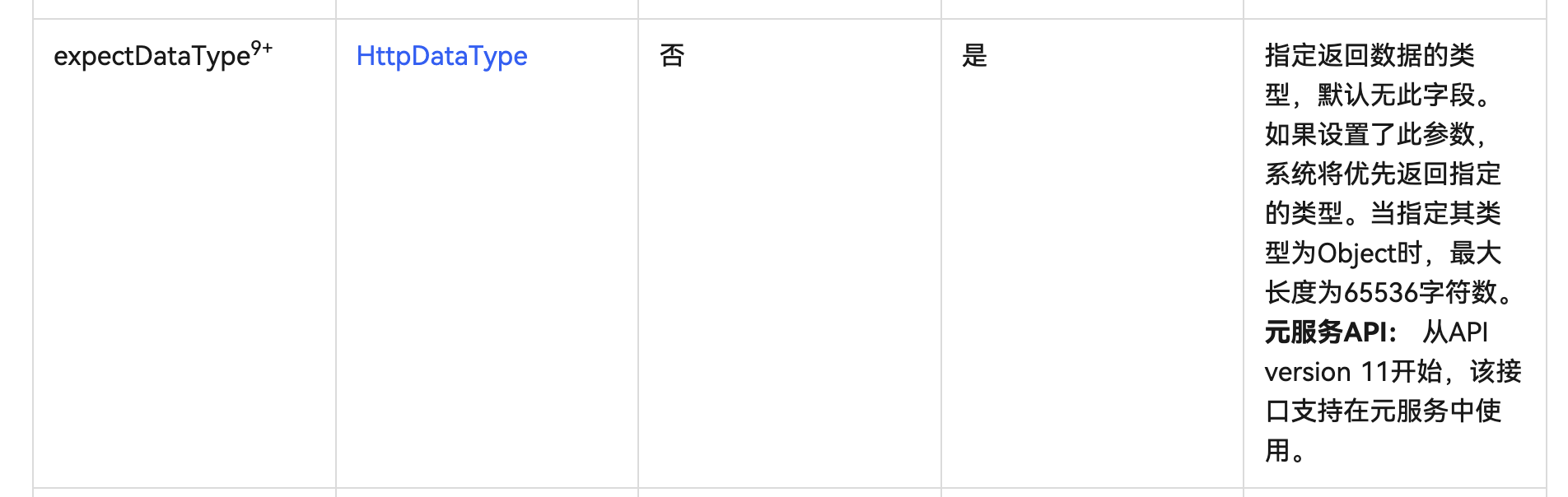
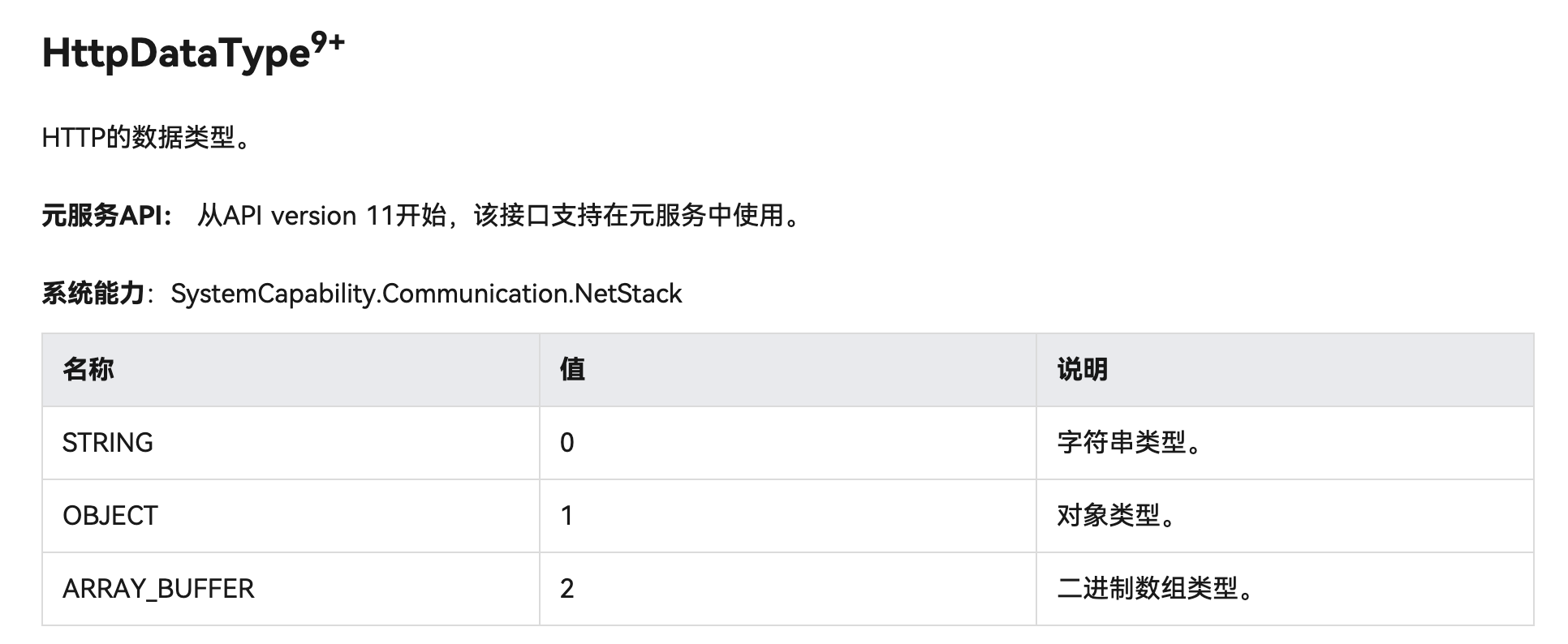
参考地址
https://developer.huawei.com/consumer/cn/doc/harmonyos-references/js-apis-http#httprequestoptions

使用JSON.parse()方法将string转为object。示例:
let response = '{"code":200,"data":{}}';
let obj = JSON.parse(response);
注意处理解析异常,使用try-catch包裹。

在HarmonyOS Next中,[@ohos](/user/ohos).net.http库的HttpResponse返回的result字段类型为string或ArrayBuffer,这是API的默认设计。当服务器返回JSON格式数据时,你需要手动将其解析为对象。
解决方案:
-
使用
JSON.parse()方法: 这是最直接的方式,将result字符串解析为JavaScript对象。import http from '[@ohos](/user/ohos).net.http'; let httpRequest = http.createHttp(); let url = 'https://example.com/api/data'; httpRequest.request(url, { method: http.RequestMethod.GET, }).then((response) => { if (response.responseCode === 200) { // 将string类型的result解析为object let data = JSON.parse(response.result as string); console.log('Parsed data:', data); } else { console.error('Request failed with code:', response.responseCode); } }).catch((err) => { console.error('Request error:', err); }); -
错误处理: 解析JSON时需捕获可能的语法错误。
try { let data = JSON.parse(response.result as string); } catch (error) { console.error('JSON parse error:', error); } -
类型安全(TypeScript): 在TypeScript中,可以定义接口来确保类型正确。
interface ApiResponse {
  code: number;
  message: string;
  data: any;
}

let parsedData: ApiResponse = JSON.parse(response.result as string);
注意事项:
- 确保服务器返回的是有效的JSON字符串,否则
JSON.parse()会抛出异常。 - 如果响应是其他格式(如XML),需使用对应的解析方法。
- 网络请求是异步操作,解析逻辑应放在Promise链或回调函数中。
这种方式是标准的JSON数据处理,与Web开发中的fetch或XMLHttpRequest处理方式一致。
