




HarmonyOS鸿蒙Next中AttributeModifier与AttributeUpdater区别及源码使用DEMO
HarmonyOS鸿蒙Next中AttributeModifier与AttributeUpdater区别及源码使用DEMO
AttributeModifier与AttributeUpdater区别及源码使用DEMO

一、结论
鸿蒙ArkUI中AttributeModifier和AttributeUpdater均用于组件属性动态配置,核心差异在于更新机制与适用场景:
AttributeModifier是基础属性设置接口,主打多状态样式封装、共享UI样式、小批量属性更新,需绑定@State状态变量触发UI更新。
AttributeUpdater继承自AttributeModifier,主打属性直通更新、大批量属性修改、组件构造入参变更,可绕过@State机制直接触发UI更新,解决Modifier大批量修改的性能损耗问题。
二、代码实现和详细解释
1、通过基础示例分别实现AttributeModifier(多状态样式+小批量更新)和AttributeUpdater(直通更新+大批量修改+构造入参变更),直观对比两者的使用方式和更新机制。
import { AttributeUpdater } from '@ohos.arkui.modifier'

/**
 * AttributeUpdater定义
 */
class MyButtonUpdate extends AttributeUpdater<ButtonAttribute> {
  // 首次绑定时触发initializeModifier方法,进行属性初始化
  initializeModifier(instance: ButtonAttribute): void {
    instance
      .width('50%')
      .height(30)

  }
}

/**
 * AttributeModifier定义
 */
class MyButtonModifier implements AttributeModifier<ButtonAttribute> {
  isDark: boolean = false

  applyNormalAttribute(instance: ButtonAttribute): void {
    if (this.isDark) {
      instance.backgroundColor(Color.Blue)
    } else {
      instance.backgroundColor(Color.Red)
    }
  }
}

@Entry
@Component
struct Index {
  // AttributeUpdater 虽然继承于AttributeModifier需要使用,但是自带更新属性的能力
  update: MyButtonUpdate = new MyButtonUpdate();

  // AttributeModifier需要使用[@State](/user/State)进行数据绑定,控件才能支持动态更新。
  // [@State](/user/State) modifier: MyButtonModifier = new MyButtonModifier();

  build() {
    Row() {
      Column() {
        Button("Button")
          // .attributeModifier(this.modifier)
          .attributeModifier(this.update)
          .onClick(() => {
            // this.modifier.isDark = !this.modifier.isDark

            // 通过attribute,直接修改组件属性,并立即触发组件属性更新
            this.update.attribute?.width('100%').fontSize(52);
          })
      }
      .width('100%')
    }
    .height('100%')
  }
}
注意: AttributeModifier:属性支持范围不支持入参为 CustomBuilder 或 Lamda 表达式的属性,且不支持手势,事件仅支持部分特定事件。
AttributeUpdater:updateConstructorParams 当前只支持 Button、Image、Text 和 Span 组件,且不支持深浅色切换等状态管理相关的操作。
DEMO源码效果:
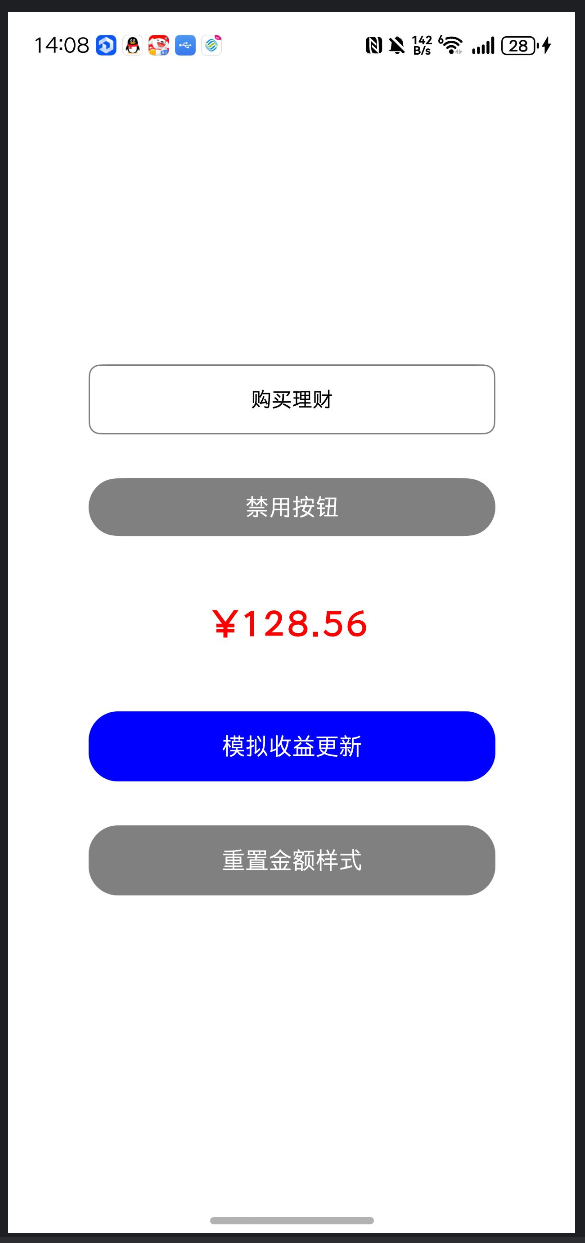
// ==================== AttributeModifier 实现(多状态+小批量更新) ====================
import { AttributeUpdater } from '@kit.ArkUI';

/**
 * 自定义Modifier:适配按钮多状态样式(普通/按下/禁用),小批量属性更新
 */
class FinanceButtonModifier implements AttributeModifier<ButtonAttribute> {
  // 控制样式切换的状态(需绑定[@State](/user/State)才能动态更新)
  isDarkMode: boolean = false;

  // 普通状态样式(理财按钮默认样式)
  applyNormalAttribute(instance: ButtonAttribute): void {
    instance
      .fontSize(this.isDarkMode ? 16 : 14)
      .fontColor(this.isDarkMode ? Color.White : Color.Black)
      .backgroundColor(this.isDarkMode ? Color.Blue : Color.White)
      .borderRadius(8)
      .borderWidth(1)
      .borderColor(Color.Grey);
  }

  // 按下状态样式(理财按钮点击反馈)
  applyPressedAttribute(instance: ButtonAttribute): void {
    instance
      .backgroundColor(this.isDarkMode ? Color.Red : Color.Grey[200])
      .fontSize(this.isDarkMode ? 15 : 13);
  }

  // 禁用状态样式(理财按钮不可点击)
  applyDisabledAttribute(instance: ButtonAttribute): void {
    instance
      .backgroundColor(Color.Grey[300])
      .fontColor(Color.Grey[500])
      .fontSize(14);
  }
}

// ==================== AttributeUpdater 实现(直通更新+大批量修改) ====================
/**
 * 自定义Updater:适配文本大批量属性更新+构造入参修改(理财金额展示)
 */
class FinanceTextUpdater extends AttributeUpdater<TextAttribute, TextInterface> {
  // 首次绑定组件时初始化样式(仅执行一次)
  initializeModifier(instance: TextAttribute): void {
    instance
      .fontSize(20)
      .fontColor(Color.Black)
      .fontWeight(FontWeight.Normal)
      .textAlign(TextAlign.Center)
      .letterSpacing(1)
      .lineHeight(24);
  }

  // 正常态属性更新(大批量样式配置)
  applyNormalAttribute(instance: TextAttribute): void {
    instance
      .fontSize(20)
      .fontColor(Color.Black)
      .fontWeight(FontWeight.Normal);
  }

  // 自定义方法:批量更新理财金额文本样式(直通更新)
  updateFinanceStyle(isProfit: boolean) {
    // 通过attribute直接获取组件属性实例,无需[@State](/user/State)触发更新
    if (this.attribute) {
      this.attribute
        .fontSize(isProfit ? 24 : 20)
        .fontColor(isProfit ? Color.Red : Color.Green)
        .fontWeight(isProfit ? FontWeight.Bold : FontWeight.Normal)
        .letterSpacing(isProfit ? 2 : 1)
        .lineHeight(isProfit ? 28 : 24);
    }
  }
}

// ==================== 页面组件(对比使用) ====================
@Entry
@Component
struct AttrTestPage {
  // Modifier需绑定[@State](/user/State)才能动态更新
  [@State](/user/State) btnModifier: FinanceButtonModifier = new FinanceButtonModifier();
  // Updater无需[@State](/user/State),直接实例化即可
  textUpdater: FinanceTextUpdater = new FinanceTextUpdater();
  [@State](/user/State) isBtnDisabled: boolean = false;

  build() {
    Column({ space: 30 }) {
      // ---------- AttributeModifier 使用示例(理财操作按钮) ----------
      Button("购买理财")
        .attributeModifier(this.btnModifier)
        .enabled(!this.isBtnDisabled) // 控制禁用状态
        .width('80%')
        .height(48)
        .onClick(() => {
          // Modifier需修改实例属性+依赖[@State](/user/State)触发更新
          this.btnModifier.isDarkMode = !this.btnModifier.isDarkMode;
        });

      Button(this.isBtnDisabled ? '启用按钮' : '禁用按钮')
        .width('80%')
        .height(40)
        .backgroundColor(Color.Grey)
        .fontColor(Color.White)
        .onClick(() => {
          this.isBtnDisabled = !this.isBtnDisabled;
        });

      // ---------- AttributeUpdater 使用示例(理财金额展示) ----------
      Text("¥0.00")
        .attributeModifier(this.textUpdater)
        .width('80%')
        .height(60);

      Button("模拟收益更新")
        .width('80%')
        .height(48)
        .backgroundColor(Color.Blue)
        .fontColor(Color.White)
        .onClick(() => {
          // Updater直通更新:1. 批量修改样式 2. 修改构造入参(文本内容)
          this.textUpdater.updateFinanceStyle(true);
          this.textUpdater.updateConstructorParams("¥128.56"); // 修改Text内容
        });

      Button("重置金额样式")
        .width('80%')
        .height(48)
        .backgroundColor(Color.Grey)
        .fontColor(Color.White)
        .onClick(() => {
          this.textUpdater.updateFinanceStyle(false);
          this.textUpdater.updateConstructorParams("¥0.00");
        });
    }
    .width('100%')
    .height('100%')
    .justifyContent(FlexAlign.Center)
    .padding(20);
  }
}
三、引用资料地址
1、AttributeModifier官方文档:https://developer.huawei.com/consumer/cn/doc/harmonyos-references/ts-universal-attributes-attribute-modifier#attributemodifier 2、AttributeUpdater官方文档:https://developer.huawei.com/consumer/cn/doc/harmonyos-references/js-apis-arkui-attributeupdater
更多关于HarmonyOS鸿蒙Next中AttributeModifier与AttributeUpdater区别及源码使用DEMO的实战系列教程也可以访问 https://www.itying.com/category-93-b0.html

AttributeModifier用于自定义组件属性修改器,通过重写applyNormalAttribute方法实现属性值的动态计算和设置。AttributeUpdater是属性更新接口,通过实现update方法响应属性变化并执行更新逻辑。两者区别在于:Modifier关注属性值的生成逻辑,Updater关注属性变化时的行为响应。
源码DEMO:
// AttributeModifier示例
class MyModifier extends AttributeModifier<number> {
  applyNormalAttribute() {
    return this.attribute.value * 2;
  }
}

// AttributeUpdater示例
class MyUpdater implements AttributeUpdater<number> {
  update(attribute: Attribute<number>) {
    console.log('属性更新:', attribute.value);
  }
}

AttributeModifier和AttributeUpdater是HarmonyOS Next中用于管理组件属性动态更新的两个关键接口,主要区别在于更新机制和适用场景。
核心区别:
- AttributeModifier:属性修改器,通过创建新属性对象实现完全替换式更新,适用于需要整体重置属性的场景。
- AttributeUpdater:属性更新器,通过增量修改现有属性对象实现局部更新,适用于仅需调整部分属性的场景。
源码使用示例:
// 1. AttributeModifier 示例 - 完全替换属性
class ColorModifier implements AttributeModifier<TextAttribute> {
  private newColor: ResourceColor

  constructor(color: ResourceColor) {
    this.newColor = color
  }

  applyNormalAttribute(instance: TextAttribute): TextAttribute {
    // 创建新属性对象并完全替换
    return new TextAttribute({
      ...instance,
      fontColor: this.newColor  // 整体更新颜色属性
    })
  }
}

// 使用方式
Text("Hello HarmonyOS")
  .attributeModifier(new ColorModifier(Color.Red))

// 2. AttributeUpdater 示例 - 增量更新属性
class FontSizeUpdater implements AttributeUpdater<TextAttribute> {
  private sizeDelta: number

  constructor(delta: number) {
    this.sizeDelta = delta
  }

  updateAttribute(instance: TextAttribute): void {
    // 直接修改现有属性对象
    instance.fontSize = instance.fontSize + this.sizeDelta
  }
}

// 使用方式
Text("Hello HarmonyOS")
  .attributeUpdater(new FontSizeUpdater(2))
性能对比:
- AttributeModifier每次更新创建新对象,内存开销较大但状态管理清晰
- AttributeUpdater直接修改现有对象,内存效率更高但需注意状态同步
选择建议:
- 需要完全重置属性状态时使用AttributeModifier
- 仅需调整个别属性值时使用AttributeUpdater
- 频繁更新的场景优先考虑AttributeUpdater以获得更好性能
两者都支持链式调用,可根据实际需求灵活组合使用,实现精细化的属性管理。
