




HarmonyOS鸿蒙Next中如何使用Canvas绘制自定义图形和动画?
HarmonyOS鸿蒙Next中如何使用Canvas绘制自定义图形和动画? 我想创建一个自定义的仪表盘组件,显示实时的数据变化,比如一个速度表或者进度环。我应该如何使用Canvas来绘制自定义图形?如何实现动态的绘制效果?

实现思路
- Canvas绘图思路:
初始化画布:在onReady回调中获取绘图上下文
分层绘制:先绘制背景,再绘制前景,最后绘制动态元素
坐标系理解:Canvas使用左上角为原点的坐标系
状态管理:通过状态变量控制绘图内容的变化
- 动画实现策略:
缓动函数:通过数学公式实现平滑的动画效果
状态更新:动画过程中更新状态变量,触发重绘
性能优化:避免不必要的重绘,清理动画资源
- 组件化设计:
属性配置:通过@Prop传递组件配置参数
方法暴露:提供公共方法供外部调用
生命周期管理:在aboutToDisappear中清理资源
事件处理:通过回调函数处理用户交互
- 绘图技巧:
路径绘制:使用beginPath()开始新路径
样式设置:分别设置填充样式和描边样式
文字绘制:注意文字对齐和基线设置
颜色计算:根据数值动态计算颜色
使用场景
Canvas适用于需要自定义绘制的各种场景,比如对于数据可视化中的图表、仪表盘、进度条,再比如对于动画效果中粒子效果、波形动画等等。
实现效果
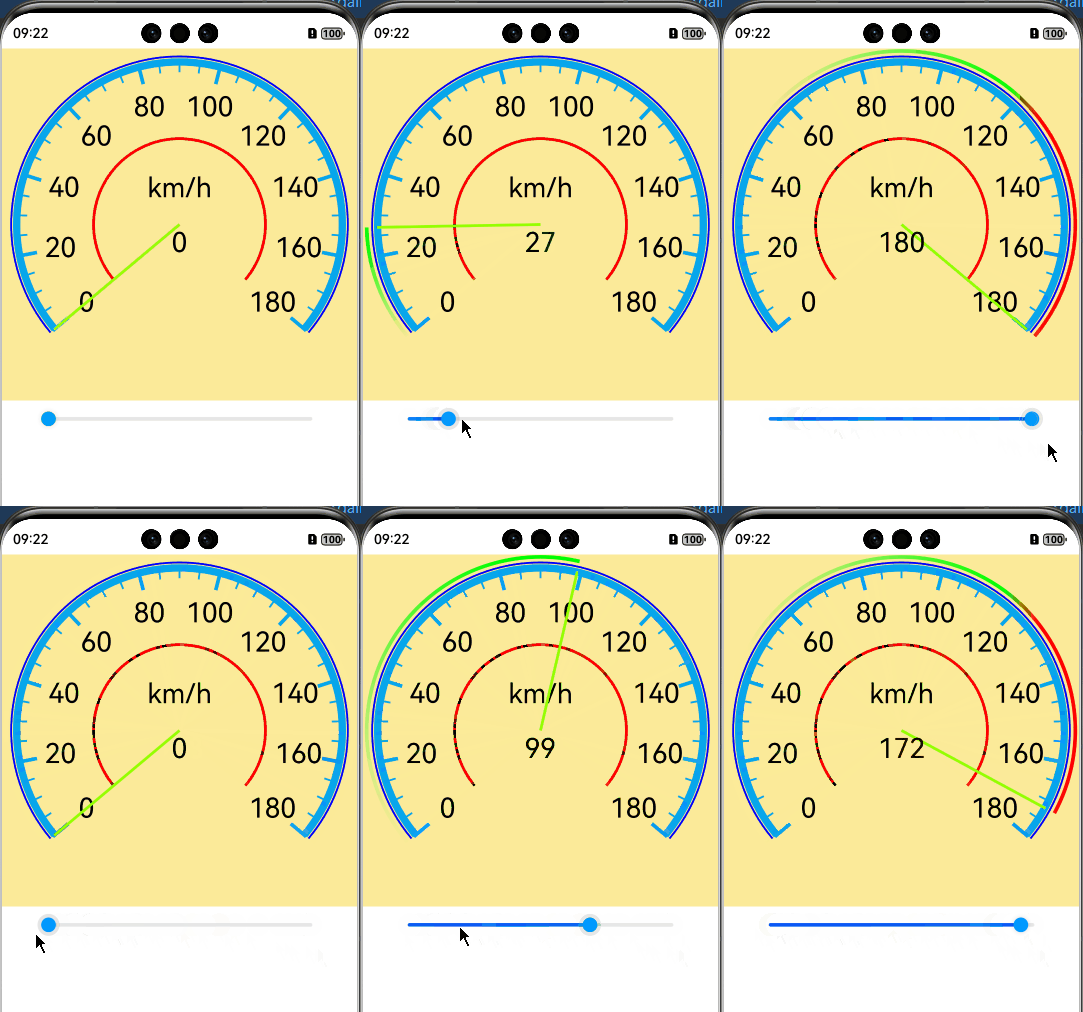
完整代码
@Entry
@ComponentV2
struct CanvasTest {
  private settings: RenderingContextSettings = new RenderingContextSettings(true);
  private context: CanvasRenderingContext2D = new CanvasRenderingContext2D(this.settings);
  private context2: CanvasRenderingContext2D = new CanvasRenderingContext2D(this.settings);
  private context3: CanvasRenderingContext2D = new CanvasRenderingContext2D(this.settings);
  @Local centerX: number = 0
  @Local centerY: number = 0
  @Local currentSpeed: number = 0
  @Local angle: number = 0
  @Local startAngle:number= Math.PI * 140 / 180   //弧线的起始弧度
  @Local endAngle:number= Math.PI * 40 / 180   //弧线的起始弧度

  //绘制渐变外环
  draw(){
    this.context3.clearRect(0,0,2*this.centerX,2*this.centerX)
    this.context3.beginPath()
    let grad = this.context3.createLinearGradient(this.getStartX(), this.getStartY(), this.getEndX(), this.getEndY())
    grad.addColorStop(0, '#0000ff00')
    grad.addColorStop(0.9, '#00ff00')
    if (this.currentSpeed>120) {
      grad.addColorStop(1, '#ff0000')
    }else {
      grad.addColorStop(1, '#00ff00')
    }
    this.context3.strokeStyle = grad;
    this.context3.lineWidth = 4;
    this.context3.arc(this.centerX, this.centerY, this.centerX - 4, this.startAngle, Math.PI * (140+(this.currentSpeed * 260 / 180) ) / 180)
    this.context3.stroke()
  }

  build() {
    Column() {
      Stack() {
        Canvas(this.context)
          .width('100%')
          .height('100%')
          .backgroundColor("#fceb99")
          .onReady(() => {
            //绘制外环
            this.context.beginPath()
            this.context.strokeStyle = '#0000ff';
            this.context.lineWidth = 2;
            this.context.arc(this.centerX, this.centerY, this.centerX - 10, this.startAngle, this.endAngle)
            this.context.stroke()
            //绘制内环
            this.context.beginPath()
            this.context.strokeStyle = '#07A6EC';
            this.context.lineWidth = 8;
            this.context.arc(this.centerX, this.centerY, this.centerX - 16, this.startAngle,  this.endAngle)
            this.context.stroke()
            //绘制刻度
            this.context.save()
            this.context.translate(this.centerX, this.centerY);
            this.context.rotate(Math.PI * 50 / 180)
            for (let i = 0; i <= 36; i++) {
              if (i % 4 == 0) {
                this.context.beginPath()
                this.context.lineWidth = 4;
                this.context.strokeStyle = '#07A6EC';
                this.context.moveTo(0, this.centerY - 34);
                this.context.lineTo(0, this.centerY - 12);
                this.context.stroke();
              } else {
                this.context.beginPath()
                this.context.lineWidth = 2;
                this.context.strokeStyle = '#07A6EC';
                this.context.moveTo(0, this.centerY - 26);
                this.context.lineTo(0, this.centerY - 12);
                this.context.stroke();
              }
              this.context.rotate(Math.PI * (260 / 36) / 180)
            }
            this.context.restore()
            //绘制数字
            this.context.save()
            this.context.translate(this.centerX, this.centerY);
            for (let i = 0; i < 10; i++) {
              // 转换为弧度
              const radians = (140 + i * (260 / 9)) * Math.PI / 180;
              // 计算坐标
              const x = (this.centerY - 60) * Math.cos(radians);
              const y = (this.centerY - 60) * Math.sin(radians);
              this.context.textAlign = 'center'
              this.context.textBaseline = 'middle'
              this.context.font = '30vp sans-serif'
              this.context.fillText(i * 20 + '', x, y)
            }
            //绘制中间单位
            this.context.textAlign = 'center'
            this.context.textBaseline = 'middle'
            this.context.font = '30vp sans-serif'
            this.context.fillText('km/h', 0, -40)
            this.context.restore()
            //绘制红色圆环
            this.context.translate(0, 0);
            this.context.beginPath()
            this.context.strokeStyle = Color.Red;
            this.context.lineWidth = 3;
            this.context.arc(this.centerX, this.centerY, this.centerX - 100, this.startAngle,  this.endAngle)
            this.context.stroke()
          })
        Canvas(this.context3)
          .width('100%')
          .height('100%')

        Canvas(this.context2)
          .width('100%')
          .height('100%')
          .onReady(() => {
            this.context2.beginPath()
            this.context2.lineWidth = 3;
            this.context2.strokeStyle = "#95ff00";
            this.context2.moveTo(this.centerX, this.centerY)
            this.context2.lineTo(this.centerX, 14)
            this.context2.stroke()
          })
          .rotate({ centerX: this.centerX, centerY: this.centerY, angle: this.cacleAngle() })

        Text(this.currentSpeed + '').fontColor(Color.Black).fontSize(30).offset({ y: 20 })

      }.height('50%').width('100%')
      .onSizeChange((oldValue: SizeOptions, newValue: SizeOptions) => {
        this.centerX = (newValue.width as number) / 2
        this.centerY = (newValue.height as number) / 2
      })

      Slider({
        value: this.currentSpeed,
        min: 0,
        max: 180,
        step: 1,
      })
        .width('80%')
        .blockColor("#0099ff")//设置滑块的颜色
        .onChange((value: number, mode: SliderChangeMode) => {
          this.currentSpeed = value
        })
    }
  }

  cacleAngle(): number {
    this.draw();
    // (当前速度/最大速度180)*圆环角度260- 默认其实位置从中心位置向左旋转130
    return (this.currentSpeed * 260 / 180) - 130
  }

  getStartX() {
    const angleRadians = 140 * Math.PI / 180;
    return this.centerX + this.centerX * Math.cos(angleRadians);
  }

  getStartY(): number {
    const angleRadians = 140 * Math.PI / 180;
    return this.centerX + this.centerX * Math.sin(angleRadians);
  }

  getEndX() {
    const angleRadians = (140+(this.currentSpeed * 260 / 180) )* Math.PI / 180;
    return this.centerX + this.centerX * Math.cos(angleRadians);
  }
  getEndY(): number {
    const angleRadians = (140+(this.currentSpeed * 260 / 180))* Math.PI / 180;
    return this.centerX + this.centerX * Math.sin(angleRadians);
  }
}
更多关于HarmonyOS鸿蒙Next中如何使用Canvas绘制自定义图形和动画?的实战系列教程也可以访问 https://www.itying.com/category-93-b0.html

在HarmonyOS Next中,使用Canvas绘制自定义图形和动画主要通过ArkTS的Canvas组件和CanvasRenderingContext2D API实现。首先,在UI中声明Canvas组件并设置宽高。通过CanvasRenderingContext2D的绘图指令,如fillRect、strokeRect、arc等绘制图形。动画可通过requestAnimationFrame循环更新Canvas状态实现,结合变换方法如translate、rotate进行动态效果。
在HarmonyOS Next中,使用Canvas绘制自定义图形和动画是构建自定义UI组件的核心能力。以下是实现仪表盘等动态图形的关键步骤:
1. 创建Canvas组件
在ArkUI(基于声明式开发范式)中,使用Canvas组件作为绘制区域:
Canvas(this.context)
  .width('100%')
  .height('100%')
  .onReady(() => {
    // 绘制逻辑
  })
2. 绘制自定义图形
通过CanvasRenderingContext2D对象进行2D绘制:
- 基础图形:使用
beginPath()、arc()、lineTo()等方法绘制表盘、刻度 - 样式设置:通过
strokeStyle、lineWidth、fillStyle控制外观 - 文本绘制:
fillText()添加数值标签
示例绘制圆形进度条:
// 绘制背景圆环
context.beginPath();
context.arc(centerX, centerY, radius, 0, Math.PI * 2);
context.stroke();

// 绘制进度弧
context.beginPath();
context.arc(centerX, centerY, radius, startAngle, endAngle);
context.stroke();
3. 实现动态动画
- 数据驱动更新:将绘制逻辑封装为函数,绑定到状态变量
- 动画循环:使用
requestAnimationFrame实现平滑动画 - 性能优化:仅在数据变化时重绘,避免每帧全量绘制
4. 封装为可复用组件
将Canvas绘制逻辑封装为自定义组件,通过参数传递:
- 接收数据源(如当前进度、最大值)
- 暴露配置接口(颜色、尺寸等)
- 内置动画过渡效果
关键注意事项
- 坐标系以左上角为原点,注意坐标计算
- 在高分辨率屏幕上使用
window.devicePixelRatio适配 - 及时清理不再使用的绘制上下文
这种方案可直接应用于速度表、进度环等数据可视化场景,通过Canvas的底层绘制能力实现完全自定义的视觉效果。
