




HarmonyOS 鸿蒙Next中如何实现听歌识曲功能?
HarmonyOS 鸿蒙Next中如何实现听歌识曲功能? 如何实现听歌识曲功能?

效果
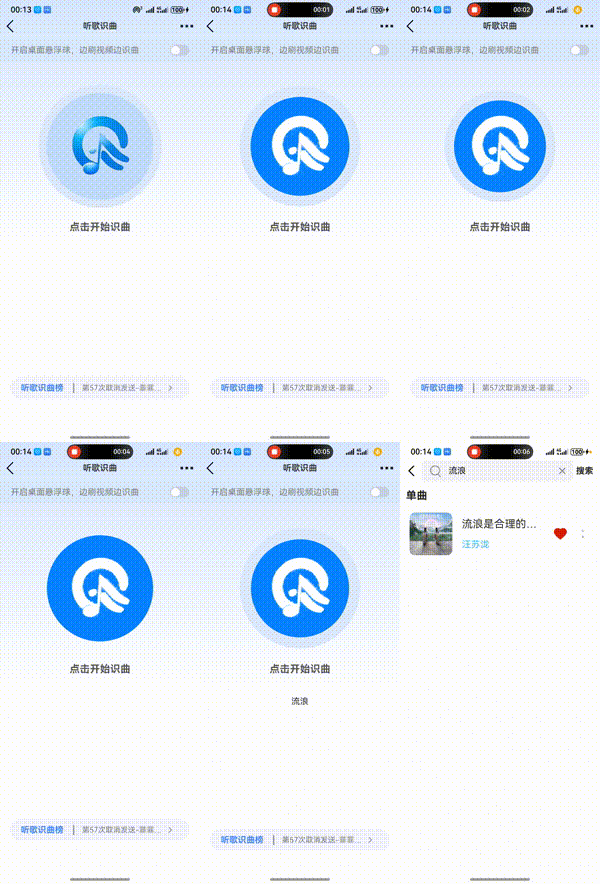
实现思路
- 完成界面ui和动画效果 2.点击事件后申请录音API使用权限、出现动画 3.通过鸿蒙自带的ai语音识别文字功能 4.把识别结果做参数请求后端API获取歌曲信息
完整代码
import { speechRecognizer } from '@kit.CoreSpeechKit';
import { BusinessError } from '@kit.BasicServicesKit';
import { fileIo } from '@kit.CoreFileKit';
import { hilog } from '@kit.PerformanceAnalysisKit';
import AudioCapturer from '../../utils/AudioCapturer';
import { permissionUtil } from '../../utils/PermissionUtil';


const TAG = 'CoreSpeechKitDemo';
let asrEngine: speechRecognizer.SpeechRecognitionEngine;


@Builder
export function MainPageBuilder() { // 细节2:按照这个格式配置
  Listen()
}

@Component
struct Listen {
  @StorageProp('bottomRectHeight') bottomRectHeight: number = 0;
  @StorageProp('topRectHeight') topRectHeight: number = 0;

  @State isRecognize: boolean = false
  @State circleScaleIn: number = 1
  @State circleScaleOut: number = 1

  @Consume navPathStack:NavPathStack

  build() {
    NavDestination() {
      Column() {
        Row() {
          Image($r('app.media.ai_listen_left')).width(30).margin({ left: 10 })
          Text('听歌识曲').fontSize(16).fontWeight(600)
          Image($r('app.media.ai_listen_gd')).width(30).margin({ right: 10 })
        }.width('100%').justifyContent(FlexAlign.SpaceBetween).onClick(() => this.navPathStack.pushPathByName('AiListen',null))

        Row() {
          Text('开启桌面悬浮球,边刷视频边识曲').fontColor(Color.Gray).margin({ left: 20 })
          Toggle({ type: ToggleType.Switch, isOn: false })
            .selectedColor('#007DFF')
            .switchPointColor('#FFFFFF')
            .onChange((isOn: boolean) => {
              console.info('Component status:' + isOn)
            }).margin({ right: 20 })
        }
        .backgroundColor('#d9e8fc')
        .justifyContent(FlexAlign.SpaceBetween)
        .width('100%')
        .height(40)
        .margin({ top: 10, bottom: 20 })

        // Row() {
        //   Column() {
        //     Image($r('app.media.profile_heart_fill')).width(40).margin({ bottom: 10 }).fillColor('#fc5260')
        //     Text('哼唱识别').fontSize(14)
        //   }
        //
        //   Column() {
        //     Image($r('app.media.profile_heart_fill'))
        //       .width(40)
        //       .margin({ bottom: 10 })
        //       .fillColor('#fc5260')
        //     Text('视频识曲').fontSize(14)
        //   }
        //
        //   Column() {
        //     Image($r('app.media.profile_heart_fill')).width(40).margin({ bottom: 10 }).fillColor('#fc5260')
        //     Text('链接识曲').fontSize(14)
        //   }
        //
        //   Column() {
        //     Image($r('app.media.profile_heart_fill'))
        //       .width(40)
        //       .margin({ bottom: 10 })
        //       .fillColor('#fc5260')
        //     Text('live识别').fontSize(14)
        //   }
        //
        // }.justifyContent(FlexAlign.SpaceAround).width('90%')

        Column({ space: 40 }) {
          Stack() {
            Circle({width:200,height:200})
              .stroke('#dce9fb')
              .strokeWidth(30)
              .fill('none')
              .scale({x:this.circleScaleOut,y:this.circleScaleOut})
            Circle({ width: 200, height: 200 })
              .fill(this.isRecognize ? '#0783ff' : '#c1dbfc')
              .scale({ x: this.circleScaleIn, y:this.circleScaleIn})

            Image(this.isRecognize ? $r('app.media.ai_listen_logo_white') : $r('app.media.logo'))
              .width(150)
              .padding(15)
              .borderRadius('50%')
              .onClick(async () => {
                // 一、申请权限  麦克风
                const state = await permissionUtil.checkPermissions(['ohos.permission.MICROPHONE'], getContext())
                if (!state) return
                console.log('录音API')


                // 特效
                this.isRecognize = !this.isRecognize
                if (this.isRecognize) {
                  animateTo({ duration: 500, iterations: -1, playMode: PlayMode.Alternate }, () => {
                    this.circleScaleIn = 0.85
                  })
                  animateTo({duration:1000,iterations:-1,curve:Curve.EaseInOut},()=>{
                    this.circleScaleOut = 0.85
                  })
                } else {
                  animateTo({ duration: 0 }, () => {
                    this.circleScaleIn = 1
                    this.circleScaleOut= 1
                  })
                }

                // 二、开始的代码、取消的代码  6666666666666666
                if (this.isRecognize) {
                  console.log('识曲开始')
                  this.createByCallback();
                } else {
                  console.log('识曲取消')
                  // 1 关闭鸿蒙自带的ai语音识别文字功能
                  asrEngine.cancel(this.sessionId);
                  // 2 跳转到搜索音乐页面  根据识别后的结果 去服务器数据库里面匹配(切记并不是这么跳转而是自动超时取消、和主动取消后  记得关闭loading动画)

                }
              })
          }

          Text('点击开始识曲')
            .fontWeight(700)
            .fontSize(19)
            .fontColor('#575757')
          Text(this.aiResult)
        }.margin({ top: 40, bottom: 230 }).alignItems(HorizontalAlign.Center)

        Row() {
          Text('听歌识曲榜')
            .border({ width: { right: 2 }, color: Color.Gray })
            .width(100)
            .margin({ right: 15, left: 20 })
            .fontColor('#4487f5')
            .fontWeight(700)
          Text('第57次取消发送-菲菲公主')
            .fontColor(Color.Gray)
            .fontSize(14)
            .textOverflow({ overflow: TextOverflow.Ellipsis })
            .maxLines(1)
            .width(160)
          Image($r('app.media.ai_listen_chevron_right'))
            .fillColor(Color.Gray)
            .width(10)
            .margin({ right: 10 })
        }.backgroundColor('#f3f4fc').height(40).borderRadius(30).width('90%')

      }.padding({ top: px2vp(this.topRectHeight) })
      .linearGradient({ direction: GradientDirection.Bottom, colors: [['#d7e7ff', 0], ['#fff', 0.6]] })

    }.hideTitleBar(true)
  }


  // 极乐世界

  @State createCount: number = 0;
  @State result: boolean = false;
  @State voiceInfo: string = "";
  @State sessionId: string = "123456";
  @State sessionId2: string = "1234567";
  private mAudioCapturer = new AudioCapturer();
  // 创建引擎,通过callback形式返回
  private createByCallback() {
    // 设置创建引擎参数
    let extraParam: Record<string, Object> = {"locate": "CN", "recognizerMode": "short"};
    let initParamsInfo: speechRecognizer.CreateEngineParams = {
      language: 'zh-CN',
      online: 1,
      extraParams: extraParam
    };


    // 调用createEngine方法
    speechRecognizer.createEngine(initParamsInfo, (err: BusinessError, speechRecognitionEngine:
      speechRecognizer.SpeechRecognitionEngine) => {
      if (!err) {
        hilog.info(0x0000, TAG, 'Succeeded in creating engine.');
        // 接收创建引擎的实例
        asrEngine = speechRecognitionEngine;
        this.setListener();
      } else {
        // 无法创建引擎时返回错误码1002200001,原因:语种不支持、模式不支持、初始化超时、资源不存在等导致创建引擎失败
        // 无法创建引擎时返回错误码1002200006,原因:引擎正在忙碌中,一般多个应用同时调用语音识别引擎时触发
        // 无法创建引擎时返回错误码1002200008,原因:引擎已被销毁
        hilog.error(0x0000, TAG, `Failed to create engine. Code: ${err.code}, message: ${err.message}.`);
      }
    });
  }
  // 查询语种信息,以callback形式返回
  private queryLanguagesCallback() {
    // 设置查询相关参数
    let languageQuery: speechRecognizer.LanguageQuery = {
      sessionId: this.sessionId
    };
    // 调用listLanguages方法
    asrEngine.listLanguages(languageQuery, (err: BusinessError, languages: Array<string>) => {
      if (!err) {
        // 接收目前支持的语种信息
        hilog.info(0x0000, TAG, `Succeeded in listing languages, result: ${JSON.stringify(languages)}`);
      } else {
        hilog.error(0x0000, TAG, `Failed to create engine. Code: ${err.code}, message: ${err.message}.`);
      }
    });
  };
  // 开始识别
  private startListeningForWriteAudio() {
    // 设置开始识别的相关参数
    let recognizerParams: speechRecognizer.StartParams = {
      sessionId: this.sessionId,
      audioInfo: { audioType: 'pcm', sampleRate: 16000, soundChannel: 1, sampleBit: 16 } //audioInfo参数配置请参考AudioInfo
    }
    // 调用开始识别方法
    asrEngine.startListening(recognizerParams);
  };
  private startListeningForRecording() {
    let audioParam: speechRecognizer.AudioInfo = { audioType: 'pcm', sampleRate: 16000, soundChannel: 1, sampleBit: 16 }
    let extraParam: Record<string, Object> = {
      "recognitionMode": 0,
      "vadBegin": 2000,
      "vadEnd": 3000,
      "maxAudioDuration": 20000
    }
    let recognizerParams: speechRecognizer.StartParams = {
      sessionId: this.sessionId,
      audioInfo: audioParam,
      extraParams: extraParam
    }
    hilog.info(0x0000, TAG, 'startListening start');
    asrEngine.startListening(recognizerParams);
  };
  // 写音频流
  private async writeAudio() {
    this.startListeningForWriteAudio();
    let ctx = this.getUIContext().getHostContext() as Context
    let filenames: string[] = fileIo.listFileSync(ctx.filesDir);
    if (filenames.length <= 0) {
      hilog.error(0x0000, TAG, `No file exists in the target directory.`);
      return;
    }
    let filePath: string = `${ctx.filesDir}/${filenames[0]}`;
    let file = fileIo.openSync(filePath, fileIo.OpenMode.READ_WRITE);
    try {
      let buf: ArrayBuffer = new ArrayBuffer(1280);
      let offset: number = 0;
      while (1280 == fileIo.readSync(file.fd, buf, {
        offset: offset
      })) {
        let uint8Array: Uint8Array = new Uint8Array(buf);
        asrEngine.writeAudio(this.sessionId, uint8Array);
        await this.countDownLatch(1);
        offset = offset + 1280;
      }
    } catch (err) {
      hilog.error(0x0000, TAG, `Failed to read from file. Code: ${err.code}, message: ${err.message}.`);
    } finally {
      if (null != file) {
        fileIo.closeSync(file);
      }
    }
  }
  // 麦克风语音转文本
  private async startRecording() {
    this.startListeningForRecording();
    // 录音获取音频
    let data: ArrayBuffer;
    hilog.info(0x0000, TAG, 'create capture success');
    this.mAudioCapturer.init((dataBuffer: ArrayBuffer) => {
      hilog.info(0x0000, TAG, 'start write');
      hilog.info(0x0000, TAG, 'ArrayBuffer ' + JSON.stringify(dataBuffer));
      data = dataBuffer
      let uint8Array: Uint8Array = new Uint8Array(data);
      hilog.info(0x0000, TAG, 'ArrayBuffer uint8Array ' + JSON.stringify(uint8Array));
      // 写入音频流
      asrEngine.writeAudio(this.sessionId2, uint8Array);
    });
  };
  // 计时
  public async countDownLatch(count: number) {
    while (count > 0) {
      await this.sleep(40);
      count--;
    }
  }
  // 睡眠
  private sleep(ms: number):Promise<void> {
    return new Promise(resolve => setTimeout(resolve, ms));
  }
  // 设置回调
  @State aiResult:string = ''
  private setListener() {
    // 创建回调对象
    let setListener: speechRecognizer.RecognitionListener = {
      // 开始识别成功回调
      onStart(sessionId: string, eventMessage: string) {
        hilog.info(0x0000, TAG, `onStart, sessionId: ${sessionId} eventMessage: ${eventMessage}`);
      },
      // 事件回调
      onEvent(sessionId: string, eventCode: number, eventMessage: string) {
        hilog.info(0x0000, TAG, `onEvent, sessionId: ${sessionId} eventCode: ${eventCode} eventMessage: ${eventMessage}`);
      },
      // 识别结果回调,包括中间结果和最终结果
      onResult: (sessionId: string, result: speechRecognizer.SpeechRecognitionResult) => {
        hilog.info(0x0000, TAG, `hello onResult, sessionId: ${sessionId} sessionId: ${JSON.stringify(result)}`);
        hilog.info(0x0000, TAG, `hello 结果, sessionId: ${sessionId} sessionId: ${result.result}`);
        this.aiResult = result.result
      },
      // 识别完成回调
      onComplete: (sessionId: string, eventMessage: string) => {
        hilog.info(0x0000, TAG, `onComplete, sessionId: ${sessionId} eventMessage: ${eventMessage}`);
        this.isRecognize = false
        if (this.aiResult) {
          this.navPathStack.pushPathByName('SearchMusic', this.aiResult)
        }
      },
      // 错误回调,错误码通过本方法返回
      // 返回错误码1002200002,开始识别失败,重复启动startListening方法时触发
      // 更多错误码请参考错误码参考
      onError(sessionId: string, errorCode: number, errorMessage: string) {
        hilog.error(0x0000, TAG, `onError, sessionId: ${sessionId} errorCode: ${errorCode} errorMessage: ${errorMessage}`);
      },
    }
    // 设置回调
    asrEngine.setListener(setListener);
    this.startRecording();
  };
  // 极乐世界 end
}
更多关于HarmonyOS 鸿蒙Next中如何实现听歌识曲功能?的实战系列教程也可以访问 https://www.itying.com/category-93-b0.html


在HarmonyOS Next中实现听歌识曲功能,需使用音频采集、特征提取和云端匹配技术。通过@ohos.multimedia.audio模块进行音频录制,获取PCM数据。利用音频指纹算法(如频谱分析)提取特征值,生成唯一指纹。通过HTTP/HTTPS请求将指纹发送至音乐识别服务API(如第三方音乐平台接口)进行匹配,返回歌曲信息。需申请网络权限和音频录制权限。

在HarmonyOS Next中实现听歌识曲功能,核心在于音频采集、特征提取和云端/本地匹配。以下是关键步骤和API使用思路:
-
音频采集:使用
AudioCapturerAPI实时录制麦克风输入的音频流。需配置采样率(建议16kHz或44.1kHz)、位深和声道数,并持续获取PCM数据。 -
特征提取:对采集的音频进行预处理(如降噪、归一化),然后通过算法(如频谱分析、梅尔频率倒谱系数MFCC)生成音频指纹。可借助
AudioProcessor或本地AI模型(如NNRt)加速计算。 -
匹配服务:
- 云端匹配:将指纹通过网络模块(如
Http)发送至音乐识别服务商API(如AcoustID),解析返回的歌曲信息。 - 本地匹配:若应用内置数据库,可使用
RDB或ObjectBox存储指纹特征,通过相似度算法(如哈希对比)快速检索。
- 云端匹配:将指纹通过网络模块(如
-
性能优化:建议采用流式处理,分段采集音频(如10秒片段)并提取特征,以降低内存占用。可结合
Worker线程避免阻塞主线程。 -
权限与隐私:需在
module.json5中声明ohos.permission.MICROPHONE权限,并动态申请。音频数据需本地处理或加密传输,保障用户隐私。
示例代码片段(音频采集):
import audio from '@ohos.multimedia.audio';
// 创建AudioCapturer实例,配置参数并启动采集
let audioCapturer = await audio.createAudioCapturer(audio.AudioCapturerOptions);
audioCapturer.start();
// 循环读取音频数据缓冲区
let buffer = await audioCapturer.read(bufferSize, isBlocking);
注意:具体识别算法需自行实现或集成第三方SDK(需适配HarmonyOS)。建议参考华为音频开发指南和AI能力文档进行深度优化。
