




HarmonyOS鸿蒙Next中Canvas绘制文字什么时候能支持自定义字体?
HarmonyOS鸿蒙Next中Canvas绘制文字什么时候能支持自定义字体? Canvas绘制文字,设置自定义字体无效,实际效果是系统默认字体。什么时候能支持自定义字体呢?

API 18开始 DrawingRenderingContext可以使用ArkGraphics2D下的drawing进行自定义字体
CanvasRenderingContext2D可以使用ArkGraphics2D下的text进行自定义字体
drawing加载自定义字体:
- 通过makeFromRawFile(从API version 18开始)加载自定义字体。并使用drawTextBlob绘制文本,drawing接口绘制自定义文字时,不需要调用this.uiContext.getFont().registerFont或者fontCollection.loadFontSync提前注册字体,而是通过drawing.Typeface.makeFromRawFile(从API version 18开始)传入rawfile目录下的自定义字体文件。
import { drawing } from '@kit.ArkGraphics2D';

// xxx.ets
@Entry
@Component
struct CanvasExample {
  private context: DrawingRenderingContext = new DrawingRenderingContext();

  build() {
    Flex({ direction: FlexDirection.Column, alignItems: ItemAlign.Center, justifyContent: FlexAlign.Center }) {
      Canvas(this.context)
        .width('100%')
        .height('50%')
        .backgroundColor('#D5D5D5')
        .onReady(() => {
          let font = new drawing.Font();
          font.setSize(50);
          // 加载rawfile目录下的自定义字体文件HarmonyOS_Sans_Bold.ttf
          const myTypeFace = drawing.Typeface.makeFromRawFile($rawfile('HarmonyOS_Sans_Bold.ttf'));
          font.setTypeface(myTypeFace);
          const textBlob =
            drawing.TextBlob.makeFromString("Hello World", font, drawing.TextEncoding.TEXT_ENCODING_UTF8);
          this.context.canvas.drawTextBlob(textBlob, 60, 100);
          this.context.invalidate();
        })
    }
    .width('100%')
    .height('100%')
  }
}
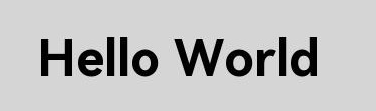
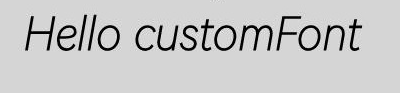
text加载自定义字体
// xxx.ets
import { text } from '@kit.ArkGraphics2D';

@Entry
@Component
struct FontDemo {
  private settings: RenderingContextSettings = new RenderingContextSettings(true);
  private context: CanvasRenderingContext2D = new CanvasRenderingContext2D(this.settings);

  build() {
    Flex({ direction: FlexDirection.Column, alignItems: ItemAlign.Center, justifyContent: FlexAlign.Center }) {
      Canvas(this.context)
        .width('100%')
        .height('100%')
        .backgroundColor('rgb(213,213,213)')
        .onReady(() => {
          // 加载rawfile目录下的自定义字体文件HarmonyOS_Sans_Thin_Italic.ttf
          let fontCollection = text.FontCollection.getGlobalInstance();
          fontCollection.loadFontSync('HarmonyOS_Sans_Thin_Italic', $rawfile("HarmonyOS_Sans_Thin_Italic.ttf"))
          // 加粗,字体大小为30vp,字体系列为HarmonyOS_Sans_Thin_Italic
          this.context.font = "bold 30vp HarmonyOS_Sans_Thin_Italic"
          this.context.fillText("Hello customFont", 20, 140)
        })
    }
    .width('100%')
    .height('100%')
  }
}
Tip:
CanvasRenderingContext2D中自定义字体注册有以下两种方式。
- 一种是通过ArkUI的异步接口this.uiContext.getFont().registerFont注册,调用后立即绘制可能会导致自定义字体不生效。
- 另一种是直接调用字体引擎的fontCollection.loadFontSync接口来注册自定义字体到字体引擎。在直接调用字体引擎接口注册自定义字体时,fontCollection的实例需要是text.FontCollection.getGlobalInstance(),因为组件默认会从该实例加载字体。如果使用其他实例,可能会导致自定义字体不生效。
相关文档:
- [@ohos.graphics.drawing (绘制模块)](https://developer.huawei.com/consumer/cn/doc/harmonyos-references/js-apis-graphics-drawing)
- [@ohos.graphics.text (文本模块)](https://developer.huawei.com/consumer/cn/doc/harmonyos-references/js-apis-graphics-text#loadfontsync)
更多关于HarmonyOS鸿蒙Next中Canvas绘制文字什么时候能支持自定义字体?的实战系列教程也可以访问 https://www.itying.com/category-93-b0.html

使用自定义字体绘制文本
从API version 20开始,可以通过getGlobalInstance获取应用全局字体管理器的实例,然后使用loadfontsync接口从设置的路径中加载自定义字体并通过font(设置文本绘制中的字体样式)接口设置文本绘制中的字体样式,接着通过fillText(绘制填充类文本)、strokeText(绘制描边类文本)等接口进行文本绘制。
import { text } from '@kit.ArkGraphics2D';

@Entry
@Component
struct CustomFont {
  private settings: RenderingContextSettings = new RenderingContextSettings(true);
  private context: CanvasRenderingContext2D = new CanvasRenderingContext2D(this.settings);

  build() {
    Flex({ direction: FlexDirection.Column, alignItems: ItemAlign.Center, justifyContent: FlexAlign.Center }) {
      Canvas(this.context)
        .width('100%')
        .height('100%')
        .backgroundColor('#F5DC62')
        .onReady(() => {
          //加载自定义字体
          let fontCollection = text.FontCollection.getGlobalInstance();
          fontCollection.loadFontSync('customFont', $rawfile("customFont.ttf"))
          this.context.font = '30vp customFont'
          this.context.fillText("Hello World!", 20, 50)
          this.context.strokeText("Hello World!", 20, 100)
        })
    }
    .width('100%')
    .height('100%')
  }
}


从 API version 20 开始,可以通过 @kit.ArkGraphics2D 中的 drawing 模块实现自定义字体绘制。需使用 Typeface 类加载字体文件,并结合 Font 类设置字体样式。
import { text } from '@kit.ArkGraphics2D';

@Entry
@Component
struct CustomFont {
  private settings: RenderingContextSettings = new RenderingContextSettings(true);
  private context: CanvasRenderingContext2D = new CanvasRenderingContext2D(this.settings);

  build() {
    Flex({ direction: FlexDirection.Column, alignItems: ItemAlign.Center, justifyContent: FlexAlign.Center }) {
      Canvas(this.context)
        .width('100%')
        .height('100%')
        .backgroundColor('#F5DC62')
        .onReady(() => {
          //加载自定义字体
          let fontCollection = text.FontCollection.getGlobalInstance();
          fontCollection.loadFontSync('customFont', $rawfile("customFont.ttf"))
          this.context.font = '30vp customFont'
          this.context.fillText("Hello World!", 20, 50)
          this.context.strokeText("Hello World!", 20, 100)
        })
    }
    .width('100%')
    .height('100%')
  }
}
参考地址
https://developer.huawei.com/consumer/cn/doc/harmonyos-guides/arkts-drawing-customization-on-canvas#画布组件常用方法

HarmonyOS Next的Canvas组件目前支持通过font属性设置字体,包括字体族、大小和样式。自定义字体功能需通过加载字体文件并注册到系统字体管理器实现,之后可在Canvas绘制时通过fontFamily指定已注册的字体名称来使用。

目前HarmonyOS Next的Canvas API在绘制文字时,确实还不支持加载自定义字体文件(如.ttf/.otf)。当前CanvasRenderingContext2D的font属性仅能使用系统预置的字体族名称。
根据官方路线图,自定义字体支持已在规划中,预计会在后续的SDK更新中提供。建议关注官方发布的版本更新说明,以获取确切的功能上线时间。
在此之前,若需实现特定字体效果,可考虑以下替代方案:
- 将文字预先转换为矢量路径(Path2D),再通过Canvas绘制路径。
- 对于静态文字,可使用图像处理工具生成图片资源进行渲染。
- 利用SVG矢量图形嵌入文字并渲染到Canvas。
这些方法虽会增加处理复杂度,但能暂时满足部分自定义字体的视觉需求。
