




HarmonyOS鸿蒙Next中如何实现沉浸式导航栏渐变效果
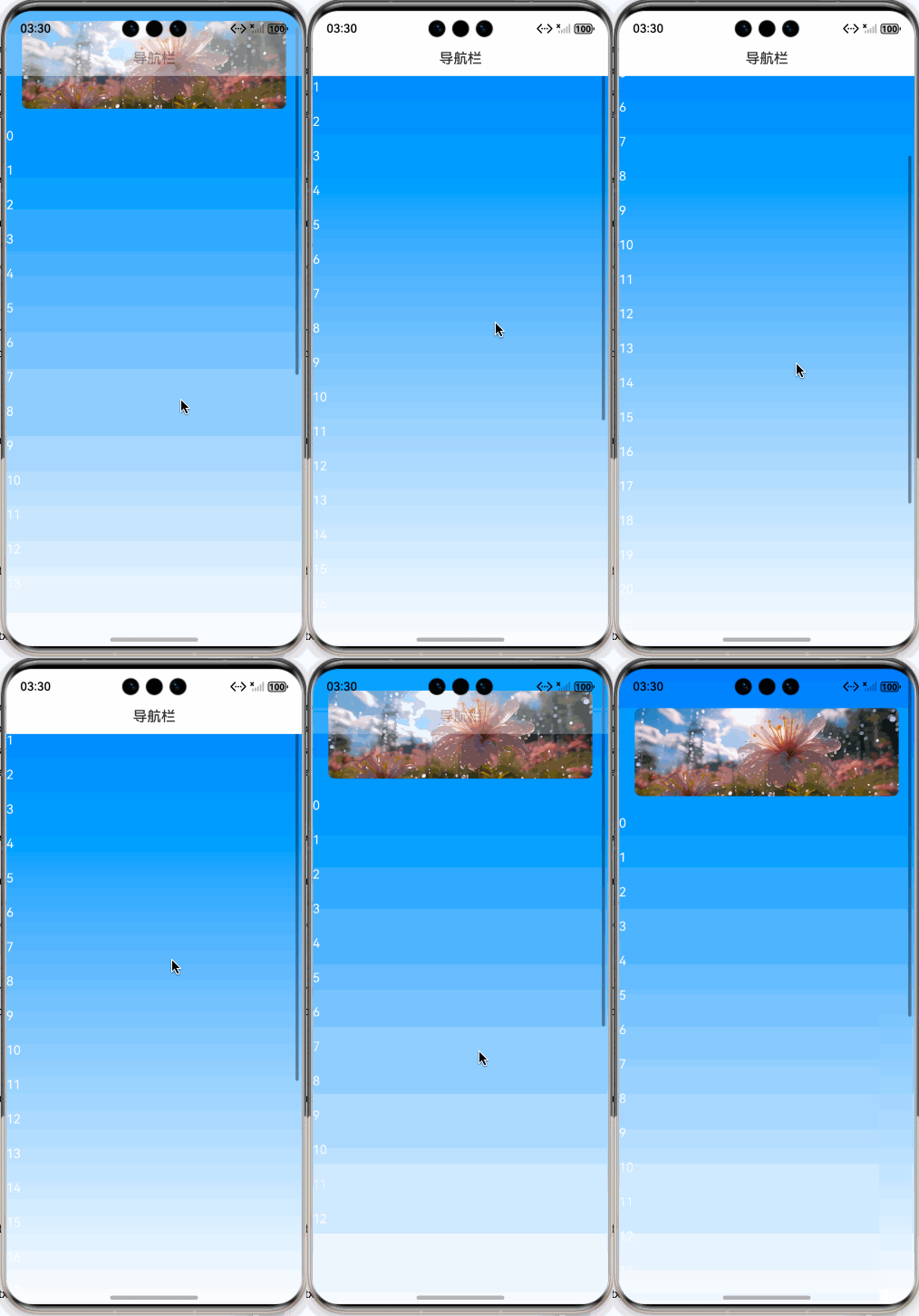
HarmonyOS鸿蒙Next中如何实现沉浸式导航栏渐变效果 自定义导航栏,上滑是逐渐淡入、下滑后淡出效果。

预览效果:
实现步骤:
1、使用Stack布局,将滚动组件放到自定义导航栏的底层。
Stack() {
  Column() {
    List({ scroller: this.listScroller, space: 25 }) {

    }
  }
  this.navbar()
}
.width('100%')
.height('100%')
.alignContent(Alignment.Top)
2、开启沉浸式,并获取顶部安全区域高度
const context = this.getUIContext().getHostContext()
if (context) {
  window.getLastWindow(context).then((win: window.Window) => {
    win.setWindowLayoutFullScreen(true)
    const topArea = win.getWindowAvoidArea(window.AvoidAreaType.TYPE_SYSTEM);
    this.topAreaHeight = this.getUIContext().px2vp(topArea.topRect.height)
  })
}
3、监听List列表组件的onDidScroll方法,根据滚动的偏移量,动态计算导航栏的透明度。 滚动偏移量大于导航栏高度则完全显示导航栏,否则使用滚动偏移量除以导航栏高度的值作为透明度。
.onDidScroll((scrollOffset: number, scrollState: ScrollState) => {
  const offsetY = this.listScroller.currentOffset().yOffset
  const navHeight = this.getNavHeight()
  if (offsetY <= navHeight) {
    this.navOpacity = offsetY / navHeight;
  } else {
    this.navOpacity = 1;
  }
})
4、完整的demo:
/**
 * @fileName : NavbarGradient.ets
 * @author : @cxy
 * @date : 2025/12/22
 * @description : 导航栏沉浸式渐变效果
 */
import { window } from "@kit.ArkUI";

@Component
export struct NavbarGradient {
  @State topAreaHeight: number = 0
  @State navOpacity: number = 0
  @State list: string[] = []
  private listScroller: ListScroller = new ListScroller()

  aboutToAppear(): void {
    const context = this.getUIContext().getHostContext()
    if (context) {
      window.getLastWindow(context).then((win: window.Window) => {
        win.setWindowLayoutFullScreen(true)
        const topArea = win.getWindowAvoidArea(window.AvoidAreaType.TYPE_SYSTEM);
        this.topAreaHeight = this.getUIContext().px2vp(topArea.topRect.height)
      })
    }

    const list: string[] = []
    for (let index = 0; index < 30; index++) {
      list.push(index.toString())
    }
    this.list = list
  }

  build() {
    Stack() {
      Column() {
        List({ scroller: this.listScroller, space: 25 }) {
          ListItem() {
            Image($r('app.media.banner'))
              .aspectRatio(3 / 1)
              .width('100%')
              .borderRadius(8)
          }
          .padding({ left: 20, right: 20, top: 50 })

          ForEach(this.list, (item: string) => {
            ListItem() {
              Text(item)
                .fontColor('#fff')
            }
          }, (item: string) => item)
        }
        .layoutWeight(1)
        .onDidScroll((scrollOffset: number, scrollState: ScrollState) => {
          const offsetY = this.listScroller.currentOffset().yOffset
          const navHeight = this.getNavHeight()
          if (offsetY <= navHeight) {
            this.navOpacity = offsetY / navHeight;
          } else {
            this.navOpacity = 1;
          }
        })
      }
      .width('100%')
      .height('100%')
      .linearGradient({
        angle: 180,
        colors: [['#ff007bff', 0], ['#ffffffff', 1]]
      })

      this.navbar()
    }
    .width('100%')
    .height('100%')
    .alignContent(Alignment.Top)
  }

  @Builder
  navbar() {
    Row() {
      Row() {
        Text('导航栏')
          .fontSize(18)
          .fontWeight(FontWeight.Medium)
      }
      .justifyContent(FlexAlign.Center)
      .width('100%')
      .height(44)
    }
    .backgroundColor('#fff')
    .opacity(this.navOpacity)
    .width('100%')
    .height(this.getNavHeight())
    .padding({ top: this.topAreaHeight })
  }

  getNavHeight(): number {
    return this.topAreaHeight + 44
  }
}
更多关于HarmonyOS鸿蒙Next中如何实现沉浸式导航栏渐变效果的实战系列教程也可以访问 https://www.itying.com/category-93-b0.html

在HarmonyOS Next中,实现沉浸式导航栏渐变效果主要通过Window和WindowStage的API控制。使用window.getTopWindow()获取窗口实例,通过setWindowSystemBarProperties()方法设置导航栏属性。将isShow设为false可隐藏默认导航栏,实现沉浸式。渐变效果需自定义NavigationBar组件,结合Canvas或LinearGradient绘制背景,并监听页面滚动,动态计算与更新颜色透明度。

在HarmonyOS Next中实现沉浸式导航栏的渐变(淡入淡出)效果,核心是通过监听页面滚动,动态计算并设置导航栏的背景透明度。以下是基于ArkTS的关键实现步骤和代码示例:
1. 页面结构与状态定义
首先,在页面组件中定义控制导航栏透明度的状态变量(如navBarOpacity),并构建一个可滚动的页面内容(使用Scroll或List组件)。
import { ScrollState } from '@kit.ArkUI';

@Entry
@Component
struct ImmersiveNavBarPage {
  // 状态变量:导航栏背景透明度(0为完全透明,1为完全不透明)
  @State navBarOpacity: number = 0;
  // 滚动控制器,用于监听滚动位置
  private scrollController: ScrollController = new ScrollController();

  build() {
    Column() {
      // 自定义导航栏
      this.buildCustomNavBar()
      // 可滚动内容区域
      Scroll(this.scrollController) {
        // 你的页面内容,例如一个很长的Column或List
        Column() {
          // 这里放置足够长的内容以触发滚动
          ForEach(Array.from({ length: 50 }), (item, index) => {
            Text(`列表项 ${index}`)
              .width('100%')
              .height(80)
              .fontSize(16)
              .textAlign(TextAlign.Center)
              .border({ width: 1, color: Color.Gray })
          })
        }
        .width('100%')
      }
      .scrollable(ScrollDirection.Vertical)
      .onScroll((scrollOffset: ScrollState, event: ScrollEvent) => {
        // 滚动监听回调
        this.onScrollChange(scrollOffset);
      })
      .width('100%')
      .height('100%')
    }
    .width('100%')
    .height('100%')
  }
}
2. 构建自定义导航栏组件
构建一个使用状态变量navBarOpacity控制背景透明度的导航栏。
@Builder
buildCustomNavBar() {
  Column() {
    Row() {
      Image($r('app.media.back')) // 返回图标
        .width(24)
        .height(24)
        .margin({ left: 12 })
      Text('页面标题')
        .fontSize(18)
        .fontWeight(FontWeight.Medium)
        .margin({ left: 12 })
      Blank() // 占位空间
      Image($r('app.media.more')) // 更多操作图标
        .width(24)
        .height(24)
        .margin({ right: 12 })
    }
    .width('100%')
    .height(56) // 导航栏典型高度
    .justifyContent(FlexAlign.Start)
    .alignItems(VerticalAlign.Center)
  }
  .width('100%')
  // 关键:背景色根据navBarOpacity动态变化
  .backgroundColor(`rgba(255, 255, 255, ${this.navBarOpacity})`)
  // 可选:添加阴影或边框以在非全透明时增强层次感
  .shadow({ radius: this.navBarOpacity > 0.1 ? 4 : 0, color: Color.Gray, offsetX: 0, offsetY: 2 })
}
3. 滚动监听与透明度计算
在onScrollChange方法中,根据滚动偏移量计算透明度。通常设置一个滚动阈值(如SCROLL_THRESHOLD = 50),在阈值内进行线性插值。
// 定义滚动阈值:超过此值后导航栏变为完全不透明
private readonly SCROLL_THRESHOLD: number = 50;

onScrollChange(scrollState: ScrollState) {
  // 获取垂直滚动偏移量
  const scrollOffset = scrollState.offsetY;
  let opacity = 0;

  if (scrollOffset <= 0) {
    // 处于顶部或向上拉出顶部时,完全透明
    opacity = 0;
  } else if (scrollOffset >= this.SCROLL_THRESHOLD) {
    // 超过阈值,完全显示
    opacity = 1;
  } else {
    // 在阈值内线性渐变
    opacity = scrollOffset / this.SCROLL_THRESHOLD;
  }

  // 更新状态,触发UI重绘
  this.navBarOpacity = opacity;
}
关键点说明
- 性能:滚动事件触发频繁,确保计算逻辑轻量。线性插值计算是高效的。
- 交互连贯性:阈值(
SCROLL_THRESHOLD)可根据实际导航栏高度或设计需求调整,通常建议在30-100之间。 - 视觉衔接:导航栏背景使用
rgba颜色,透明度变化平滑。可配合阴影的显示/隐藏增强视觉效果。 - 手势协调:若页面存在其他横向滚动或复杂手势,需注意事件冲突,通常
Scroll组件的垂直滚动不会干扰。
此方案通过纯ArkTS实现,不依赖原生平台代码,在HarmonyOS Next的声明式UI范式下运行高效。
