




HarmonyOS鸿蒙Next中如何实现带下标滚动的金刚区
HarmonyOS鸿蒙Next中如何实现带下标滚动的金刚区 滚动下标跟随金刚区滚动同步,进度一致。
3 回复

实现细节:
1、使用横向的List实现金刚区
2、使用两个Row内嵌实现滚动下标
3、在List的onDidScroll回调中计算滚动进度
4、通过修改下标内部Row的offset来达到同步滚动的效果
预览效果:
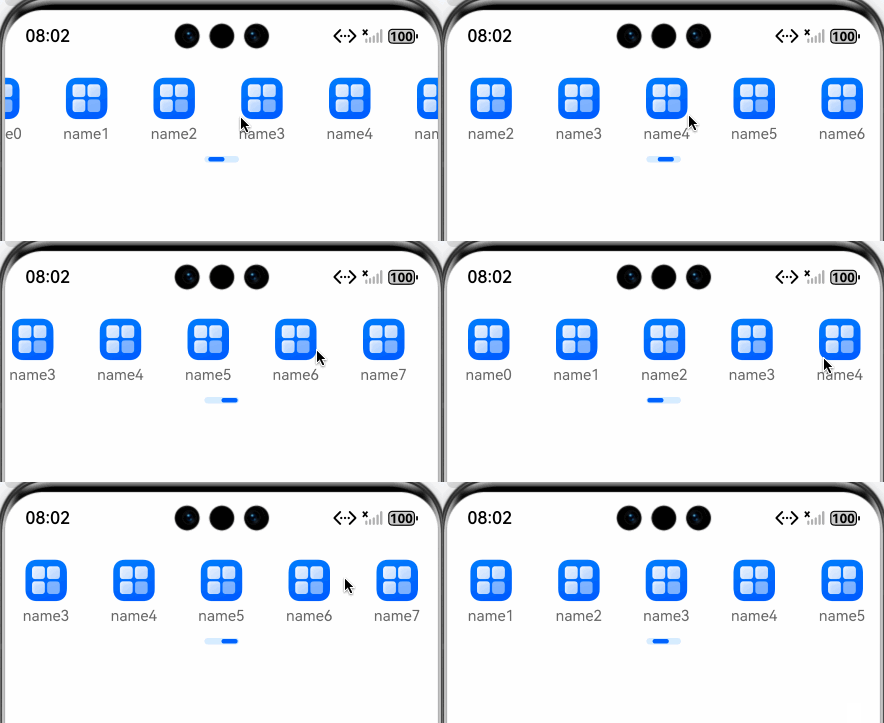
完整demo代码:
/**
 * @fileName : MenuView.ets
 * @author : @cxy
 * @date : 2025/12/19
 * @description : 金刚区
 */

export class MenuViewItem {
  name: string = ''
  url: ResourceStr = ''
}

@Component
export struct MenuView {
  @State offsetX: number = 0
  @State menuWidth: number = 0
  @State menus: MenuViewItem[] = []
  private columnCount: number = 5
  private scroller: Scroller = new Scroller()

  onDidBuild(): void {
    const list: MenuViewItem[] = []
    for (let index = 0; index < 8; index++) {
      list.push({
        name: 'name' + index,
        url: $r('app.media.startIcon')
      })
    }
    this.menus = list
  }

  build() {
    Column({ space: 8 }) {
      List({ scroller: this.scroller, space: 5 }) {
        ForEach(this.menus, (item: MenuViewItem) => {
          ListItem() {
            Column({ space: 5 }) {
              Image(item.url)
                .width(36)
                .height(36)
                .objectFit(ImageFit.Contain)

              Text(item.name)
                .fontColor('#666')
                .fontSize(13)
                .maxLines(1)
                .textOverflow({ overflow: TextOverflow.Ellipsis })
                .textAlign(TextAlign.Center)
            }
            .constraintSize({
              minWidth: (this.menuWidth - this.columnCount * (this.columnCount - 1)) / this.columnCount
            })
            .alignItems(HorizontalAlign.Center)
          }
          .onClick(() => {

          })

        }, (item: MenuViewItem) => item.name)
      }
      .height(60)
      .width('100%')
      .listDirection(Axis.Horizontal)
      .edgeEffect(EdgeEffect.Spring)
      .scrollBar(BarState.Off)
      .onDidScroll((scrollOffset: number, scrollState: ScrollState) => {
        const count = this.columnCount
        if (this.menus.length > count) {
          const offsetX = this.scroller.currentOffset().xOffset
          const contentWidth = this.menus.length * (this.menuWidth / count)
          let precent = offsetX / (contentWidth - this.menuWidth)
          precent = Math.min(1, precent)
          precent = Math.max(0, precent)
          this.offsetX = (30 - 14 - 2) * precent
        }
      })

      if (this.menus.length > this.columnCount) {
        Row() {
          Row()
            .height(4)
            .borderRadius('50%')
            .width(14)
            .backgroundColor('#ff005eff')
            .offset({ x: this.offsetX })
        }
        .backgroundColor('#DBEDFF')
        .borderRadius('50%')
        .width(30)
        .padding(1)
      }
    }
    .justifyContent(FlexAlign.Start)
    .alignItems(HorizontalAlign.Center)
    .width('100%')
    .onAreaChange((oldValue: Area, newValue: Area) => {
      this.menuWidth = newValue.width as number
    })
    .margin({ top: 20 })
  }
}
更多关于HarmonyOS鸿蒙Next中如何实现带下标滚动的金刚区的实战系列教程也可以访问 https://www.itying.com/category-93-b0.html

在HarmonyOS Next中实现带下标滚动的金刚区,可使用Swiper组件嵌套Tabs组件实现。Swiper负责横向滚动展示图标区域,Tabs的TabBar作为下标指示器。通过Swiper的onChange事件与Tabs的onChange事件联动,保持两者索引同步。主要涉及ArkUI的声明式开发,使用Swiper、Tabs、Flex等布局组件组合完成。

