




HarmonyOS 鸿蒙Next应用开启长时任务后退后台几小时后蓝牙自动断开,重连时调用 getPersistentDeviceIds 报错 2900003(蓝牙开关已关闭)
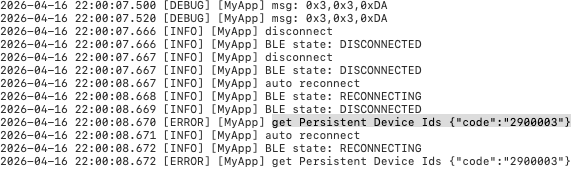
HarmonyOS 鸿蒙Next应用开启长时任务后退后台几小时后蓝牙自动断开,重连时调用 getPersistentDeviceIds 报错 2900003(蓝牙开关已关闭) 【问题描述】:开发的应用使用 backgroundTaskManager 申请长时任务后置于后台运行,经过几个小时(例如从 22:00:07 开始)蓝牙连接会自动断开。在断线重连逻辑中,直接调用 getPersistentDeviceIds 接口获取已配对设备 ID 以进行重连,但该接口返回错误码 {“code”:“2900003”},错误提示为“蓝牙开关已关闭”。检查手机系统设置,确认蓝牙开关实际处于开启状态。
【问题现象】:
- 应用退至后台数小时后,蓝牙连接无征兆断开。
- 断连事件触发自动重连逻辑,但在重连第一步获取持久化设备 ID 时失败。
- 接口报错内容为 get Persistent Device Ids {“code”:“2900003”},含义为蓝牙开关关闭。
- 手动检查手机蓝牙开关为打开状态,错误与实际情况不符。
【版本信息】:
设备:CLS-AL00 6.0.0.130(SP25C00E130R5P6patch01)(API Version 22)
【复现代码】:
private _reconnect() {
    setTimeout(() => {
      SLog.info("auto reconnect")
      if (this.connState === BleState.RECONNECTING) {
        SLog.error("正在重连......")
        return;
      }
      this._updateState(BleState.RECONNECTING);
      this.disconnect();
      try {
        let deviceIds = access.getPersistentDeviceIds();
        SLog.debug('deviceIds: ', deviceIds);
        if (deviceIds != null && deviceIds.length > 0) {
          this.connect(deviceIds[0]);
        }
      } catch (error) {
        SLog.error('get Persistent Device Ids', JSON.stringify(error))
      }
    }, 1000)
  }
/** 连接设备 */
  connect(device: BleDevice | string) {
    this.manager.connect(device, {
      onStartConnect: () => SLog.info("connecting"),
      onConnectSuccess: (bleDevice: BleDevice) => {
        SLog.info("connect success")
        this.currentDevice = bleDevice
        access.addPersistentDeviceId(bleDevice.mDeviceId).catch((err: BusinessError) => {
          SLog.error('add Persistent DeviceId:', JSON.stringify(err));
        });

        this.manager.getBluetoothGattServices(bleDevice, (err, services) => {
          services.forEach((service: ble.GattService) => {

            if (service.serviceUuid.toUpperCase() == UUID.SERVICE_UUID.toUpperCase()) {
              this.serviceUuid = service.serviceUuid;
              SLog.info("Service UUID:", service.serviceUuid);
              SLog.info("Service characteristics count:", service.characteristics.length);

              service.characteristics.forEach((char, index) => {
                SLog.info(`Characteristic ${index} UUID:`, char.characteristicUuid);
                SLog.info(`Characteristic ${index} properties:`, JSON.stringify(char.properties));

                // 检查所有可能的写入属性
                const hasWrite = char?.properties?.write || false;
                const hasWriteNoResponse = char?.properties?.writeNoResponse || false;
                // const hasSignedWrite = char?.properties?.signedWrite || false;

                SLog.info(`Characteristic ${index} hasWrite:`, hasWrite);
                SLog.info(`Characteristic ${index} hasWriteNoResponse:`, hasWriteNoResponse);
                // SLog.info(`Characteristic ${index} hasSignedWrite:`, hasSignedWrite);

                if (char?.properties?.notify && char.characteristicUuid.toLowerCase() == UUID.READ_CHAR.toLowerCase()) {
                  SLog.info("Notify Characteristic UUID:", char.characteristicUuid)
                  this.notify(service.serviceUuid, char.characteristicUuid)
                }

                // 选择第一个支持写入的特征值
                if ((hasWrite || hasWriteNoResponse) &&
                  char.characteristicUuid.toLowerCase() == UUID.WRITE_CHAR.toLowerCase()) {
                  SLog.info("Write Characteristic UUID:", char.characteristicUuid)
                  this.writeCharacteristicUuid = char.characteristicUuid;
                }
              })
            }

          })

          // 打印最终使用的 UUID
          SLog.info("Final Service UUID:", this.serviceUuid);
          SLog.info("Final Write Characteristic UUID:", this.writeCharacteristicUuid);

        })
      },
      onConnectFail: (device, e) => {
        SLog.error("connect fail", e)
        this._updateState(BleState.ERROR)
        this._reconnect()
      },
      onDisConnected: () => {
        SLog.info("disconnect")
        this._updateState(BleState.DISCONNECTED)
        this._reconnect()
      }
    })
  }
更多关于HarmonyOS 鸿蒙Next应用开启长时任务后退后台几小时后蓝牙自动断开,重连时调用 getPersistentDeviceIds 报错 2900003(蓝牙开关已关闭)的实战教程也可以访问 https://www.itying.com/category-93-b0.html

尊敬的开发者,您好,感谢您的反馈,问题正在加速处理中,还请关注后续版本,感谢您的理解与支持。如果问题修复后,我们会及时联系你们进行确认。
更多关于HarmonyOS 鸿蒙Next应用开启长时任务后退后台几小时后蓝牙自动断开,重连时调用 getPersistentDeviceIds 报错 2900003(蓝牙开关已关闭)的实战系列教程也可以访问 https://www.itying.com/category-93-b0.html


尊敬的开发者,您好,
根据描述推测可能是功耗管控夜间关闭蓝牙的问题,需要日志确认。
请使用如下方法获取日志:
hdc file recv /data/log/hilog ./hilog //输出hilog日志
hdc file recv data/log/bt/ ./btlog //输出HCI日志


这是一个典型的低功耗管理策略与蓝牙子系统状态同步导致的问题。虽然你申请了 backgroundTaskManager 长时任务,但系统为了功耗优化,在长时间灭屏或后台运行后,会对非核心服务的资源进行“软冻结”或逻辑状态下线。
1. 核心原因分析
-
状态不一致(Soft Off): 报错
2900003(Bluetooth switch is off) 并不一定代表物理开关关闭,而是指蓝牙服务在当前应用上下文(Context)中处于不可用状态。当应用进入后台数小时,系统可能进入了深度睡眠模式,此时蓝牙驱动层虽开,但应用层的蓝牙管理服务可能因节电策略对该进程关闭了接口响应。 -
长时任务的局限性:
backgroundTaskManager只能保证你的进程不被挂起(Suspend),但不能强制要求所有硬件模组(如蓝牙、GPS)始终保持高功耗唤醒状态。 -
重试逻辑太快: 你的
_reconnect代码中使用setTimeout(..., 1000),在系统刚刚因断连唤醒应用时,蓝牙协议栈可能还在“回温”阶段,直接调用接口极易触发状态异常。
2. 解决方案
A. 引入状态校验与监听(最关键)
不要在断连后立即调用 getPersistentDeviceIds,而应先通过 access.getState() 检查蓝牙开关状态。如果返回关闭,应监听蓝牙开关状态变化。
import { access } from '@kit.ConnectivityKit';

private _reconnect() {
  const state = access.getState();
  SLog.info(`Current Bluetooth state: ${state}`);

  if (state !== access.BluetoothState.STATE_ON) {
    SLog.warn("Bluetooth service is logically OFF, waiting for system to restore...");
    // 注册状态监听,等系统把蓝牙“还”给应用
    access.on('stateChange', (data) => {
      if (data === access.BluetoothState.STATE_ON) {
        SLog.info("Bluetooth restored to ON, triggering reconnect...");
        this._executeReconnectLogic();
        access.off('stateChange'); // 记得解绑
      }
    });
    return;
  }
  this._executeReconnectLogic();
}
B. 优化重连退避策略(Exponential Backoff)
固定的 1 秒重连在高频断连或系统深度睡眠唤醒时极易失败。建议增加延迟步长:
-
第一次重连:5s
-
第二次重连:10s
-
以此类推,给系统协议栈留出初始化时间。
C. 检查长时任务类型
确保在申请长时任务时使用了正确的类型。对于蓝牙持续连接,建议同时申请 DATA_TRANSFER(数据传输)或 DEVICE_MANAGEMENT(设备管理,需权限)。
注意: 在 API 12+,长时任务审核非常严格,确保
module.json5中配置了对应的requestPermissions。
D. 使用 on('bleCharacteristicChange') 保持活跃
系统有时会因为链路无数据传输而判定蓝牙为“空闲”从而切断。尝试每隔 1-5 分钟发送一个心跳包(最小 MTU),以维持 Link Layer 的活跃。
3. 针对报错 2900003 的代码防御建议
修改后的 _reconnect 逻辑:
try {
  // 1. 增加一步显式的开关状态检查
  if (access.getState() === access.BluetoothState.STATE_ON) {
    let deviceIds = access.getPersistentDeviceIds();
    // ...后续逻辑
  } else {
    SLog.error('Logical Bluetooth Off detected despite physical switch being On');
    // 可以在此处引导用户重启蓝牙,或者通过代码重新触发逻辑唤醒
  }
} catch (error) {
  let err = error as BusinessError;
  if (err.code === 2900003) {
    // 触发退避重试逻辑,等待 5-10 秒后再试
    SLog.warn('System Bluetooth service busy or soft-off, retrying later...');
  }
}
4. 补充建议
- 权限检查确认: 检查是否拥有
ohos.permission.ACCESS_BLUETOOTH和ohos.permission.APPROXIMATELY_LOCATION。

这有点像HarmonyOS 后台管控的特征你复现流程应该是这样
22:00:07 应用退后台
 ↓
~几分钟后(具体时间不定,HarmonyOS 策略决定)
 ↓
系统认为应用"不再需要蓝牙" → 软挂起 BLE 能力
 ↓
BLE 栈对应用返回"开关已关闭"(但状态栏图标不变)
 ↓
你的重连逻辑调用 getPersistentDeviceIds → 触发权限检查
 ↓
系统拒绝 → 错误码 2900003
我觉得这个和之前的一个问题有很大的相似度, 我觉得是Ho的省电策略 引起的, 你这样试下
- 在退后台前主动保存设备 ID,不要等到断连后才去调用
getPersistentDeviceIds,要在连接稳定时就存好 - 退后台时不要让系统强制切断,要主动管理连接生命周期:
- BLE 状态检测 + 状态恢复引导,如果 BLE 被系统软挂起,尝试主动唤醒:
- 使用 BLE 连接状态变化回调,不要自己轮询,使用系统回调来感知连接状态变化:
你的核心误解应该是 你看到的"蓝牙开关开着"是用户层的,系统层的 BLE 栈对你的应用已经关闭了。
大概是这个意思, 你实践一下,问题不大 相关的api 我看你代码你应该都知道在哪,就不贴了
如有帮助给个采纳 很重要的~~~ 谢谢 , 此外也可以关注我哦,感谢感谢


该错误2900003表示蓝牙适配器已关闭。长时任务后台运行时,系统可能因资源管理策略自动关闭蓝牙。需在调用 getPersistentDeviceIds 前通过蓝牙状态监听确保蓝牙已开启,或在蓝牙重新开启后重试。

该问题源于系统对后台蓝牙的省电管控。应用长时间后台运行时,蓝牙底层可能被置为低功耗或重启,导致蓝牙服务状态异常。此时虽然系统 UI 显示蓝牙开启,但 getPersistentDeviceIds 实际检查到适配器未就绪,因此返回 2900003(蓝牙开关已关闭)。
解决思路:
- 重连前先调用
bluetooth.getState()获取实际状态。若返回STATE_OFF,则主动调用bluetooth.enableBluetooth()开启蓝牙;若为STATE_TURNING_ON/OFF,等待状态稳定后重试。 - 适当延长重试间隔并限制次数,避免在蓝牙未就绪时持续上报错误。
- 长时任务无法彻底阻止系统蓝牙省电策略,连接断开时可结合通知提醒用户手动恢复蓝牙。调整逻辑后即可规避该错误码。
