




HarmonyOS鸿蒙Next应用开发低功耗蓝牙BLE的功能讲解和DEMO源码
HarmonyOS鸿蒙Next应用开发低功耗蓝牙BLE的功能讲解和DEMO源码
鸿蒙应用开发低功耗蓝牙BLE的功能讲解和DEMO源码

一、结论
此项目实际上是从官方文档基础上进行了扩展。文档所示例的样本代码比较割裂,只是针对API功能的讲解,在不知道BLE完成业务流程的基础上,我们是不清楚如何调用的。在鸿蒙中主要通过ble这个系统能力进行低功耗蓝牙的实现。
项目整个框架采用管理对象进行BLE功能的封装:
GattServermanager 作为GATT服务器(周边设备)的管理类,实现服务器的初始化和服务的注册。
GattClientManager 作为周边设备客户端管理类,实现链接和数据读写传递。
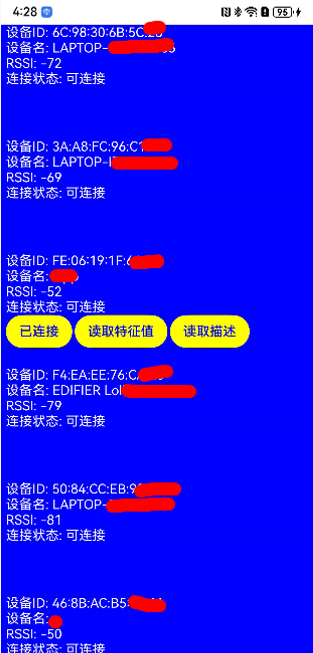
BleScanManager 作为BLE扫描管理类,实现扫描和结果的处理。
BleAdvertisingManager 作为BLE广播类,实现广播的处理,特征值和描述符的生成。
BLEMgr 作为总管理类,业务逻辑的感知层,业务直接调用BLEMgr实现低功耗蓝牙接口的调用。
二、代码实现和详细解释
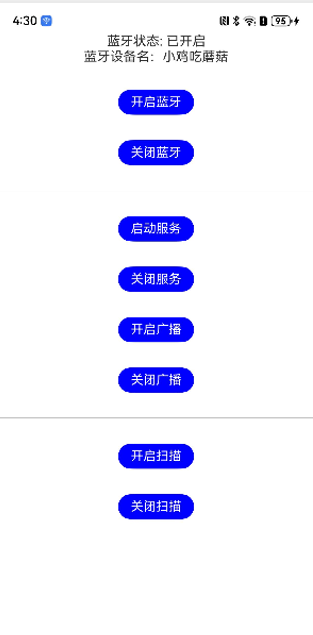
HaronyOS+BLE蓝牙DEMO 实现了BLE蓝牙完整的交互过程: 1.管理蓝牙的开启和关闭 2.外围设备的服务创建,广播等 3.中央设备的扫描,链接,读取特征和描述等
Index.ets 启动页
import { CommonTextModifier } from '../common/CommonTextModifier'
import { BLEMgr } from '../mgr/BLEMgr';
import { promptAction } from '[@kit](/user/kit).ArkUI';
import { PermissionsUtil } from '../utils/PermissionsUtil';

@Entry
@Component
struct Index {

  @State isOpenBluetooth: boolean = false;

  private mBLEMgr: BLEMgr = new BLEMgr();
  txtModifier: CommonTextModifier = new CommonTextModifier()

  async aboutToAppear() {
    let isHave: boolean = await PermissionsUtil.requestPermission();
    if(isHave){
      this.isOpenBluetooth = this.mBLEMgr.getBluetoothState();
    }else{
      this.toSysSettingPage();
    }
  }

  private toSysSettingPage(){
    globalThis.sysContext.startAbility({
      bundleName: 'com.huawei.hmos.settings',
      abilityName: 'com.huawei.hmos.settings.MainAbility',// com.huawei.hmos.settings.AppInfoAbility
      uri: 'application_info_entry', //application_settings   application_info_entry
      parameters: {
        pushParams: globalThis.sysContext.abilityInfo.bundleName // 应用包名com.example.tosettingdemo  'uiAbilityContext.abilityInfo.bundleName'
      }
    });
  }

  onClickStart = async ()=>{
    let isHave: boolean = await PermissionsUtil.requestPermission();
    if(isHave){
      this.mBLEMgr.startBluetooth((str: string)=>{
        let content: string = "";
        if (str == 'STATE_ON') {
          content = "蓝牙已开启";
        }else{
          content = "开启错误:" + str;
        }
        promptAction.showToast({
          message: content
        });
      });
    }else{
      this.toSysSettingPage();
    }
  }

  onClickClose = async ()=>{
    let isHave: boolean = await PermissionsUtil.requestPermission();
    if(isHave){
      this.mBLEMgr.closeBluetooth((str: string)=>{
        let content: string = "";
        if (str == 'STATE_OFF') {
          content = "蓝牙已关闭";
        }else{
          content = "关闭错误:" + str;
        }
        promptAction.showToast({
          message: content
        });
      });
    }else{
      this.toSysSettingPage();
    }
  }

  onClickStartAdv = ()=>{
    this.mBLEMgr.startAdvertising((advState: string)=>{
      let content: string = "";
      if(advState == "STARTED"){
        content = "广播已开启";
      }else{
        content = "广播错误:" + advState;
      }
      promptAction.showToast({
        message: content
      });
    });
  }

  onClickCloseAdv = ()=>{
    this.mBLEMgr.stopAdvertising((str: string)=>{
      promptAction.showToast({
        message: str
      });
    });
  }

  onClickStartScan = ()=>{
    this.mBLEMgr.startScan();
  }

  onClickCloseScan = ()=>{
    this.mBLEMgr.stopScan();
  }

  onClickStartServer = ()=>{
    this.mBLEMgr.registerServer((res: string)=>{
      promptAction.showToast({
        message: res
      });
    });
  }

  onClickCloseServer = ()=>{
    this.mBLEMgr.unRegisterServer((res: string)=>{
      promptAction.showToast({
        message: res
      });
    });
  }

  @Builder LineView(){
    Line().width("100%").height(px2vp(2)).backgroundColor(Color.Black).margin({
      top: px2vp(100)
    })
  }

  build() {
    Column() {

      Column(){
        Text(this.isOpenBluetooth ? "蓝牙状态: 已开启" : "蓝牙状态: 已关闭")
        Text("蓝牙设备名:" + this.mBLEMgr.getCurrentDeviceName())
      }

      Text("开启蓝牙")
        .attributeModifier(this.txtModifier)
        .onClick(this.onClickStart)

      Text("关闭蓝牙")
        .attributeModifier(this.txtModifier)
        .onClick(this.onClickClose)

      this.LineView()

      Text("启动服务")
        .attributeModifier(this.txtModifier)
        .onClick(this.onClickStartServer)

      Text("关闭服务")
        .attributeModifier(this.txtModifier)
        .onClick(this.onClickCloseServer)

      Text("开启广播")
        .attributeModifier(this.txtModifier)
        .onClick(this.onClickStartAdv)

      Text("关闭广播")
        .attributeModifier(this.txtModifier)
        .onClick(this.onClickCloseAdv)

      this.LineView()

      Text("开启扫描")
        .attributeModifier(this.txtModifier)
        .onClick(this.onClickStartScan)

      Text("关闭扫描")
        .attributeModifier(this.txtModifier)
        .onClick(this.onClickCloseScan)

    }
    .height('100%')
    .width('100%')
  }
}
BLEMgr.ets
import bleAdvertisingManager from "./BleAdvertisingManager";
import bleScanManager from "./BleScanManager";
import { access } from '[@kit](/user/kit).ConnectivityKit';
import gattServerManager from "./GattServerManager";
import { connection } from '[@kit](/user/kit).ConnectivityKit';
import { BusinessError } from "[@kit](/user/kit).BasicServicesKit";

const TAG: string = "BLEMgr";

export class BLEMgr {

  public getBluetoothState(): boolean {
    let state = access.getState();
    return this.getStateName(state) == "STATE_ON" ? true : false;
  }

  /**
   * 当前设备蓝牙设备名称
   */
  public getCurrentDeviceName(){
    let localName: string = "";
    try {
      localName = connection.getLocalName();
      console.info(TAG, 'getCurrentDeviceName localName: ' + localName);
    } catch (err) {
      console.error(TAG, 'getCurrentDeviceName errCode: ' + (err as BusinessError).code + ', errMessage: ' + (err as BusinessError).message);
    }
    return localName;
  }

  /**
   * 蓝牙广播状态
   * @param state
   * @returns
   */
  public getAdvState(state: number){
    switch (state) {
      case 1:
        // 首次启动广播后的状态。
        return 'STARTED';
      case 2:
        // 临时启动广播后的状态。
        return 'ENABLED';
      case 3:
        // 临时停止广播后的状态。
        return 'DISABLED';
      case 4:
        // 完全停止广播后的状态。
        return 'STOPPED';
      default:
        return 'unknown status';
    }
  }

  /**
   * 蓝牙开启状态
   * @param state
   * @returns
   */
  private getStateName(state: number): string {
    switch (state) {
      case 0:
        // 蓝牙已关闭。
        return 'STATE_OFF'; ;
      case 1:
        // 蓝牙正在打开。
        return 'STATE_TURNING_ON';
      case 2:
        // 蓝牙已打开。
        return 'STATE_ON';
      case 3:
        // 蓝牙正在关闭。
        return 'STATE_TURNING_OFF';
      case 4:
        // 蓝牙正在打开LE-only模式。
        return 'STATE_BLE_TURNING_ON';
      case 5:
        // 蓝牙正处于LE-only模式。
        return 'STATE_BLE_ON';
      case 6:
        // 蓝牙正在关闭LE-only模式。
        return 'STATE_BLE_TURNING_OFF';
      default:
        return 'unknown status';
    }
  }

  /**
   * 开启蓝牙
   */
  public startBluetooth(callback: (str: string)=> void){
    try {
      access.enableBluetooth();
    } catch (err) {
      let errStr: string = JSON.stringify(err);
      console.info(TAG, 'startBluetooth enableBluetooth err: ' + errStr);
      callback(errStr);
    }
    access.on('stateChange', (data) => {
      let btStateMessage = this.getStateName(data);
      callback(btStateMessage);
      if (btStateMessage == 'STATE_ON') {
        access.off('stateChange');
      }
      console.info('bluetooth statues: ' + btStateMessage);
    });
  }

  /**
   * 关闭蓝牙
   */
  public closeBluetooth(callback: (str: string)=> void){
    access.disableBluetooth();
    access.on('stateChange', (data) => {
      let btStateMessage = this.getStateName(data);
      callback(btStateMessage);
      if (btStateMessage == 'STATE_OFF') {
        access.off('stateChange');
      }
      console.info("bluetooth statues: " + btStateMessage);
    })
  }

  /**
   * 创建GATT服务器,注册服务
   */
  public registerServer(callBack: (str: string)=> void){
    gattServerManager.registerServer(callBack);
  }

  /**
   * 删除服务,关闭GATT服务器
   */
  public unRegisterServer(callBack: (str: string)=> void){
    gattServerManager.unRegisterServer(callBack);
  }

  /**
   * 开启广播
   */
  public async startAdvertising(callBack: (state: string)=> void) {
    await bleAdvertisingManager.startAdvertising((state: number)=>{
      let advState: string = this.getAdvState(state);
      callBack(advState);
    });
  }

  /**
   * 关闭广播
   */
  public async stopAdvertising(callBack: (str: string)=> void) {
    await bleAdvertisingManager.stopAdvertising(callBack);
  }

  /**
   * 开始扫描
   */
  public startScan() {
    bleScanManager.startScan();
  }

  /**
   * 关闭扫描
   */
  public stopScan() {
    bleScanManager.stopScan();
  }


}
GattServermanager.ets
import { ble } from '[@kit](/user/kit).ConnectivityKit';
import { constant } from '[@kit](/user/kit).ConnectivityKit';
import { BusinessError } from '[@kit](/user/kit).BasicServicesKit';

const TAG: string = 'GattServerManager';

export class GattServerManager {
  gattServer: ble.GattServer | undefined = undefined;
  connectState: ble.ProfileConnectionState = constant.ProfileConnectionState.STATE_DISCONNECTED;
  myServiceUuid: string = '00001810-0000-1000-8000-00805F9B34FB';
  myCharacteristicUuid: string = '00001820-0000-1000-8000-00805F9B34FB';
  myFirstDescriptorUuid: string = '00002902-0000-1000-8000-00805F9B34FB'; // 2902一般用于notification或者indication
  mySecondDescriptorUuid: string = '00002903-0000-1000-8000-00805F9B34FB';

  // 构造BLEDescriptor
  private initDescriptor(des: string, value: ArrayBuffer): ble.BLEDescriptor {
    let descriptor: ble.BLEDescriptor = {
      serviceUuid: this.myServiceUuid,
      characteristicUuid: this.myCharacteristicUuid,
      descriptorUuid: des,
      descriptorValue: value
    };
    return descriptor;
  }

  // 构造BLECharacteristic
  private initCharacteristic(): ble.BLECharacteristic {
    let descriptors: Array<ble.BLEDescriptor> = [];
    let descBuffer = new ArrayBuffer(2);
    let descValue = new Uint8Array(descBuffer);
    descValue[0] = 31;
    descValue[1] = 32;
    descriptors[0] = this.initDescriptor(this.myFirstDescriptorUuid, new ArrayBuffer(2));
    descriptors[1] = this.initDescriptor(this.mySecondDescriptorUuid, descBuffer);
    let charBuffer = new ArrayBuffer(2);
    let charValue = new Uint8Array(charBuffer);
    charValue[0] = 21;
    charValue[1] = 22;
    let characteristic: ble.BLECharacteristic = {
      serviceUuid: this.myServiceUuid,
      characteristicUuid: this.myCharacteristicUuid,
      characteristicValue: charBuffer,
      descriptors: descriptors
    };
    return characteristic;
  }

  // 1. 订阅连接状态变化事件
  public onGattServerStateChange() {
    if (!this.gattServer) {
      console.error(TAG, 'no gattServer');
      return;
    }
    try {
      this.gattServer.on('connectionStateChange', (stateInfo: ble.BLEConnectionChangeState) => {
        let state = '';
        switch (stateInfo.state) {
          case 0:
            state = 'DISCONNECTED';
            break;
          case 1:
            state = 'CONNECTING';
            break;
          case 2:
            state = 'CONNECTED';
            break;
          case 3:
            state = 'DISCONNECTING';
            break;
          default:
            state = 'undefined';
            break;
        }
        console.info(TAG, 'onGattServerStateChange: device=' + stateInfo.deviceId + ', state=' + state);
      });
    } catch (err) {
      console.error(TAG, 'errCode: ' + (err as BusinessError).code + ', errMessage: ' + (err as BusinessError).message);
    }
  }

  // 2. server端注册服务时调用
  public registerServer(callBack: (str: string)=> void) {
    let characteristics: Array<ble.BLECharacteristic> = [];
    let characteristic = this.initCharacteristic();
    characteristics.push(characteristic);
    let gattService: ble.GattService = {
      serviceUuid: this.myServiceUuid,
      isPrimary: true,
      characteristics: characteristics
    };

    console.info(TAG, 'registerServer ' + this.myServiceUuid);
    try {
      this.gattServer = ble.createGattServer(); // 2.1 构造gattServer,后续的交互都需要使用该实例
      this.onGattServerStateChange(); // 2.2 订阅连接状态
      this.gattServer.addService(gattService);
      callBack("服务成功");
    } catch (err) {
      callBack("服务失败:" + JSON.stringify(err));
      console.error(TAG, 'errCode: ' + (err as BusinessError).code + ', errMessage: ' + (err as BusinessError).message);
    }
  }

  // 3. 订阅来自gattClient的读取特征值请求时调用
  public onCharacteristicRead() {
    if (!this.gattServer) {
      console.error(TAG, 'no gattServer');
      return;
    }

    console.info(TAG, 'onCharacteristicRead');
    try {
      this.gattServer.on('characteristicRead', (charReq: ble.CharacteristicReadRequest) => {
        let deviceId: string = charReq.deviceId;
        let transId: number = charReq.transId;
        let offset: number = charReq.offset;
        console.info(TAG, 'receive characteristicRead');
        let rspBuffer = new ArrayBuffer(2);
        let rspValue = new Uint8Array(rspBuffer);
        rspValue[0] = 21;
        rspValue[1] = 22;
        let serverResponse: ble.ServerResponse = {
          deviceId: deviceId,
          transId: transId,
          status: 0, // 0表示成功
          offset: offset,
          value: rspBuffer
        };

        try {
          this.gattServer?.sendResponse(serverResponse);
        } catch (err) {
          console.error(TAG, 'errCode: ' + (err as BusinessError).code + ', errMessage: ' + (err as BusinessError).message);
        }
      });
    } catch (err) {
      console.error(TAG, 'errCode: ' + (err as BusinessError).code + ', errMessage: ' + (err as
更多关于HarmonyOS鸿蒙Next应用开发低功耗蓝牙BLE的功能讲解和DEMO源码的实战系列教程也可以访问 https://www.itying.com/category-93-b0.html
HarmonyOS Next低功耗蓝牙BLE功能基于分布式软总线实现设备间通信。开发涉及扫描、连接、数据读写等核心操作。系统提供BluetoothKit API,支持GATT客户端/服务端模式。关键流程包括权限申请、设备发现、服务特征值操作。DEMO源码展示完整BLE通信流程,涵盖广播监听、连接管理、数据传输等典型场景。

在HarmonyOS Next应用开发中,低功耗蓝牙(BLE)功能主要通过@ohos.bluetooth.ble API模块实现。以下是核心功能讲解与一个基础的连接与数据通信DEMO源码框架。
核心功能讲解
- 中心设备模式:HarmonyOS Next设备作为中心设备(Client),扫描、连接外围设备(如传感器),并与之通信。
- 关键操作:
- 扫描设备:通过
bluetooth.ble.startBLEScan方法,配合ScanFilter过滤目标设备。 - 连接设备:获取到目标设备ID后,使用
bluetooth.ble.createGattConnection建立GATT连接。 - 服务与特征值发现:连接成功后,通过
bluetooth.ble.getServices和bluetooth.ble.getCharacteristics发现设备的服务(Service)和特征值(Characteristic)。 - 数据读写:对具有相应权限的特征值进行读(
bluetooth.ble.readCharacteristicValue)、写(bluetooth.ble.writeCharacteristicValue)操作。 - 通知/指示:通过
bluetooth.ble.setNotifyCharacteristicChange订阅特征值通知,以接收外围设备主动发送的数据。
- 扫描设备:通过
- 权限配置:在
module.json5文件中需声明ohos.permission.ACCESS_BLUETOOTH和ohos.permission.DISCOVER_BLUETOOTH权限。
DEMO源码框架(ArkTS)
以下是一个极简的BLE连接与订阅通知的代码框架,演示核心流程。
import { ble } from '@ohos.bluetooth.ble';
import { BusinessError } from '@ohos.base';

// 1. 定义存储设备ID、服务UUID和特征值UUID的变量
let targetDeviceId: string = ''; // 从扫描结果中获取
const SERVICE_UUID: string = '0000180F-0000-1000-8000-00805F9B34FB'; // 示例:电池服务
const CHARACTERISTIC_UUID: string = '00002A19-0000-1000-8000-00805F9B34FB'; // 示例:电池电量特征

// 2. 扫描设备(需在用户操作触发,如按钮点击)
function startScan() {
  let scanFilter: ble.ScanFilter = {
    deviceId: '', // 可填写特定设备ID进行过滤,为空则扫描所有
    name: '' // 可填写设备名称进行过滤
  };
  try {
    ble.startBLEScan([scanFilter], {
      interval: 0, // 扫描间隔,0为默认
      dutyMode: ble.ScanDuty.SCAN_MODE_LOW_POWER // 扫描模式
    });
    console.log('开始扫描');
    // 监听扫描结果
    ble.on('BLEDeviceFind', (data: Array<ble.ScanResult>) => {
      for (let i = 0; i < data.length; i++) {
        let device: ble.ScanResult = data[i];
        // 此处应添加您的设备过滤逻辑,例如通过设备名称或广播数据
        if (device.deviceName?.includes('YourDeviceName')) {
          targetDeviceId = device.deviceId;
          console.log(`找到目标设备: ${device.deviceName}, ID: ${targetDeviceId}`);
          ble.stopBLEScan(); // 找到后停止扫描
          connectDevice(); // 连接设备
          break;
        }
      }
    });
  } catch (err) {
    console.error(`扫描失败: ${(err as BusinessError).code}, ${(err as BusinessError).message}`);
  }
}

// 3. 连接设备并发现服务
async function connectDevice() {
  try {
    await ble.createGattConnection(targetDeviceId);
    console.log('连接成功');
    // 发现服务
    let services: Array<ble.GattService> = await ble.getServices(targetDeviceId);
    for (let service of services) {
      if (service.serviceUuid === SERVICE_UUID) {
        console.log(`找到目标服务: ${SERVICE_UUID}`);
        // 发现特征值
        let characteristics: Array<ble.GattCharacteristic> = await ble.getCharacteristics(targetDeviceId, service.serviceUuid);
        for (let char of characteristics) {
          if (char.characteristicUuid === CHARACTERISTIC_UUID) {
            console.log(`找到目标特征值: ${CHARACTERISTIC_UUID}`);
            // 4. 订阅通知(如果特征值支持)
            if (char.properties & ble.GattCharacteristicProperties.PROPERTY_NOTIFY) {
              await ble.setNotifyCharacteristicChange(targetDeviceId, service.serviceUuid, CHARACTERISTIC_UUID, true);
              console.log('已订阅通知');
              // 监听特征值变化
              ble.on('BLECharacteristicChange', (data: Array<ble.GattCharacteristicChangeInfo>) => {
                for (let info of data) {
                  if (info.deviceId === targetDeviceId && info.characteristicUuid === CHARACTERISTIC_UUID) {
                    console.log(`收到数据: ${Array.from(info.value).map(b => b.toString(16).padStart(2, '0')).join(' ')}`);
                  }
                }
              });
            }
            // 5. 示例:读取特征值
            let value: Uint8Array = await ble.readCharacteristicValue(targetDeviceId, service.serviceUuid, CHARACTERISTIC_UUID);
            console.log(`读取值: ${Array.from(value).join(',')}`);
            break;
          }
        }
        break;
      }
    }
  } catch (err) {
    console.error(`连接或发现服务失败: ${(err as BusinessError).code}, ${(err as BusinessError).message}`);
  }
}

// 6. 断开连接(在应用退出或需要时调用)
function disconnectDevice() {
  try {
    ble.off('BLECharacteristicChange'); // 取消监听
    ble.setNotifyCharacteristicChange(targetDeviceId, SERVICE_UUID, CHARACTERISTIC_UUID, false); // 取消订阅
    ble.disconnectBLEDevice(targetDeviceId);
    console.log('断开连接');
  } catch (err) {
    console.error(`断开连接失败: ${(err as BusinessError).code}, ${(err as BusinessError).message}`);
  }
}
关键说明
- 设备过滤:实际开发中,需要在
BLEDeviceFind回调中根据设备名称、广播数据包中的服务UUID或制造商数据来精准识别您的目标设备。 - UUID:示例中的服务与特征值UUID为蓝牙标准电池服务的UUID,您需要将其替换为您实际外围设备对应的UUID。
- 错误处理:BLE操作易因设备状态、权限、距离等原因失败,务必对每个异步操作进行
try-catch捕获BusinessError。 - 生命周期管理:在应用页面
onPageHide或应用退出时,应主动断开连接、取消订阅和移除事件监听,释放资源。
此DEMO提供了从扫描到数据接收的核心流程。更完整的功能(如写入数据、连接参数更新、多设备管理)请参考官方文档中@ohos.bluetooth.ble模块的详细API说明。
